In April a NinjaTrader forum member interrupted a thread about connection drops with a different problem. “Anyone having issues with the NinjaTrader add-on to Tradingview? Mine has been fine all year until now, and won’t connect all of a sudden” (luke_bg, NinjaTrader forum, Apr 2026). Nobody answered him. A year earlier, another member had given up on the opposite route. “I have tried to remake an indicator I use in tradingview 3 times now and have failed everytime. I do not have a coding background” (domjabs, NinjaTrader forum, May 2025).
Between those two posts is the whole problem. You chart on TradingView because that is where your indicators and your community live. You execute on NinjaTrader 8 because that is where your futures broker, your ATM strategies and your prop-firm account live. The two don’t talk, and the three ways to make them talk are built on different assumptions, cost different money and break in different places.
Below I’ll take each of the three methods through the same moment: an alert fires, and what happens next. Then the constraint that decides the choice before price or speed does, and a side-by-side table to pick with. You’ll leave knowing which method matches your account, your broker and your hours, and which to rule out in a minute.
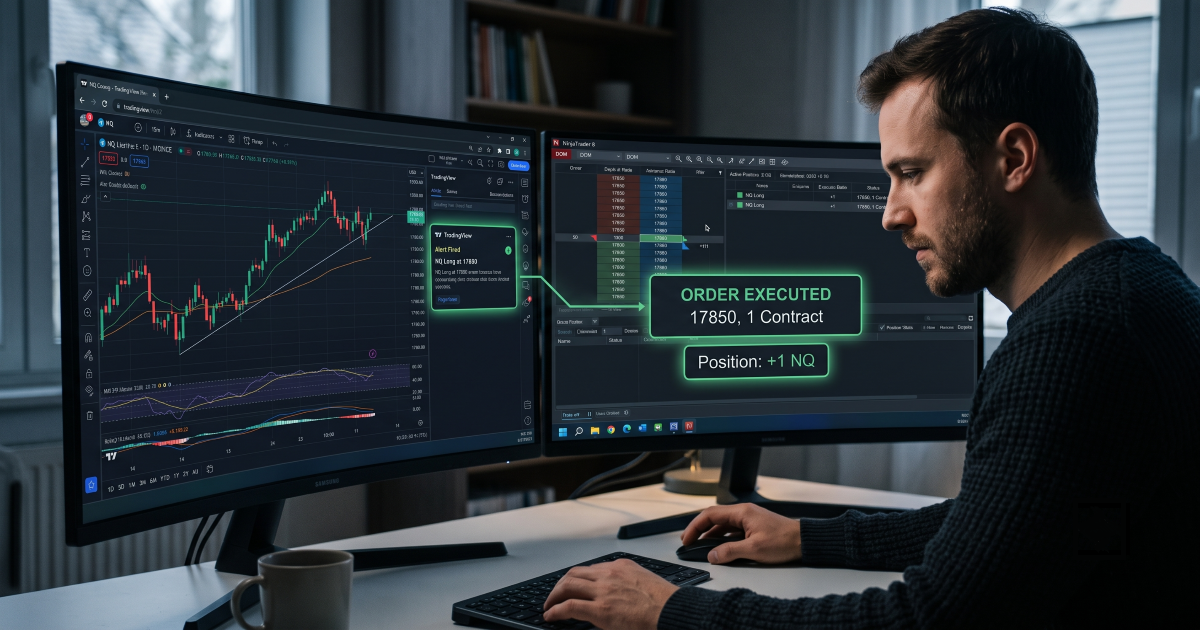
TradingView doesn’t place orders in NinjaTrader. It fires alerts, and an alert can carry a webhook: an HTTP POST to a URL, sent the moment your condition is true. NinjaTrader 8 is a desktop application on a Windows machine, connected to your broker through Rithmic, CQG or NinjaTrader’s own brokerage. It has no webhook listener. So “connecting” means one specific thing: getting that POST turned into a real order on your NT8 account, every time, including the times you aren’t watching.
Keep one more thing in view. Your reason for staying on TradingView charts is usually the indicator, not the chart. And the indicator often can’t simply be moved. On the NinjaTrader forum a trader compared an anchored VWAP on both platforms and found “huge discrepencies between the two” (BlumenStrasse, NinjaTrader forum, Aug 2026). If the signal you trust lives in TradingView’s calculation, porting it is not a neutral step. Connecting is.
NinjaTrader offers TradingView access for $9.99 a month. You open TradingView’s Trading Panel, pick NinjaTrader, log in with your NinjaTrader brokerage account, and place futures orders from TradingView’s chart (NinjaTrader, “TradingView + NinjaTrader”). That is a real, supported integration, and for what it does it is clean.
What it does is manual trading. You click buy on TradingView and the order goes through your NinjaTrader brokerage account. An alert from a Pine Script strategy does not become an order through this panel, because TradingView’s broker integrations execute your clicks, not your alerts. It also lives on the brokerage side, not inside the NinjaTrader 8 desktop, so your NT8 ATM strategies, add-ons and non-NinjaTrader brokers are not part of it. If you want TradingView’s charts with a fast order ticket and you are at the screen, this is the simplest option on the list. If you want alerts to trade while you sleep, it is not on the list at all.
NinjaScript is C#. A developer can write a strategy or add-on that receives TradingView’s message and submits an order through your broker connection, on the desktop, with full access to everything NT8 exposes. There is no middleman and no subscription. The alert goes from TradingView to your machine and into the market.
The cost is in the second half of the sentence. NT8 can’t receive a webhook directly, so something public has to accept the POST and pass it on. That is either a small server you host, or the ATI file interface with a script writing order files into NT8’s folder. Then the receiver has to handle contract rolls, so that NQ1! becomes NQ 12-26 without you editing anything. It has to know which account to trade, since a single NT8 install often holds a live account, a sim and three evaluations. It has to reconnect after a data blip and log what it did. A basic version is a few hours of work. A version you’d trust with a funded account is a project, and every NT8 update is a chance for it to break on a busy morning with you as the support team. If you can build and maintain that, this route gives you the most control on the list.
The third route puts a provider’s server between TradingView and your terminal, and a ready-made receiver inside NinjaTrader 8. Here is the chain when an alert fires.
Two things follow from that shape. Symbol mapping mostly disappears, because the receiver trades whatever instrument the chart it sits on is showing. Attach it to the NQ 12-26 chart and that is what it trades, whatever TradingView calls the alert. And the NT8 problem that Method 2 makes you solve yourself, the public address and the reconnect logic, is the provider’s job. What stays yours is the terminal: it has to be open and connected, which is the next section but one.
Cloud copiers differ in what they support. Some run only MetaTrader and list NT8 as “coming”. Some trigger from indicator alerts only, not from strategies. Some can’t use protected TradingView indicators. Check three things on any product page: NT8 desktop support, strategy alerts as well as indicator alerts, and whether the message format is generated for you or something you write by hand.
| Built-in connection | Custom NinjaScript | Cloud copier | |
|---|---|---|---|
| Alerts fire trades automatically | No, manual clicks only | Yes | Yes |
| Runs inside NinjaTrader 8 desktop | No, brokerage side | Yes | Yes |
| Works with any NT8-supported broker | NinjaTrader Brokerage only | Yes | Yes |
| Coding required | No | Yes, and maintenance | No |
| Contract rolls and account selection | Handled by the broker panel | You build it | Depends on the product; ask |
| Who fixes it at 3 AM | NinjaTrader support | You | The provider, for their part; you, for the terminal |
| Cost | $9.99 a month | Developer time, then your time | Subscription; ours is €25 a month for every copier and indicator |
Every method that executes on NinjaTrader 8 needs NinjaTrader 8 running on a computer at the moment the alert fires. That sounds obvious, and it is where most first setups fail. You test on a weekday afternoon with the terminal open, it works, and the first missed trade is the one that fired while the laptop was asleep. Webhooks are not queued. An alert that lands on a closed terminal is simply lost.
Before comparing methods on speed or price, answer one question: where will NinjaTrader 8 be running when your alerts fire, and who will know if it stops? A desktop that stays on covers a session you’re awake for. A VPS covers the rest. Neither tells you when the data feed goes stale behind a green connection light, which the NinjaTrader forum spent thirty posts on this spring.
Whether a VPS belongs in your setup, and what it does and doesn’t protect, is covered in Do You Need a VPS to Automate TradingView Alerts. The wider picture of the same three routes across MT4 and MT5 as well is in Can You Connect TradingView to MT4, MT5, and NinjaTrader 8?
The built-in connection is for you if you trade manually from TradingView charts, hold a NinjaTrader brokerage account, and want a faster ticket than switching windows. Custom NinjaScript is for you if you can write and maintain C#, want no third party in the chain, and accept being on call for it. A cloud copier is for you if your alerts need to trade while you’re away, or your indicator can’t be ported. It is also the route when you run several accounts and want the same alert on all of them.
The built-in connection is the wrong pick if your futures account isn’t with NinjaTrader’s brokerage, or if you want alerts to trade while you’re away. It needs you at the ticket. Custom NinjaScript is the wrong pick if nobody on your side can fix C# after a platform update. And the cloud route is the wrong pick if your strategy is already written in NinjaScript. Then it can trade inside NT8 with no TradingView in the chain at all.
Choose by who you’ll call when a trade doesn’t arrive: yourself, your developer, or a vendor.
The TradingView to NinjaTrader Trade Copier is Method 3 built for the NT8 desktop specifically. The Receiver is a NinjaScript on your chart; you choose the account it trades, and it trades the chart’s instrument, so contract rolls are a matter of opening the new contract’s chart. Strategy alerts, indicator alerts and protected indicators all work, because the dashboard writes the alert message and you paste it. The panel keeps a log of each alert and its result, and if the Receiver loses the server you get a Telegram message within seconds. Our internal measurements put the routing leg at about 0.1 to 0.15 seconds and the full path at about 0.5. The price is €25 a month, one subscription, which also covers the MT4, MT5 and cTrader copiers and every indicator, with a 5-day free trial. The full chain running live, alert to fill, is in the video below.
Watch a live demo:
Want Method 2 built for you instead? We develop NinjaScript to order → NinjaTrader developers
Nordman Algorithms provides software infrastructure for trade automation and does not offer financial advice, trading signals, or managed trading services. This article is for informational and educational purposes only. Forum quotations are reproduced verbatim from public threads for illustration and do not constitute endorsement. Trading leveraged instruments such as Forex, CFDs and futures carries a high level of risk and may not be suitable for all investors. Only risk capital should be used. Full Risk Disclosure: https://www.nordman-algorithms.com/risk-disclosure/