Nordman Algorithms · Technical review by Alexei Kuntysh, founder
A footprint chart splits each bar into price rows and shows how many contracts traded at the bid and at the ask on every row. That layout invites a misreading. A row with 400 on the left and 1,200 on the right looks like three buyers for every seller, yet each of those 1,600 contracts had one buyer and one seller. What the two columns record is which side crossed the spread to get filled: the buyer who lifted the offer, or the seller who hit the bid.
The split itself depends on a rule you pick in the settings, so the same bar can show different numbers on two traders’ screens. In order flow trading that matters most when you mark a stacked imbalance zone and wait for price to come back to it, which is the trade worked through further down.
A candlestick keeps four prices and one volume number per bar. A footprint chart keeps the whole distribution: every price the bar traded at, with the volume at that price split in two. The left column is volume that traded at the bid, where a seller sent a market order and filled against a buyer’s resting limit order. The right column is volume at the ask, where a buyer crossed it and paid the seller’s price. Resting orders never get a column of their own. A passive buyer waiting on the bid is the other side of every sell counted in the left column.
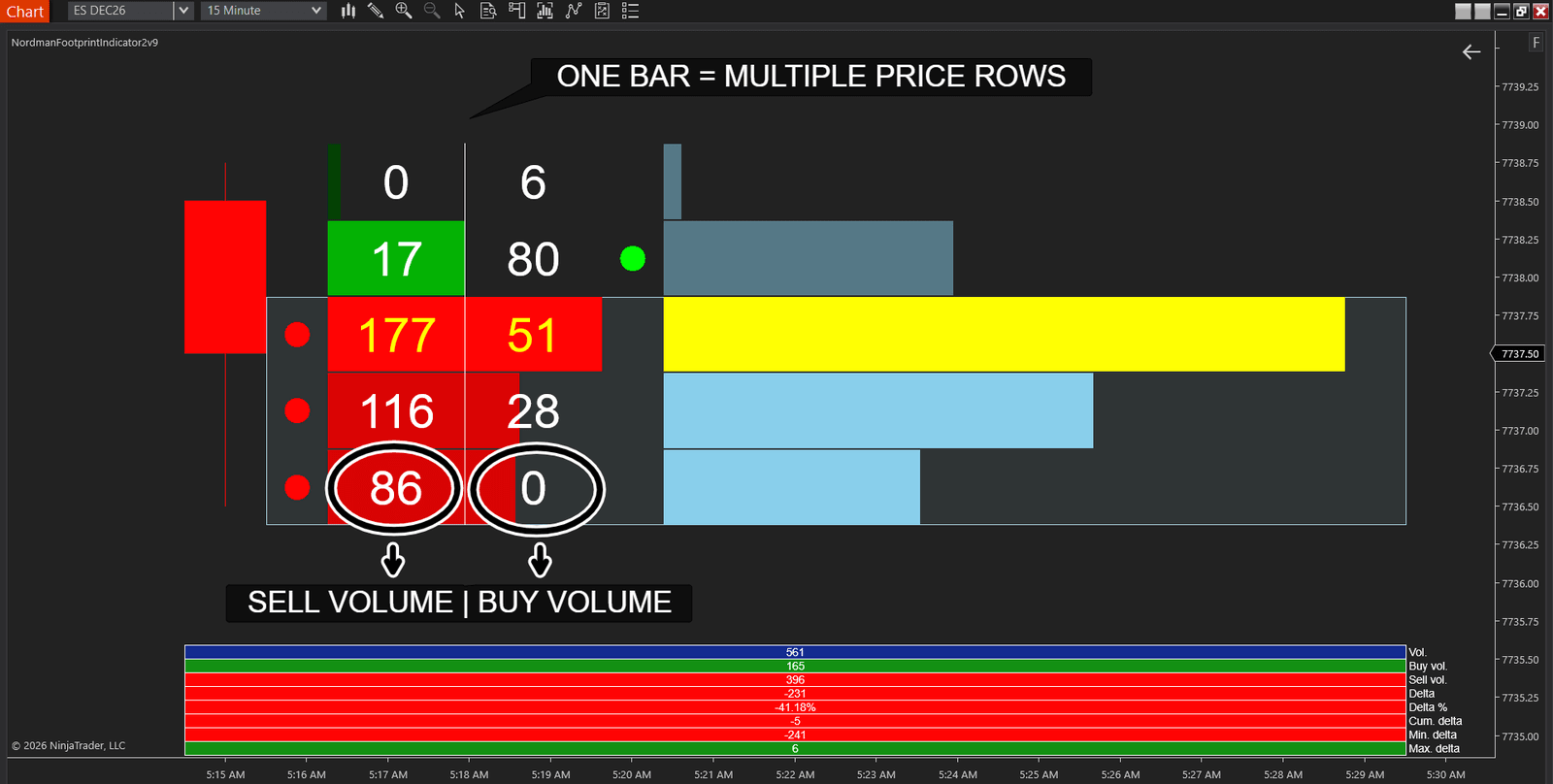
Enlarged, a single bar reads like a ledger. This is a quiet 15-minute ES bar from around 11:15 PM New York time, caught while it was still forming, with 561 contracts traded so far. A busy 5-minute bar during the day can trade over 90,000. On one of its rows 177 contracts were sold at the bid and 51 bought at the ask, and at the low of the bar 86 traded at the bid and none at the ask. Across all five rows, 396 contracts were sold aggressively and 165 bought, so its delta at that point was −231.
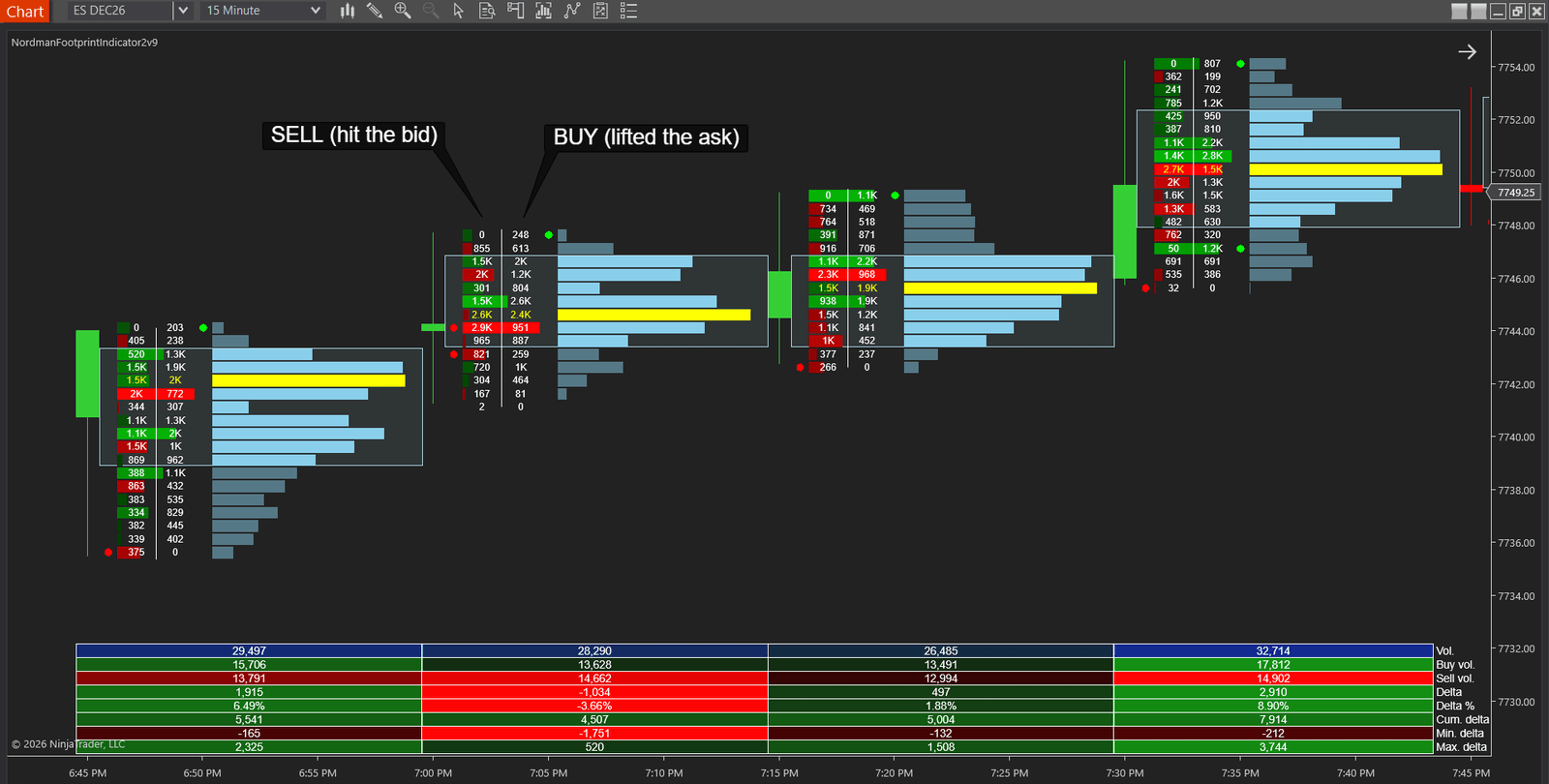
To the right of the grid the indicator draws a volume profile for each bar. Each horizontal bar is the total volume at that price, and the yellow one marks the point of control (POC), the price with the most volume. The box outlines the value area, the rows that hold most of the bar’s volume. A red or green dot beside a row marks a selling or buying imbalance, explained further down.
Delta is ask volume minus bid volume, for a row or for the whole bar. Cumulative delta keeps a running total of bar delta through the session. Our indicator prints both in a table under the bars, together with total, buy and sell volume and the lowest and highest delta reached inside the bar.
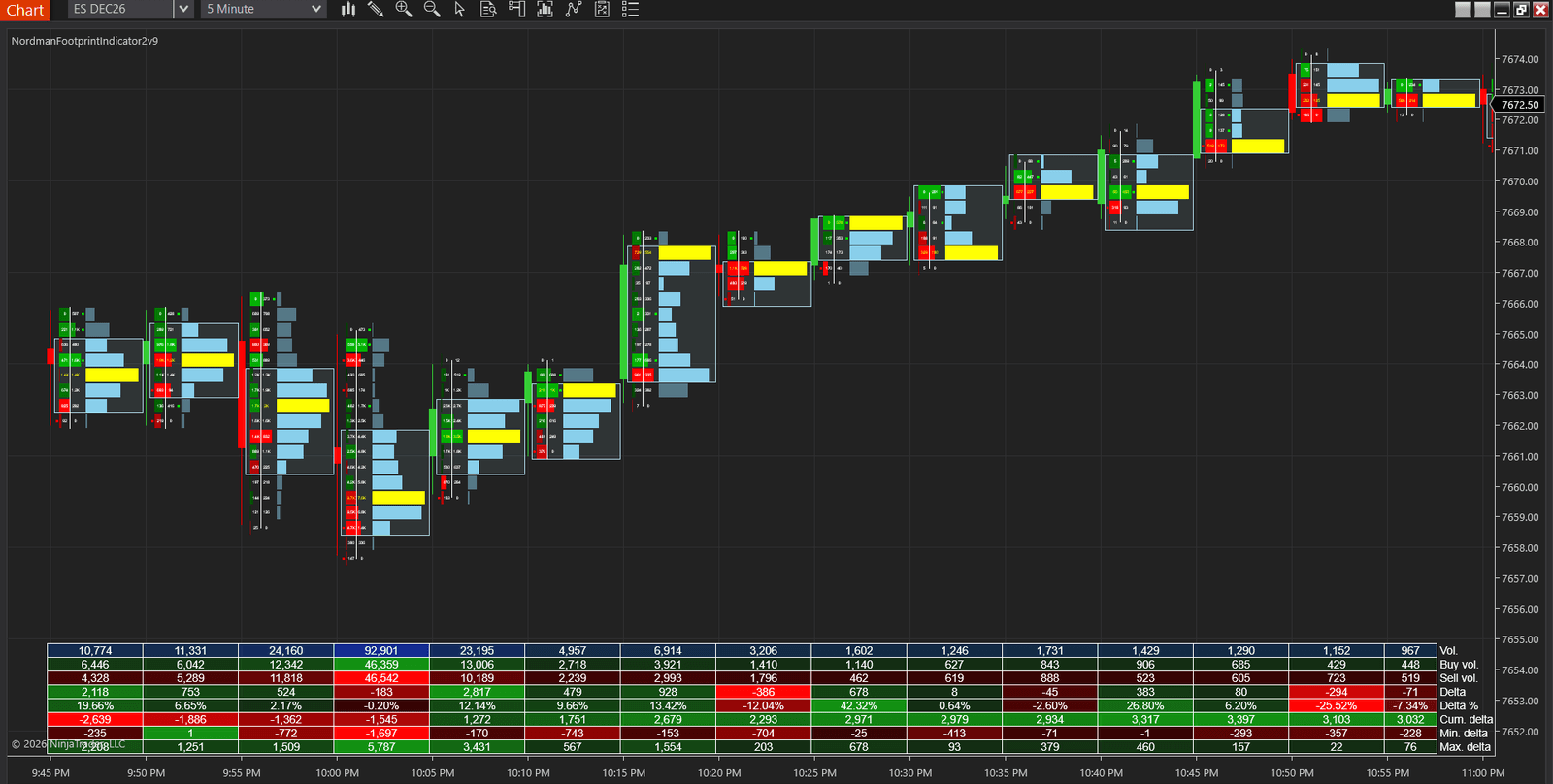
The fourth bar in that table is a good example of why the pair matters more than either number. It’s the bar that closed at 4:00 PM New York time, the end of the cash session. It traded 92,901 contracts, 46,542 at the bid and 46,359 at the ask, and closed with a delta of −183, close to zero. The bottom rows of the table tell the rest. At one point inside the bar buyers were 5,787 contracts ahead, the maximum delta, and by the close all of that had been sold back and the bar finished down. A closing delta near zero hid a swing of almost 6,000 contracts inside the bar.
Two delta numbers for the same bar don’t always agree, either. One NinjaTrader user found that the delta on footprint bars didn’t match the platform’s own cumulative delta indicator, even with the same settings and Tick Replay on (Mouh, NinjaTrader Forum, Sep 2025). The next day they wrote that it was “a matter of calculation method”: the cumulative delta indicator adds each change to a running total, while the footprint re-adds every price row of the bar on each tick. They checked it by building an indicator that copies the footprint’s method, and its values matched. If the two disagree on your chart, read the bar by the footprint’s own delta row.
Our FootPrint OrderFlow Indicator for NinjaTrader 8 draws this grid, the volume profile and the bar statistics on any chart. It comes with a five-day free trial.
Two traders can load the same instrument, the same timeframe and the same session and still see different footprints, because of the three settings below.
The indicator offers three ways to decide whether a trade was a buy or a sell. Bid Ask counts volume at the ask or above as buying and at the bid or below as selling, and it’s the only mode built on actual bid and ask data. Up Down Tick classifies by direction instead: a trade above the previous one counts as buying, a trade below it as selling, and a trade at the same price inherits the side of the one before. Minute Bar Based goes coarser still and labels all the volume of a one-minute bar by whether that bar closed up or down.
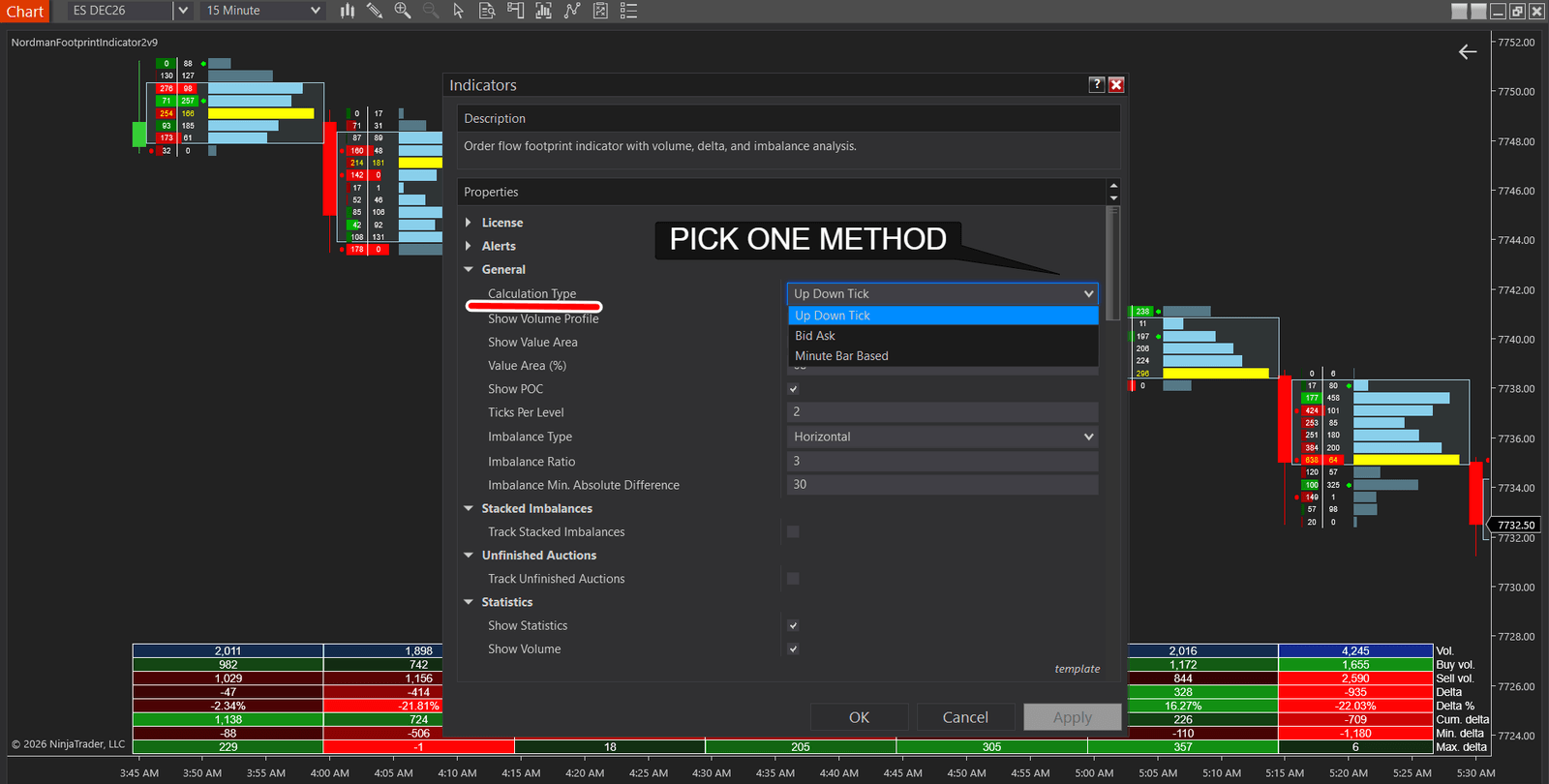
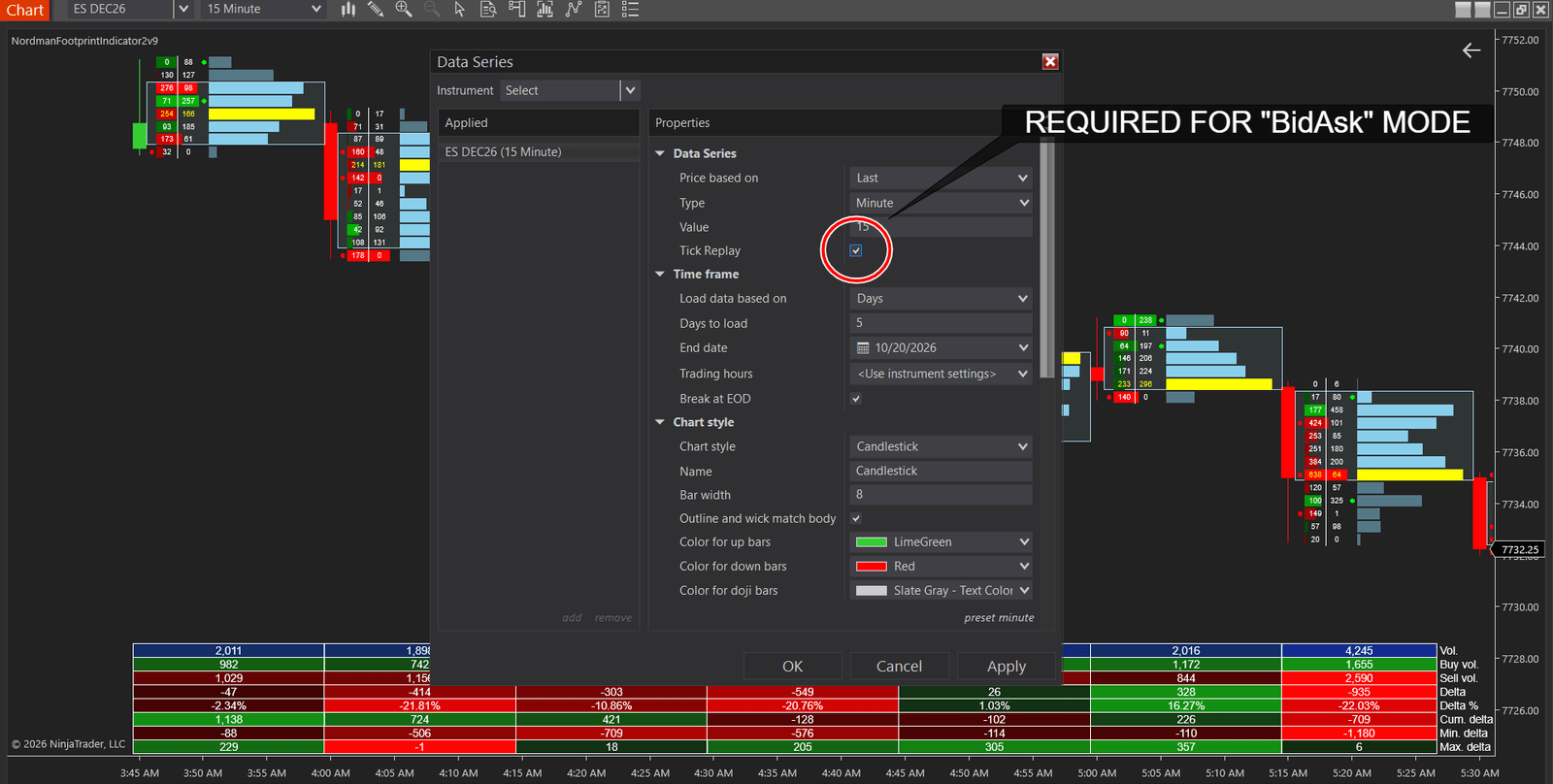
Bid Ask needs Tick Replay switched on in the chart’s Data Series settings, and without it our indicator shows a message and doesn’t calculate. NinjaTrader describes Tick Replay as a property that “will ensure that the market data (bid/ask/last) that went into building a bar is loaded in the exact sequence of market data events”. The same page warns that it “will lead to a performance impact” (NinjaTrader Help Guide). The other two modes run without Tick Replay, though Up Down Tick still needs historical tick data for the instrument, and what they show is a classification by price direction rather than recorded bid and ask volume.
On a busy contract a single bar can span dozens of prices, and the grid becomes unreadable. Ticks Per Level merges neighbouring prices into one row, two ticks by default in our indicator. Every calculation then runs on the merged rows, so a row that shows a clear imbalance at two ticks can look balanced at one tick, and the other way round. For reading individual prices we’d set it to 1 and accept a taller grid.
An imbalance is a row where one side traded far more than the other. Horizontal mode compares ask and bid volume at the same price. Diagonal mode compares the ask at one price with the bid one level lower. With a one-tick spread those two prices are the bid and the ask of the same quote, so diagonal is the standard way footprint charts compare aggressive buyers and sellers. A level counts as an imbalance when the larger side is at least the Imbalance Ratio times the smaller one, 3:1 by default. The two sides must also differ by at least the minimum absolute difference, 30 contracts by default. The second condition keeps a row of 6 against 2 from being flagged as heavily one-sided.
Any of these settings can be defended. What breaks the reading is changing them between sessions, because a footprint from last month and one from today then count different things. Pick them once for each instrument and leave them alone.
Single imbalanced rows are common and usually mean little. Several in a row on the same side show that buyers or sellers kept crossing the spread at one price after another. When the number of consecutive imbalanced levels reaches the Stacked Imbalances Threshold, three by default, our indicator draws a zone around them. A bullish zone appears when stacked buying imbalances form and the bar closes above them, a bearish one when stacked selling imbalances form and the bar closes below. The zone stays on the chart until a bar closes beyond its far side.
The return to the zone is where a trade can start. With Stacked Imbalance Strategy set to Retest, the indicator marks every return to the zone: the bar’s low touching the top of a bullish zone, or the bar’s high touching the bottom of a bearish one. Set to Breakout, it marks the bar that closes through the far side instead, and the zone ends there. The chart below shows both outcomes on one zone.
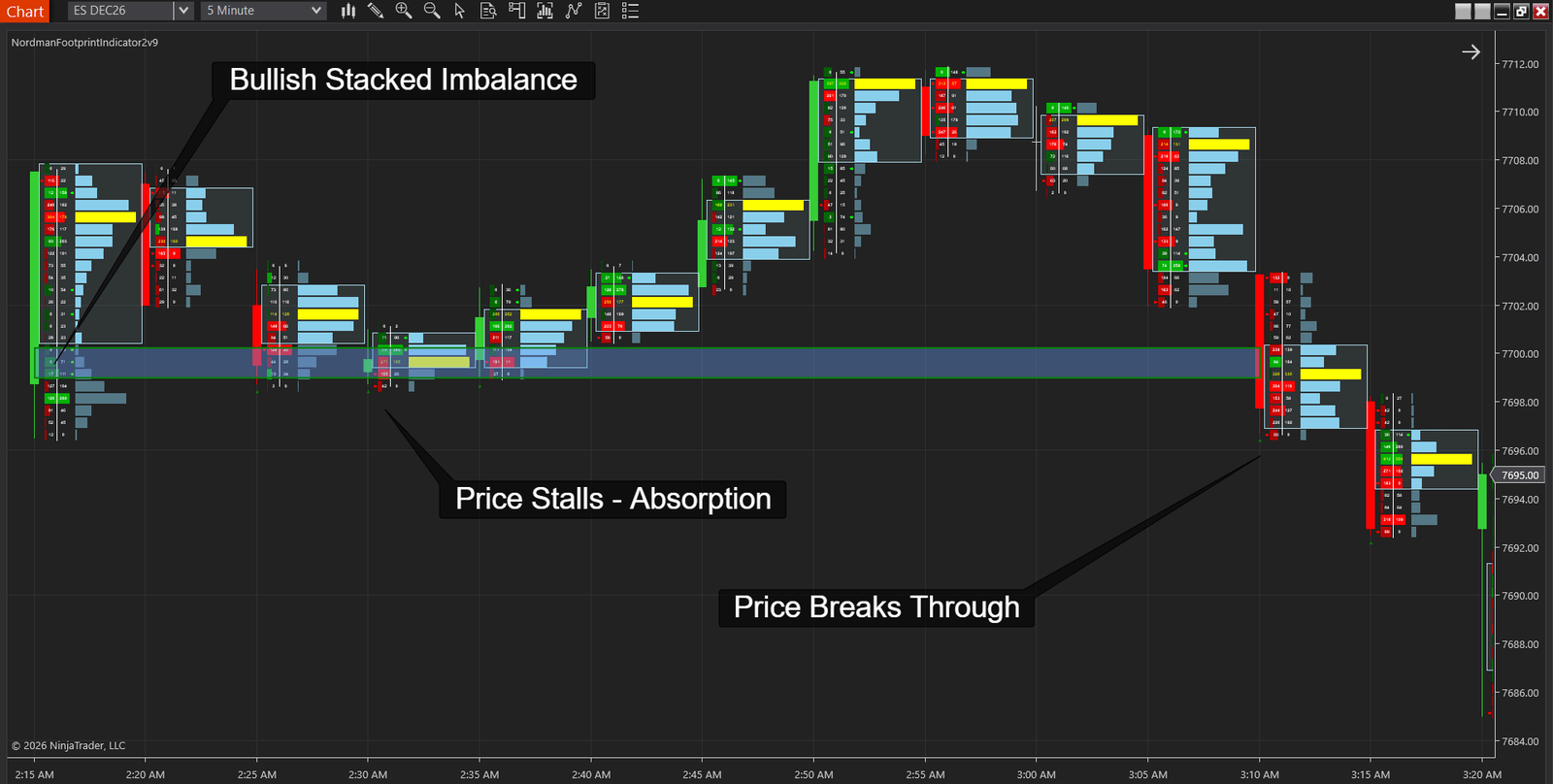
Here is that zone as a trade, on ES December futures and 5-minute bars, with prices read from the chart above and rounded to the tick. Times are the chart’s clock, UTC+2, so in New York the trade runs from about 8:15 to 9:10 PM. The prices belong to this one chart and will differ on another day. The rules stay the same.
| What you see | What you do |
|---|---|
| A bar touches the zone and closes back above its top | Buy on that close, stop one tick below the lowest retest |
| A bar touches the zone and closes inside it, as at 2:25 and 2:30 | Nothing yet. Wait for a close above the zone |
| A bar closes below the bottom of the zone, as at 3:10 | Skip. The zone is broken and the indicator removes it |
| Price never comes back to the zone | Skip. There is no trade without the return |
We picked this zone because it shows both outcomes on one chart, and one trade proves nothing about the rule. To see how retests behaved on your own instrument and timeframe, the indicator’s MFE/MAE Tracker records how far price moved for and against you after every retest marker in the loaded history.
The short side is the mirror image. A bearish zone forms when stacked selling imbalances print and the bar closes below them. The trigger is a return to the zone’s bottom that closes back below it, and the stop goes one tick above the highest retest.
The chart above runs Ticks Per Level 2, so each row is half a point of ES, with the default Imbalance Ratio of 3 and a Stacked Imbalances Threshold of 3. Turn on Track Stacked Imbalances and Draw Stacked Imbalances Zone, set Stacked Imbalance Strategy to Retest, and enable Stacked Imbalance Alerts.
The alert fires on every touch of the zone, including the two at 2:25 and 2:30 that weren’t trades. Treat it as the moment to watch the bar’s close, and enter only when the close confirms.
The footprint you see on history and the footprint you would have seen live are not always the same chart. Without Tick Replay and a data feed that keeps the original sequence of trades, a historical bar is rebuilt from whatever data is available, so a pattern you count on history may never have printed in real time. Market Replay can differ as well. Playback files and the historical data NinjaTrader caches from your live feed come from different sources. One forum member who builds order flow tools for NinjaTrader put it bluntly: “In fact they almost never match” (fc77, NinjaTrader Forum, Aug 2025). Markers are another case. With the indicator calculating on each tick, a marker on the forming bar can appear and disappear before the bar closes, and alerts fire only in real time, never on historical bars.
Thin markets cause a different problem. On a contract that trades a few hundred lots an hour, a 3:1 ratio is easy to reach by accident, and stacked zones show up where nobody was pushing hard. The minimum absolute difference helps, but we’d keep the footprint for liquid futures with steady tick data, such as ES and NQ.
Each row pairs something the chart shows with a conclusion it doesn’t support on its own.
| What you see | What it means | What it doesn’t mean |
|---|---|---|
| Ask column much larger than bid column | Buyers crossed the spread more often at that price | There were more buyers than sellers |
| Large delta, price barely moved | Passive orders likely absorbed the aggressive side | The move is confirmed |
| Delta near zero, price moved a lot | Aggressive buying and selling roughly matched, so delta doesn’t explain the move | Nobody took part |
| Stacked imbalance zone | Repeated aggression across consecutive prices | A level that has to hold |
| Price stalls against the zone on the return | Resting orders are likely absorbing at the zone | The reversal is confirmed |
| Price closes through the far side of the zone | The zone failed on the return | A signal in the other direction on its own |
The NinjaTrader FootPrint OrderFlow Indicator does the order flow counting described here, from the bid and ask grid to stacked zones with retest alerts. It comes with the €25 monthly plan that covers all our indicators and trade copiers and opens with five free days, or on its own as a €225 one-time licence.
See the FootPrint OrderFlow Indicator →
Need something custom built? We develop automation to order → NinjaTrader developers
Read each row as a pair: the left number is volume sold at the bid, the right is volume bought at the ask at that price. Then check the bar’s delta, the difference between the two sides, against what price did in the same bar, and look for rows where one side is several times the other.
Delta is volume bought at the ask minus volume sold at the bid, for one row or for the whole bar. A bar can close with a delta near zero after a large swing inside it, so the bar’s maximum and minimum delta tell you more than the closing number alone.
A volume profile shows how much traded at each price. A footprint chart splits that same volume into the bid and ask sides, bar by bar. Our indicator draws both: the footprint grid and a profile with the POC next to each bar.
No. Each contract traded has two sides, and the footprint records which one crossed the spread: volume at the ask was bought aggressively, volume at the bid was sold aggressively.
For Bid Ask mode, yes. Without it our indicator shows a message and doesn’t calculate. Up Down Tick and Minute Bar Based work without Tick Replay, as long as tick or minute history is available, but classify volume by price direction rather than by bid and ask.
Several imbalanced price levels in a row on the same side of a bar, three by default in our indicator. It marks a zone where buyers or sellers kept paying up through consecutive prices.
Nordman Algorithms provides software infrastructure for trade automation and does not offer financial advice, trading signals, or managed trading services. Footprint grids, imbalances and zones are calculated from market data by fixed rules and do not constitute a recommendation to buy, sell, or hold any instrument. This article is for informational and educational purposes only. Chart screenshots illustrate indicator behaviour on historical data and are not a record of trading results. Forum quotations are reproduced verbatim from public threads for illustration and do not constitute endorsement. Trading leveraged instruments such as Forex, CFDs and futures carries a high level of risk and may not be suitable for all investors. Only risk capital should be used. Hypothetical or simulated performance results have inherent limitations. Unlike actual performance records, simulated results do not represent real trading. Because trades have not actually been executed, these results may under- or over-compensate for the impact of market factors such as liquidity. No representation is being made that any account will achieve profits or losses similar to those shown. Full Risk Disclosure: https://www.nordman-algorithms.com/risk-disclosure/