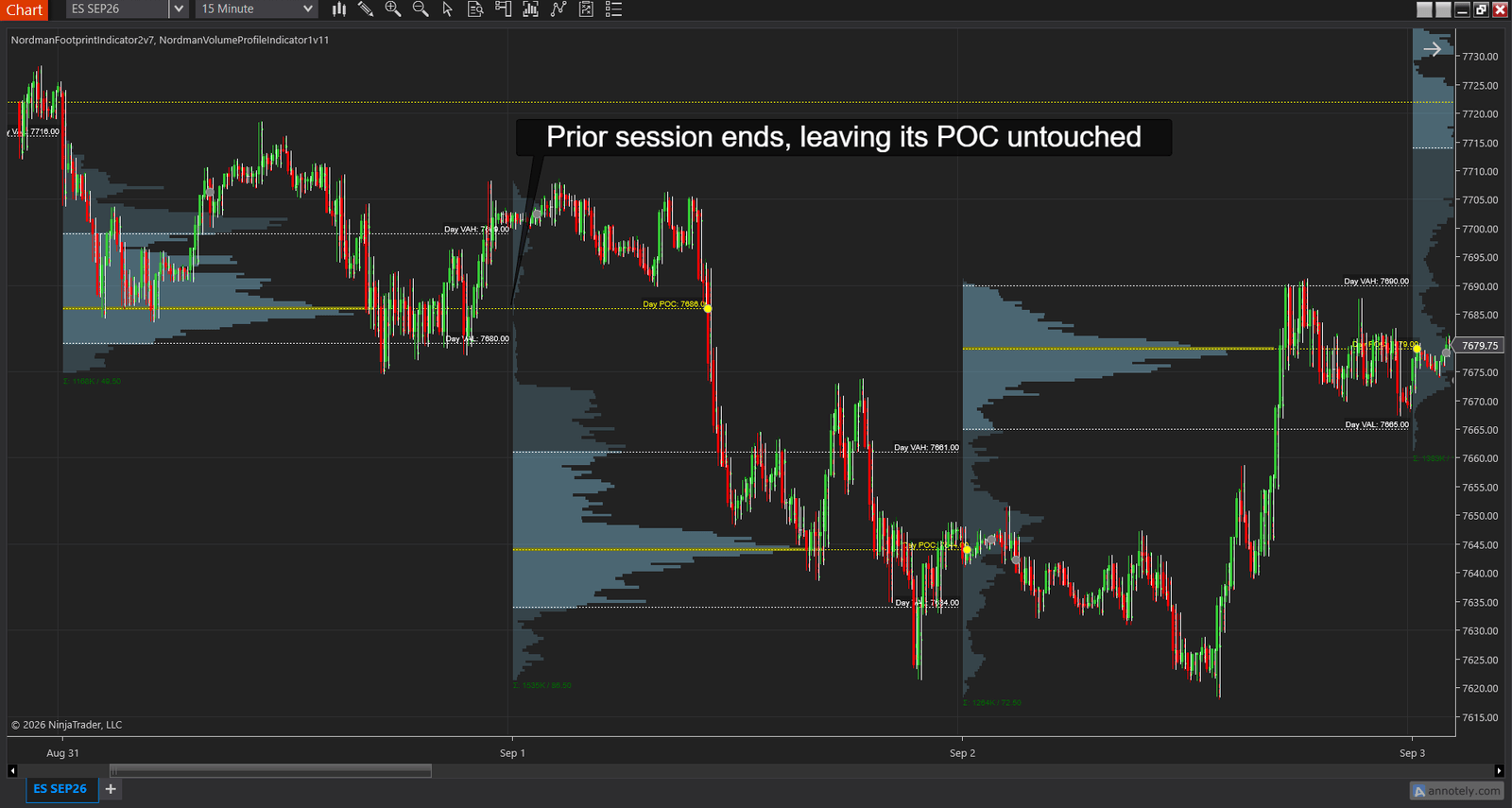
If you run a Volume Profile on your chart, you have probably seen this. A session ends, and a horizontal line from its busiest price keeps stretching to the right. A day later it is still there. Two days later it is still there. Nobody drew it, and price just never went back to it.
That line is a Virgin POC. It is one of the most talked-about levels in profile trading, and one of the most misunderstood. Some traders treat it like a magnet that pulls price back. Others say it means nothing at all. Both sides have been arguing about it for years.
In this article, I’ll explain what a Virgin POC actually is, why the two sides disagree, and how I would trade one on a real chart. By the end you’ll have a plan with an entry, a stop in ticks, a target, and the cases where you skip. You’ll also have an alert, so you don’t have to watch the level all day.
A Volume Profile shows you how much trading happened at each price, instead of at each time. Think of it as a sideways bar chart next to your candles. The longer the bar, the more contracts changed hands at that price.
For any finished period, one price will have the longest bar. That price is the Point of Control, or POC. It is simply where the most business got done. The prices around it that hold most of the volume, usually 70%, are what you’ll see called the Value Area. If profile terms are new to you, start with Volume Profile Explained, which walks through the histogram, the POC and the Value Area on a real four-session chart.
When a session or a day ends, its POC stops moving. From that moment there are only two possibilities. Either price comes back and trades through that level, or it doesn’t. As long as it hasn’t, that level is a Virgin POC. Some traders call it a naked POC, which means the same thing.
A few details matter here, so let me spell them out for you.
Here is the “magnet” view, from an ES trader on futures.io who runs both Sierra Chart and NinjaTrader.
The logic is easy to follow. A lot of people traded at that price, and price left before they were done. So there is unfinished business there, and when price comes back, that business wakes up. On a chart full of examples where price did return, it looks like a law you can rely on.
And here is the answer he got in the same thread, from a NinjaTrader 8 user with a couple of thousand posts and a “Legendary” tag next to his name.
A few lines later he adds, to the same trader: “With due respect please be careful of what you are convinced of because from where I sit you have your concepts wrong.”
This side isn’t telling you the level is useless. Blash even adds that a naked POC from a profile “drawn over days is a much higher percentage trade.” His point is narrower. The level tells you where the market was, and on a small enough chart it gets touched by noise. What the market does next isn’t in the histogram.
Here is how I read it, and it settles the argument for me. “Virgin” isn’t a strength rating. It’s a status that only lasts until the first touch. That first touch is the one fact the chart can give you for certain. Whether you should trade it is a separate question, and you answer it with a second tool, not with the level itself. The plan below is exactly that: the level tells you where, the footprint tells you whether.
Let’s put this on a real chart. The chart at the top of this article is ES on a 15-minute chart, with the NinjaTrader Volume Profile Indicator drawing a profile for each session and the Footprint indicator running on the same bars. Monday’s session ended with its POC at 7686.00, and price left without coming back. Here is your whole plan, read off three screenshots in order: the overview at the top, then the return to the level, then the zoom on the prints.
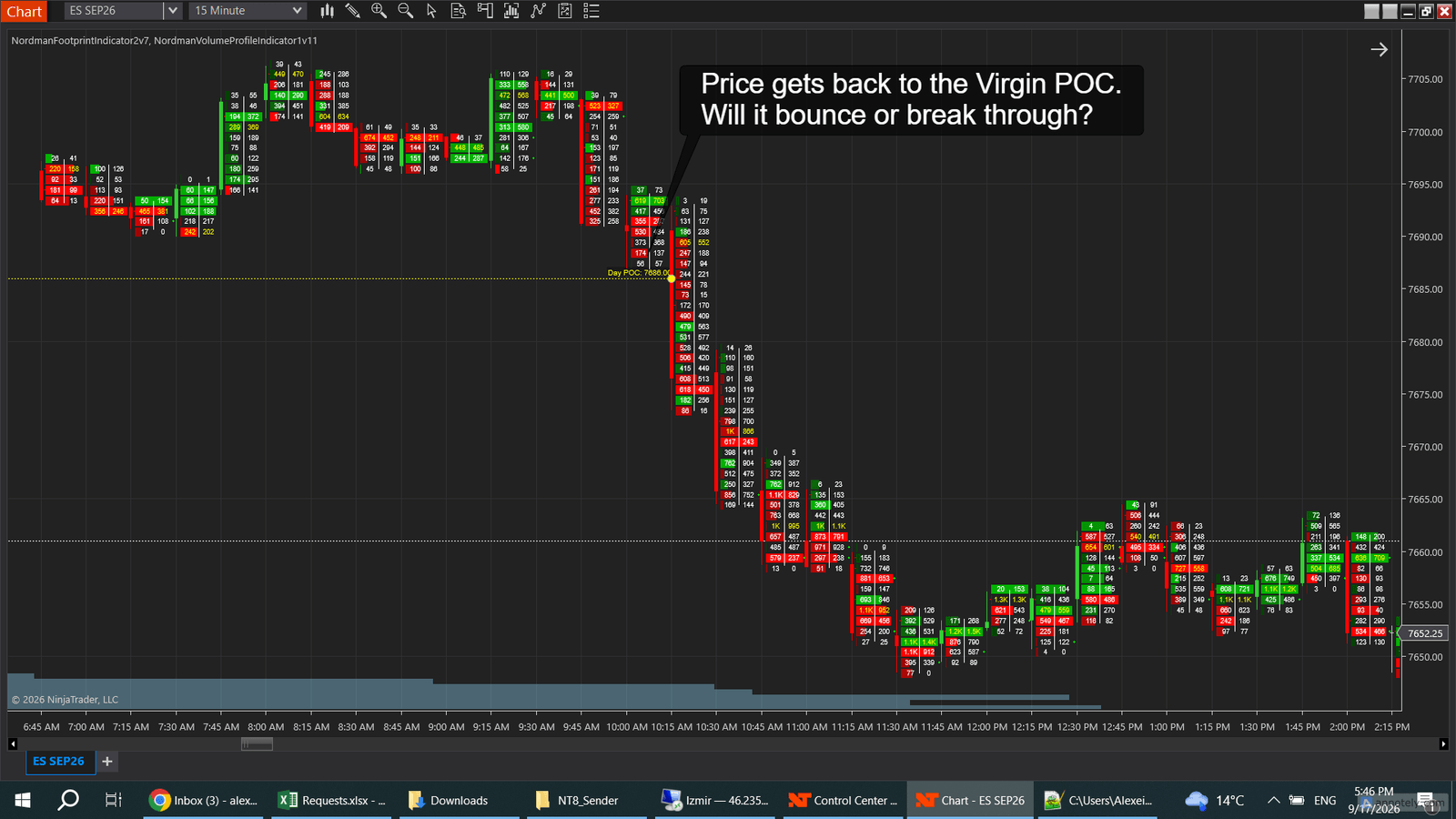
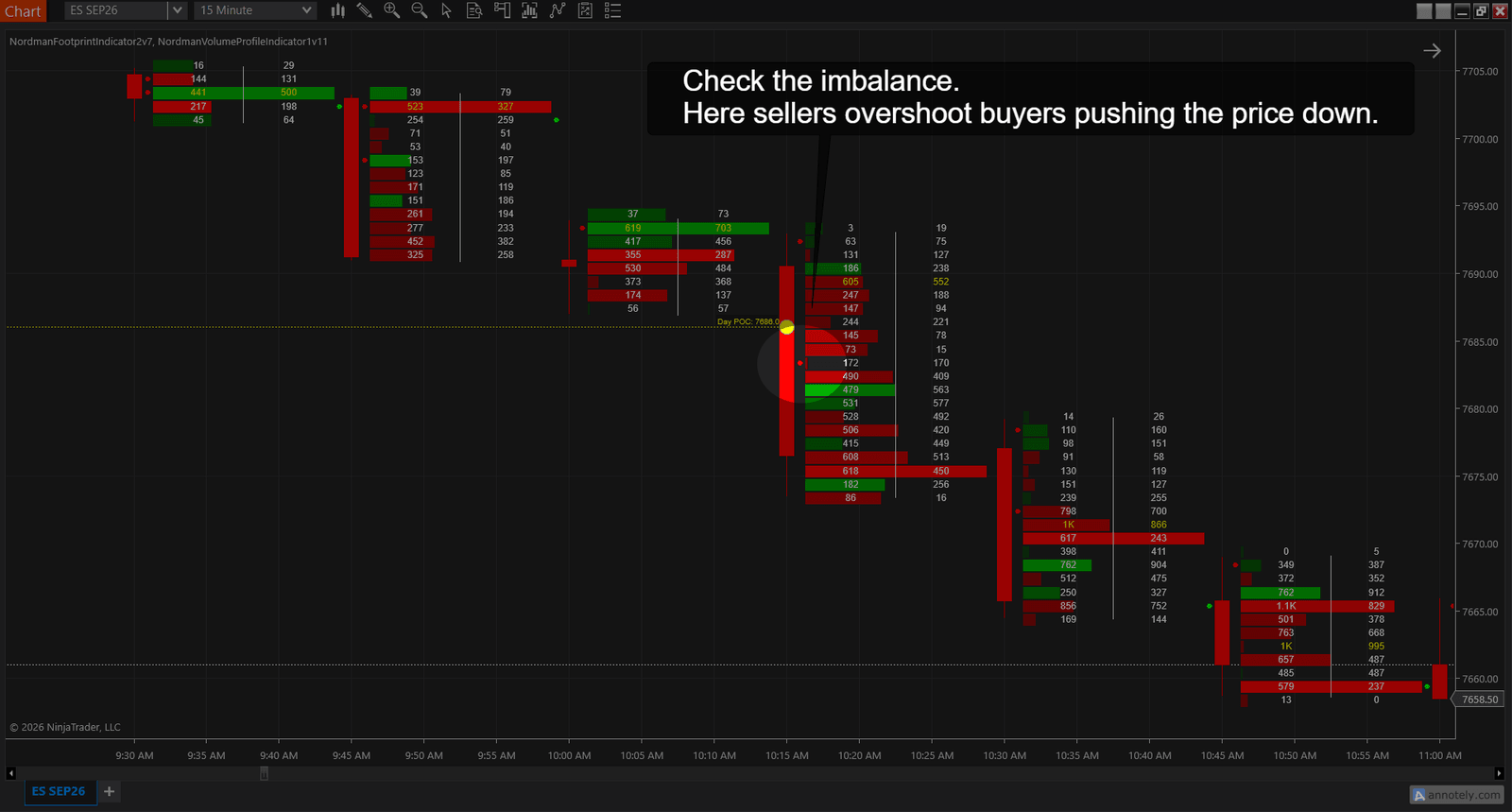
Now the part that keeps you out of bad trades. Most first touches never become a clean trigger either way, and here is what you do with each outcome you might see.
| What the footprint shows at the touch | What you do |
|---|---|
| Sellers outweigh buyers in the rows around the level, and price trades through it. | Short. Stop above the imbalance rows, first target the Value Area Low. |
| Buyers outweigh sellers at the level, and the bar closes back above it. | Long. Stop under the imbalance rows, first target the developing POC above. |
| Thin on both sides. Price drifts across the line with nothing to read. | Skip. Nobody defended it and nobody attacked it. The level is touched and ordinary from here on. |
| Imbalances one way, but the bar closes on the other side of the line. | Wait one bar. If the next bar doesn’t confirm the direction, forget the trade. |
Notice what the level did for you here. It did not tell you which way to trade. It told you where to look, and the footprint at that price told you which side was winning. The same level, with buyers overshooting sellers instead, would have been the long from the second row of the table.
Two settings and one alert make this plan run without you at the screen, and you set them once. On the Volume Profile Indicator, turn on Virgin POC tracking and the first-touch alert, and let it drop a marker on the chart where the touch happened. On the FootPrint indicator, turn on imbalance highlighting with a ratio around 300%, so the rows in step 3 get marked for you. Keep the same calculation method on both tools, or they will place the volume at different prices and you will argue with your own chart.
If you build strategies in NinjaTrader, Strategy Builder, or tools like BloodHound and BlackBird, the same events are available as plots. Virgin POC Above and Virgin POC Below give you the nearest untouched levels as values. Virgin POC Touch goes above zero on the bar where the touch happens. Connect that to an imbalance condition on the footprint, and steps 2 and 3 become a rule your platform checks for you.
Two traders can look at the same session and see different Virgin POCs. Usually one of these three settings is the reason.
Try this now. Open your profile settings and look at your Ticks Per Level value. Then think about the forum argument above. If two traders disagree about whether a Virgin POC “held,” how likely is it that they were looking at levels a few ticks apart without knowing it? On most instruments, that explains a lot of the disagreement.
| Before you act | What it protects you from |
|---|---|
| The POC comes from a finished period, and price hasn’t touched it since. | Chasing a level that is still moving. |
| Your profile period matches your holding time. | A weekly level on a 15-minute plan. |
| You have a first-touch alert set, and the footprint open at that price when it fires. | Babysitting the level, then reading it with no second tool. |
| The footprint shows imbalances on the side you want to trade, and price confirms that direction at the level. If not, you skip. | The drift-through outcome. |
| Your stop is two ticks beyond the imbalance rows, and your targets are real profile levels: the Value Area edge first, the next volume shelf second. | A one-tick stop-out and a target picked on hope. |
The plan above needs one alert on the profile and one imbalance rule on the footprint. Both are in the Volume Profile Indicator and its FootPrint companion, and the trial is long enough for you to run it on a week of your own touches.
See the Volume Profile Indicator — 5-Day Free Trial →
Need something custom built? We develop automation to order → NinjaTrader Developers
Nordman Algorithms provides algorithmic software tools for technical analysis and does not offer financial advice, trading signals, or managed trading services. The chart example and the trade plan above show how the indicators’ outputs can be read together. They are educational examples with illustrative prices, not a recommendation, and past patterns do not predict future ones. Visual markers and alerts reflect predefined mathematical conditions and do not constitute a recommendation to buy, sell, or hold any instrument. Forum quotations are reproduced verbatim from public threads for illustration and do not constitute endorsement. Futures trading carries a high level of risk. Only risk capital should be used. Full Risk Disclosure: https://www.nordman-algorithms.com/risk-disclosure/