Add a volume profile to a chart and the first thing you notice is that it looks wrong. The bars are sideways. There is a fat part, a thin part, a yellow line through the middle, and two dotted lines that don’t line up with anything on the candles. A trader on futures.io asked for exactly this. He put the problem in one sentence: “I’d like to see something similar to how the Current Day OHL works in that you can see it changing throughout the day” (pnguyen720, January 2019). He knew the levels mattered. He didn’t yet know what they were telling him.
That is the gap this article closes. A volume profile is not a new kind of volume. It is the same volume you already have, sorted by price instead of by time. Once you see it that way, the three lines on it stop being decoration and start being a map of where the market agreed and where it didn’t.
In this article, I’ll show you what the histogram actually counts, what the POC and the Value Area mean in plain words, and how to read a whole session in one glance. Then I’ll give you a plan for the one setup the profile is best at: price leaving value and coming back. You’ll get the entry, the stop in points, the two targets, and the cases where you do nothing.
The volume bars under your chart answer one question: how much traded in this five minutes, or this hour. A volume profile answers a different one: how much traded at this price, no matter when. It takes every contract that changed hands during your chosen period, drops it into the row for its price, and draws each row as a horizontal bar. Long bar, busy price. Short bar, price the market barely visited.
That is the whole trick, and it changes what you can see. Time-based volume tells you the 09:30 bar was heavy. The profile tells you that most of that heavy bar traded in a six-tick band, and that the ten ticks above it were almost empty. You stop seeing “volume came in” and start seeing “volume came in here, and refused to go there.”
A moderator there answered a trader who wanted to code his own. His definition of the line you’ll use most is the shortest honest one: “VPOC is straightforward: it’s the price with the most traded volume for the day/session” (xplorer, May 2018). Everything else on your profile is built outward from that one price.
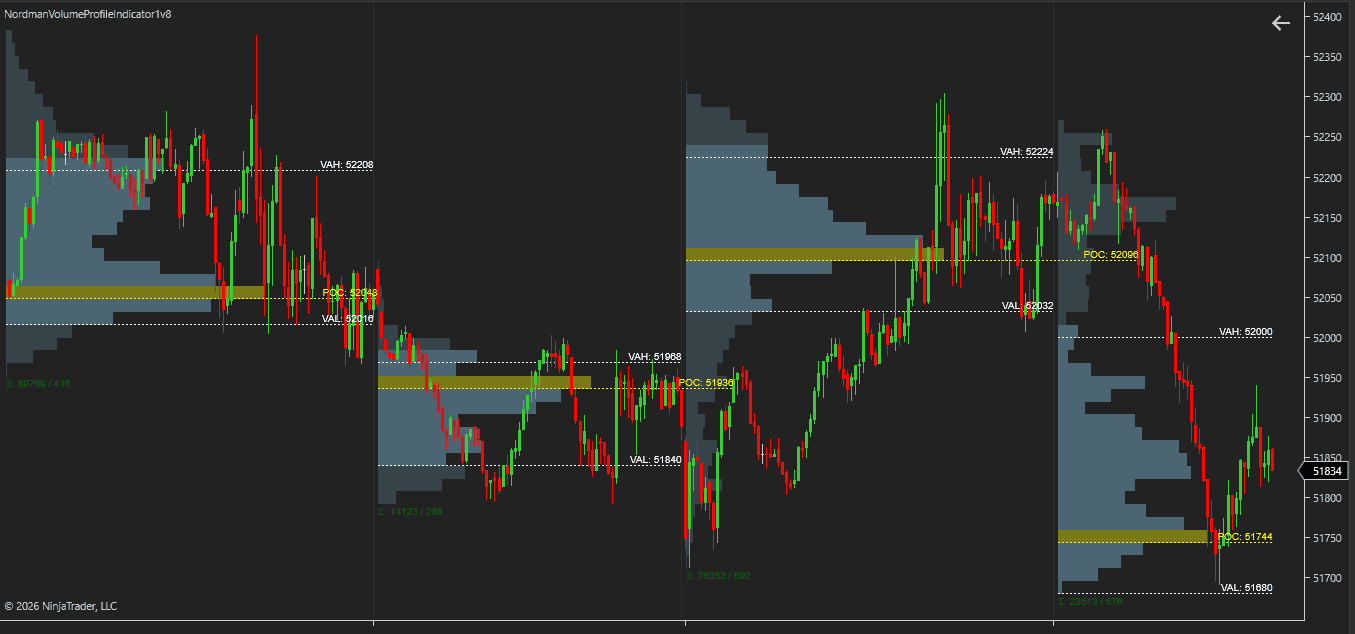
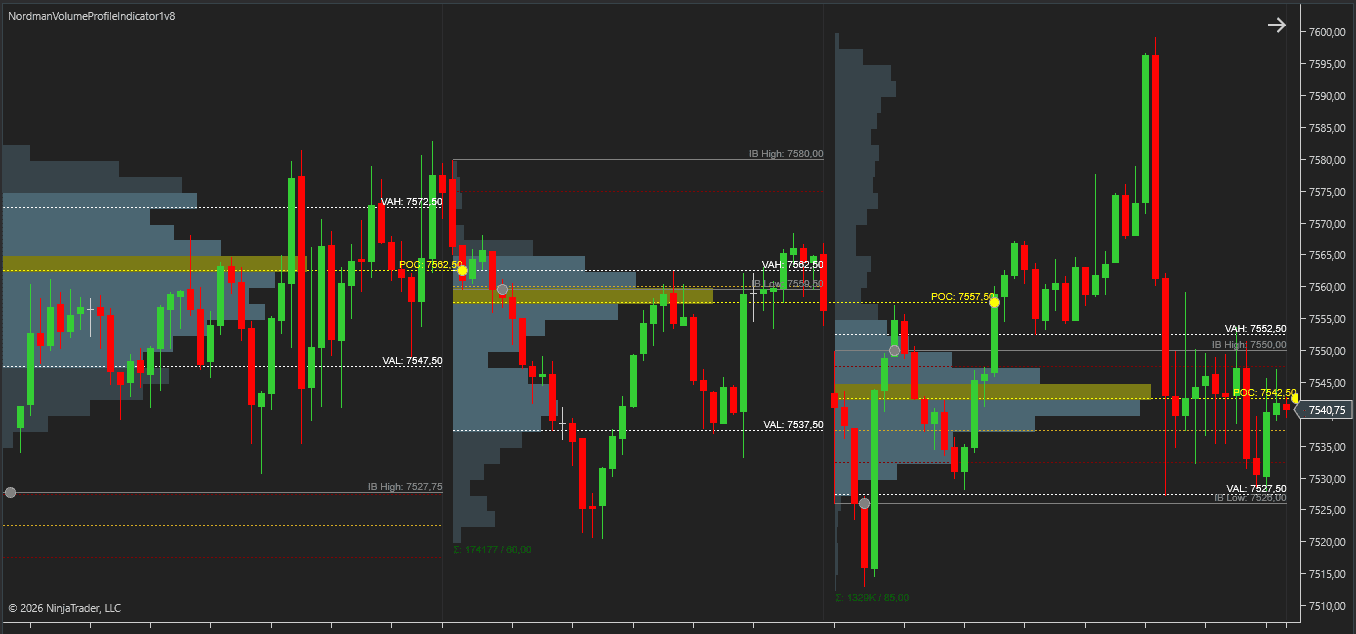
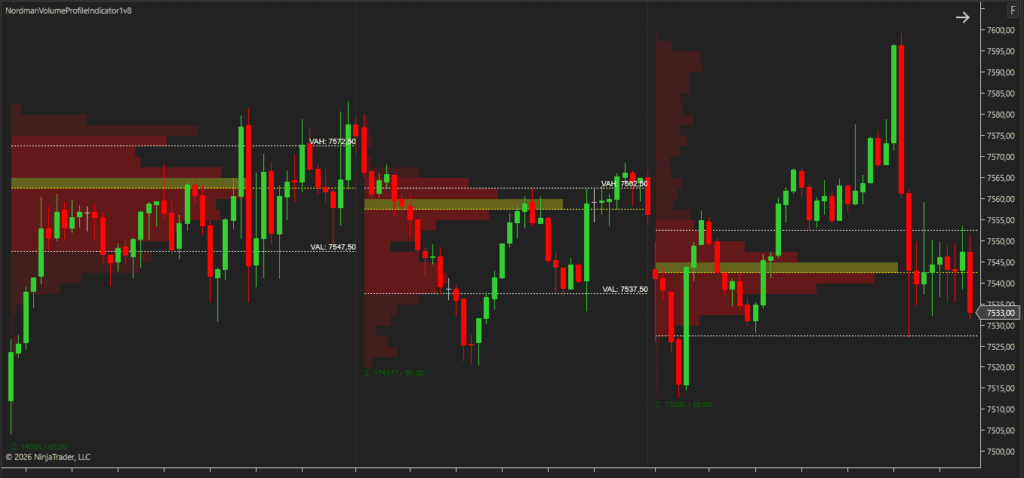
Look at the chart at the top of this article. Four sessions, four profiles, and on each one the indicator has drawn three levels. Here is what each of them is, and what you do with it.
Notice what the three lines are not. They are not support and resistance in the textbook sense, drawn from a couple of swing points you picked. They are counts. The POC is where the most trading happened, and your edges are where trading dried up. A count can’t be argued with, and that is why your profile levels survive on the chart long after trendlines get redrawn.
Once you know the three lines, the shape of the whole profile starts to talk. You don’t need to memorise letter names for shapes. Two questions cover most of it.
Read the four sessions on your chart left to right with just those two questions. You get a story without a single indicator signal. A balanced day. Then a lower and narrower one. Then a day that rallied out of it and built value higher. Then a day that fell out of that value and is looking for the next one. That is context, and context is what the profile is for.
Everything above is about a finished session. The profile you actually stare at during the day is still being built, and its levels move. The busiest price at 10:00 is often not the busiest price when you come back at 14:00. The NinjaTrader Volume Profile Indicator calls these the Developing POC and the Developing Value Area, and it draws their path as a line that steps across the session.
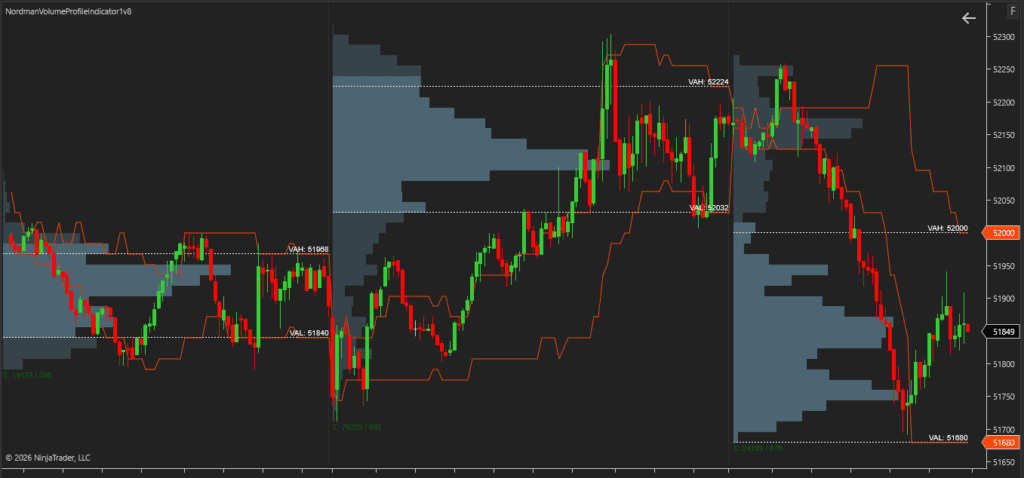
This is the part that answers the futures.io trader from the top of the article. The stepped lines on the chart above are the value area edges as they stood at each moment of the session. A Current Day High line works the same way: it shows you the high as it was, not only as it ended. When your developing POC stops moving for an hour, the market has found its price. When it jumps, the market just moved its idea of fair.
A trader on Elite Trader who uses profiles daily put the reason for watching the live histogram in one line: “I always track the STANDARD volume histogram… it tells ‘how’ price is being discovered” (tiddlywinks, December 2024). The finished profile tells you what the market decided. The developing one shows you the deciding.
Here is the argument you’ll find in every profile thread. One side treats the POC as the level: price gravitates to it, so you fade moves away from it and target it on the way back. The other side says the POC is the least interesting line on the chart, because by definition it is where everyone already agreed. Nothing new happens at a price where nothing is in dispute.
I’m on the second side, and I’ll tell you why. For you the POC is a fine target and a poor trigger. Your decisions happen at the edges of value, at the VAH and VAL, because that is where the market has to choose between accepting a new price and rejecting it. A profile trade starts at an edge and ends at the middle, not the other way round.
That is also why the profile alone is never quite enough. The edge tells you where the decision is being made. It doesn’t tell you which way it went. For that you look at what actually traded at the edge. That is where a footprint chart comes in, and why the two tools sit side by side on the chart at the top of the Virgin POC article.
Let’s use the chart at the top of this article, sessions two and three, and treat it as your screen for the day. Session two closed with value from 51840 to 51968 and its POC at 51936. Session three opened well below that, near 51700, and spent its first hour climbing. This is the setup your profile is best at: price is outside yesterday’s value and heading back toward it. Here is the whole plan, read off the chart. The levels are the indicator’s; the entry and stop are where I’d put them.
Now the part that keeps you out of bad trades. Most approaches to a value edge do not turn into a clean re-entry, so you need a rule for every version you might see.
| What you see at the edge | What you do |
|---|---|
| Price comes back to the VAL from below, closes inside value, and the next bar holds. | Long. Stop under the re-entry bar, first target the POC, second the VAH. |
| Price comes back to the VAH from above, closes inside, and the next bar holds. | Short. The mirror image: stop above the re-entry bar, first target the POC. |
| Price touches the edge and closes back outside value. | Skip. Value was rejected, not accepted. If anything, the market is building new value where it is. |
| Price opens inside yesterday’s value and stays there. | Nothing. There is no edge to trade. Wait for it to leave, or wait for tomorrow. |
The plan never asks you to predict where value will be. It asks you to notice where it was, wait for the market to come back to it, and let the close of one bar tell you whether it was accepted. That is a lot less clever than most profile strategies, which is why it survives.
Three settings and one alert run this plan for you. Set the Profile Period to Session, so each day gets its own profile and yesterday’s levels carry over cleanly. Leave the Value Area Percentage at 70, the standard most profile traders use, so your VAH and VAL match what other people are looking at. Turn on the Developing Levels, so you can see where today’s value is forming while you wait. Then set the Value Area touch alert, and let the indicator drop a marker on the chart when price reaches the edge. If you build strategies in Strategy Builder or tools like BloodHound, the same levels and touch events are available as plots, so step 3 can be a condition instead of a glance.
You and another trader can run the same indicator on the same session and still get different levels. Nine times out of ten it is one of these.
Try this now. Open your profile settings and check the Value Area Percentage. Then open the chart of anyone whose profile levels you’ve compared yours to. If the numbers are different, the argument about “whether the VAL held” was never about the market. It was about a setting.
| Before you act | What it saves you from |
|---|---|
| Your profile period matches your holding time, and the Value Area Percentage hasn’t changed since yesterday. | Levels that mean something different every day. |
| Price is outside yesterday’s value and moving back toward an edge. | Trading inside a range where there is no decision to read. |
| The touch alert is set on the edge, and you have the developing profile on screen. | Watching a line all morning and missing the bar that matters. |
| A bar closed inside value and the next one held. Not a wick, a close. | Buying a rejection. |
| Stop under the re-entry bar, first target the POC, second the far edge. | A stop at the day’s low and a target picked on hope. |
Everything in this plan runs on the session profile, the developing levels and one touch alert, all inside the Volume Profile Indicator. Five days of trial covers a full week of value-area edges on your own market.
See the Volume Profile Indicator — 5-Day Free Trial →
Need something custom built, like a value-area rule wired into your own strategy? We develop to order → NinjaTrader Developers
Nordman Algorithms provides algorithmic software tools for technical analysis and does not offer financial advice, trading signals, or managed trading services. The chart examples and the trade plan above show how the indicator’s outputs can be read together. They are educational examples with levels read off the pictured chart, not a recommendation, and past patterns do not predict future ones. Visual markers and alerts reflect predefined mathematical conditions and do not constitute a recommendation to buy, sell, or hold any instrument. Forum quotations are reproduced verbatim from public threads for illustration and do not constitute endorsement. Futures trading carries a high level of risk. Only risk capital should be used. Full Risk Disclosure: https://www.nordman-algorithms.com/risk-disclosure/