You built a strategy on TradingView. It fires alerts. You watch, you click, you switch to your broker’s terminal, you type the order in by hand. By the time you’re done, the price has moved. That is where most automation stories start, and where most of them stall, because the next word is “webhook” and it sounds like a developer’s problem.
It isn’t, but the confusion is real. On the MQL5 forum a trader asked whether he could “hit webhook url with mt4” to push signals into a bot. Two moderators spent a page working out which direction he even meant. The answer that ended it: “TradingView is offering a Webhook API. You can use it from MT4, just use WebRequest. But of course MT4 can’t be the receiver, at least not easily” (Alain Verleyen, MQL5 moderator, July 2021). That one sentence contains the whole concept, and I’ll unpack it for you.
In this article, I’ll show you what a webhook is in one sentence and what actually happens in the four stages between your alert and a placed order. You’ll see what the message contains and the three things you need before the option even appears. Then I’ll walk you through a real trader’s payload and the six ways a webhook fails. And I’ll show you how to set one up so the message never has to carry your lot size or your symbol at all.
A webhook is a message that TradingView sends to a web address the moment one of your alerts fires. That’s the whole thing. No polling, no refreshing, no checking. Your condition triggers, and TradingView sends a small HTTP POST request, a packet of text, to the URL you typed into the alert. Whatever server sits at that URL reads the message and does something with it.
Think of it as a doorbell, not a delivery. TradingView presses the button and says “the thing you asked about just happened.” What gets done about it is decided entirely on the other side of the door. Keep that picture, because it explains almost every failure you’ll ever see.
Between a candle closing on your chart and an order sitting at your broker there are four stages. The first two belong to TradingView. The last two belong to you, or to whatever service you use.
End to end, from candle close to webhook arrival, expect well under a second on a normal day. During a Non-Farm Payrolls release or an FOMC statement it can stretch to a second or two, because stage 2 is shared with every other alert on the platform firing at the same moment.
Exactly what you put in the Message field. Nothing more. TradingView does not add the symbol, the price, the timeframe or the direction on its own. If you want them in the message, you type them in, either as fixed text or with TradingView’s placeholder variables, which get swapped for live values when the alert fires.
The simplest message is plain text:
A structured message for a bot that reads JSON looks like this:
The double-brace pieces, {{close}}, {{timenow}}, {{ticker}}, are placeholders. Here the road forks. If your receiver reads JSON, which most custom bots and many platforms do, the message has to be well formed. One missing comma or one unclosed brace, and the receiver gets a request it can’t parse. If your receiver is built to work without you editing messages at all, the text comes pre-built and you paste it in. Which fork you’re on decides how much of this article you’ll need again at 2 AM.
Three things, and you need all three. Miss one and the option either isn’t there or silently doesn’t deliver.
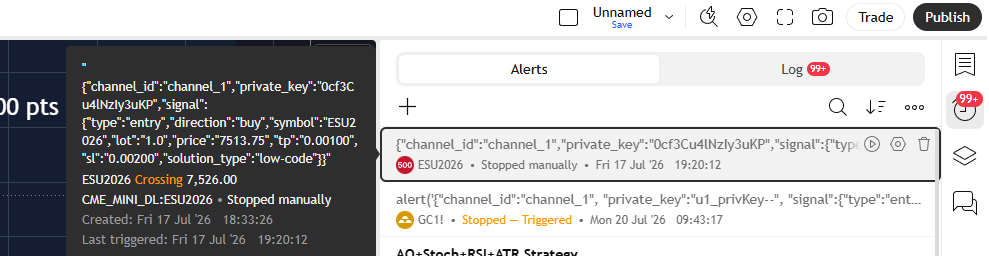
Let me take a message a real trader posted and follow it through the four stages. He was building his own Python bridge to MT5 and described his payload like this: “Right now my bot receives a JSON message containing the information it needs to send to MT5. It looks something like this: “signal”: “LONG”, “symbol”: “GBPUSD”, “volume”: 0.1, “stop_loss”: 10, “take_profit”: 10″ (Dean-Trades, September 2022).
Notice what the webhook did in that story. It carried five words to a server. Everything that made a trade out of those words, the symbol lookup, the lot conversion, the stops, the close logic, happened on his side. That is the doorbell again, and it’s why a broken automation is almost never “the webhook”.
Webhooks look simple until the day they stop. Here is where they actually break, in roughly the order I see them.
When a trade goes missing and you don’t know which of these it was, don’t guess. Walk the chain from the alert log down, one layer at a time. We wrote that procedure out in full: TradingView Alert Fired But No Trade Executed: 7 Reasons.
Every webhook adds time to your execution. Whether that time matters depends on what you trade. Here is where it goes, stage by stage, on a normal day and on a news day.
| Stage | Normal conditions | During major events |
|---|---|---|
| Alert detection, TradingView | Tens of milliseconds | Up to a second |
| Webhook dispatch, TradingView | Tenths of a second | Up to two seconds |
| Platform processing, your copier | About 0.1 to 0.15 s on ours, by our own measurement | Slightly more under a burst of alerts |
| Broker execution | Tenths of a second | Several seconds on thin liquidity |
The dispatch stage, TradingView’s own part, is usually the biggest single slice, and it’s the one you can’t touch. On our production infrastructure the whole chain, alert to broker, lands at about 0.5 seconds. If your strategy targets moves of twenty ticks and holds for minutes, that half second is noise. If you scalp three ticks on the ES open, the chain matters more than the strategy, and you should read When ~0.5s Execution Actually Matters before you buy anything.
A webhook by itself does nothing. It moves a message from point A to point B. Everything that matters happens at B, and B is what a trade copier is. If you don’t have one yet, the architecture is laid out in What Is a Trade Copier.
Most webhook copiers work the way Dean’s bot did: receive the JSON, parse the symbol, look it up in the broker’s list, translate the lot size, submit. Every step is a place to fail, and the symbol lookup fails more often than the rest put together, which is why symbol mapping has its own article.
Here is the choice I’d make, and it’s the one we built. Use the webhook as the trigger, not as the instruction. The Receiver, our component inside your terminal, already sits on the chart of the instrument you want to trade, with the lot size and the stops set on its side. When the webhook arrives it doesn’t parse a symbol or open a mapping table. It executes on the chart it’s sitting on. The message says “go”. The Receiver already knows where and how.
Two ways, and both end at the same Receiver. In the No-Code workflow you copy a ready-made webhook message from the client area and paste it into the TradingView alert. No JSON, no placeholders to debug, and it works for protected indicators you can’t edit. In the Low-Code workflow you edit the Pine Script alert conditions yourself for custom logic and use the same webhook URL. Either way the Receiver in MT4, MT5 or NinjaTrader 8 executes on its chart. Every alert is logged in the panel with an ID, and you get a Telegram message if the Receiver ever drops its connection. The platform-by-platform steps are in Can You Connect TradingView to MT4, MT5, and NinjaTrader 8?
| Before your first live alert | What it saves you from |
|---|---|
| Paid plan, 2FA on, and the Webhook URL field visible in the alert dialog. | An alert that “fires” and goes nowhere. |
| Test the URL with a request-inspection service before pointing it at real money. | A typo you only discover on the first trade that mattered. |
| If your receiver reads JSON, paste the message into a validator first. | A trailing comma turning your JSON into plain text. |
| Your receiver answers inside three seconds even on a news bar. | The cancelled request nobody retries. |
| The terminal is running when the alert can fire, or you know the trade is lost. | Finding out on Monday from your P&L. |
| You know where “close” logic lives. It is not in the webhook. | Dean’s question, asked at the worst possible time. |
Everything in this article, the webhook, the Receiver on the chart and the log that tells you what happened, is in Nordman Connector. Five days of trial is long enough to fire a week of your own alerts through it.
Need a webhook receiver with your own rules, or a bridge into a platform we don’t list? We build to order → NinjaTrader Developers
Nordman Algorithms provides software infrastructure for trade automation and does not offer financial advice, trading signals, or managed trading services. This article is for informational and educational purposes only. Forum quotations are reproduced verbatim from public threads for illustration and do not constitute endorsement. Trading leveraged instruments such as Forex, CFDs and futures carries a high level of risk and may not be suitable for all investors. Only risk capital should be used. Full Risk Disclosure: https://www.nordman-algorithms.com/risk-disclosure/