On the Prop Firm Hub thread at Forex Factory, a trader asked the question every EA owner asks before a challenge. “Does anyone here have experience with using EAs at FTMO? I have a free EA that I’m currently testing … I have no idea whether FTMO would allow something like that since it includes Grid and Martingale” (lddd, Forex Factory, Nov 2023). The reply he got was about a rule he had never heard of. “Once the EA is popular enough to hit that threshold, all traders using it will be considered a violation or breached” (AaronPriest, Forex Factory, Nov 2023).
That exchange is the whole article in two posts. Traders worry about the rule on the homepage, “are EAs allowed”, and get closed by rules three clicks deeper. Six months later, in the same thread, another member summed up the experience: “check their rules section they have alot of hidden rules. I remember in my last eval they breached my account” (montygoldy, Forex Factory, May 2024).
Here is the uncomfortable part: the firm usually isn’t lying. In almost every one of those stories the trader did break a rule. Just not the one they were watching. In this article I’ll show you the three technical triggers that close automated accounts whether or not EAs are permitted. Then a compliance matrix by strategy type. Then the three things your retail-built EA does under live conditions that you never designed it to do. If you’re running an EA on a funded account, this will save you a challenge fee. If you’re about to buy a “prop-firm EA” from a marketplace, it will save you more.
FTMO explicitly allows Expert Advisors. So do FundedNext, The5%ers, MyFundedFX and Topstep. There is no pre-approval, no source-code submission. Running an automated strategy on a prop account is a normal, expected thing in 2026, and if you’re new to the concept, What is a MetaTrader Expert Advisor covers the basics.
The line has never been “EAs banned” against “EAs allowed”. The line is a short, specific list of technical triggers that close your account whatever the EA’s permission status. Most traders read the homepage and skip the clause in the Terms where those triggers live. They are not about the strategy. They are about how the strategy talks to the platform. Everything below is based on FTMO’s current Forbidden Trading Practices page and the way the major firms enforce it this year.
Everyone talks about the 5% daily loss and the 10% maximum drawdown. Those aren’t the ones that catch you, because you’re watching them. The triggers that actually close automated accounts are structural. Your EA hits them without you knowing they exist.
FTMO’s Forbidden Trading Practices page states it plainly. More than 2,000 server requests in a day is grounds for corrective action up to termination, and every open, modification and close of a trade or pending order counts (FTMO, Forbidden Trading Practices). You probably never think about this number. Your EA opens ten trades a day, so you assume you’re nowhere near it.
What you miss is that every modification counts. Every tick-by-tick stop trail, every pending-order adjustment, every partial close, every trailing take-profit recalculation. An EA that trails a stop on every new tick during the London session can fire hundreds of modifications an hour and cross the daily cap before lunch on a volatile day. It never opens a bad trade. It never touches drawdown. And it still closes the account, because the platform classifies it as abuse. If your EA modifies orders on tick events, audit its request count over one full trading day before it goes near a funded account.
This is the one every serious firm enforces as a hard ban, not a warning. The definition is broader than most traders realise. It isn’t only an EA reading a faster feed than the broker’s. It is any strategy where your entry depends on being faster than the broker’s own price update. That includes tick-scalping systems that flip in and out within seconds, and strategies that fire on gaps between the broker’s feed and an external source.
Detection is mechanical. Risk systems flag your account where average trade duration sits under a firm-specific threshold, often under a minute, combined with a high win rate on entries taken into micro-gaps. Then a human looks at entry timing against the tape. If your EA consistently enters on the tick before a favourable move, the account closes. The awkward corollary is that a legitimate scalping strategy can look like latency arbitrage to that review. Scalp EUR/USD with 3 to 5 tick targets at a win rate above 65% and you will be looked at. That isn’t a reason not to scalp. It is a reason to expect scrutiny and to keep your entry logic documented.
This one catches careful traders because the rule changes between account stages. On the FTMO Challenge and Verification, news trading is unrestricted. You spend two months trading through NFP, CPI and FOMC with no constraint. Then you reach the funded stage on a Standard account and the rule flips: no new positions within two minutes before or after a scheduled high-impact release (FTMO, Terms & Conditions). Your EA is still configured the way it was in evaluation. One trade opened 90 seconds before NFP is enough.
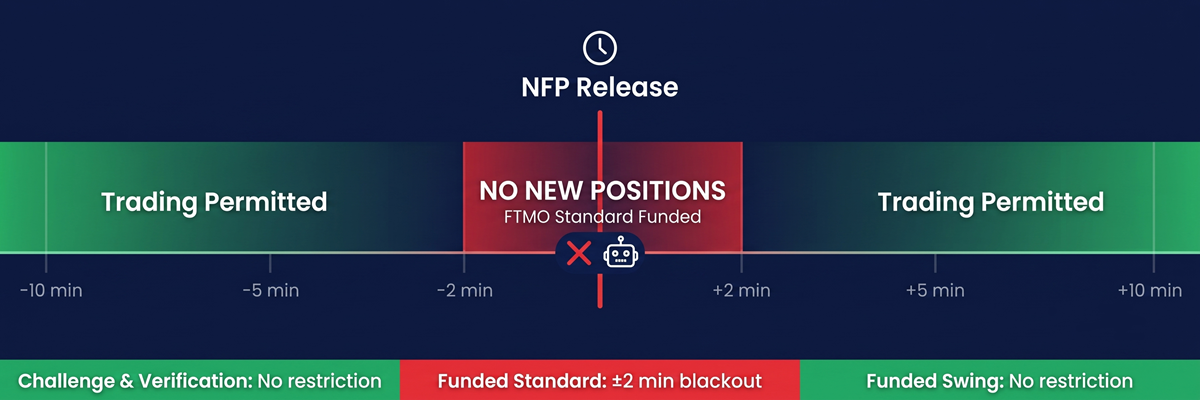
The Swing account has no news restriction and comes with lower leverage. If your strategy trades releases, Standard will close you and Swing will cap your size. Most traders default to Standard because it looks better on paper and never revisit the choice. Knowing when a release hits is one problem, and a calendar on your chart such as the MT4 News Indicator solves it. Stopping your EA from opening a position inside the window is a second problem, and most retail EAs don’t solve it. Confirm the window on FTMO’s current terms before you run anything that fires around macro releases. The rule has shifted more than once.
Here is what actually happens with each strategy type. Save it, because it ends most arguments.
| Strategy type | Status | What actually happens |
|---|---|---|
| HFT / latency arbitrage | Strict ban | Automated review flags the account within days. Termination, no payout. |
| Tick scalping, sub-30-second trades | High risk | Not banned outright, reviewed aggressively. Sub-minute duration plus high win rate equals a flag. |
| Grid / martingale | Flagged, not banned | FTMO and FundedNext allow it. The account gets manual review, and one bad sequence takes the daily cap in a single move. |
| Third-party EA, widely sold | Capital allocation risk | FTMO caps allocation at $400,000 per trader or strategy across all accounts. A popular marketplace EA can hit it across strangers running the same code (FTMO FAQ). |
| Hyperactive EA, over 2,000 requests a day | Auto-termination | Flagged by the platform, not the risk team. No exception. |
| News trading, Standard funded | Strict ban | Two minutes before and after high-impact events. Funded stage only. |
| News trading, Swing funded | Permitted | Lower leverage makes aggressive news scalping structurally unattractive anyway. |
| Copying external signals | Case by case | Manual review. Following third-party analytical output is often denied. Your own setups across your own accounts are fine. |
| Discretionary EA, trader-approved entries | Fully permitted | Bracket managers, one-click panels and semi-automation are welcome. |
If you’re in the top five rows and not sure your account is safe, keep reading. If you’re in the bottom four, your risk is procedural, not structural.
When you debate prop-firm bans you argue about the strategy. Is grid banned, can I scalp, can I run news. Almost nobody talks about how the EA behaves under live conditions, and that is where accounts die. Three patterns keep showing up in retail-built EAs that pass evaluation and lose the funded account inside a week.
Not one of these patterns is your strategy. Retry loops, tick modifications, uncapped request counts: that is implementation, not edge. Your entry logic didn’t get the account closed. The code around it did, and code can be re-engineered without touching a single entry rule.
Everything in the previous section is an engineering problem, so it has an engineering answer that leaves your strategy alone. Request throttling: stop and target modifications batched on a time or distance threshold instead of every tick, with a request counter that shows you the headroom before the platform does. Bounded retries: a capped retry sequence with backoff, so an order either lands within a set number of attempts or fails loudly into your log. A news-window filter matched to your account type, enforced in code rather than in your memory at 8:29 before NFP. And a unique implementation, because a strategy that exists in exactly one copy can’t share anyone else’s allocation.
That is the specific work we do at Nordman Algorithms: auditing an existing EA against prop-firm technical constraints and rebuilding the parts that generate violations, or building one from your specification. Two things we won’t do. We won’t make your losing strategy profitable. A technically clean EA that loses money loses it cleanly. And we don’t build HFT or latency-arbitrage systems, because the strategy itself is the violation and no engineering makes it legitimate. If your signals come from TradingView rather than a local EA, that execution layer already exists off the shelf as Nordman Connector. Its receiver enforces the spread ceiling, the trading-hours window and the daily-loss limit for you.
This matters if you run or plan to run an EA on a funded account, especially one that trails stops, retries on requote or fires around releases. It matters if you bought a marketplace EA and passed evaluation with it. And it matters if you’ve already had an account closed with a one-line notice and never learned which rule it was.
It doesn’t apply if you trade a prop account by hand with a bracket manager. Your risk there is the daily cap, not any of this. It doesn’t apply if your strategy is latency arbitrage, because no rebuild makes it allowed.
Take your EA’s log from one news day and count the stop and target modifications per minute. That number says more about your account’s risk than this article can.
Request an EA Audit or Custom Build →
Want to see the infrastructure running before you talk to us? Nordman Algorithms on YouTube, real setups and real orders landing.
Nordman Algorithms provides software infrastructure for trade automation and does not offer financial advice, trading signals, or managed trading services. This article is for informational and educational purposes only. Forum quotations are reproduced verbatim from public threads for illustration and do not constitute endorsement. Prop-firm rules change; verify the current terms of your firm before trading. Trading leveraged instruments such as Forex, CFDs and futures carries a high level of risk and may not be suitable for all investors. Only risk capital should be used. Full Risk Disclosure: https://www.nordman-algorithms.com/risk-disclosure/