MT4 ADX Crossover Indicator (Scanner)
MT4 ADX Crossover Indicator evaluates trend strength and direction using the ADX system — three lines that separate directional pressure from directional strength. The scanner dashboard monitors registered bullish and bearish conditions across all specified assets and timeframes, with configurable alerts.

Already a subscriber or have purchased a product?
What the ADX Crossover Indicator (Scanner) Does
The ADX Crossover Indicator is built on the Average Directional Index — a technical analysis system that measures both the direction and strength of a market trend through three interrelated lines. The scanner extends this to all monitored assets and timeframes simultaneously, registering conditions based on the relationship between these lines and presenting the results in a structured dashboard.
How ADX Works
The ADX system uses three lines. Two of them — +DI and -DI — track directional pressure. The third — the ADX line itself — measures how strong that directional pressure is, regardless of which direction it points.
+DI and -DI
When +DI is above -DI, upward pressure is dominant. When -DI is above +DI, downward pressure is dominant. When the two lines are close to each other, neither side is dominant — a condition typically associated with a ranging or consolidating market. As they diverge, directional pressure builds in the direction of the dominant line.
ADX Line
The ADX line is a smoothed average of the difference between the two directional lines relative to their sum. A rising ADX means directional pressure is strengthening. A falling ADX means it is weakening.
When ADX is below 25, directional conditions are considered insufficient for the crossover to carry analytical weight. When ADX moves above 25 — and particularly above 40 — directional pressure is considered more established. This threshold is configurable in the indicator settings.
How to Interpret and Use the ADX Crossover Indicator
The core analytical condition is the +DI/-DI crossover — but only when evaluated alongside the ADX line level.
Crossover Conditions
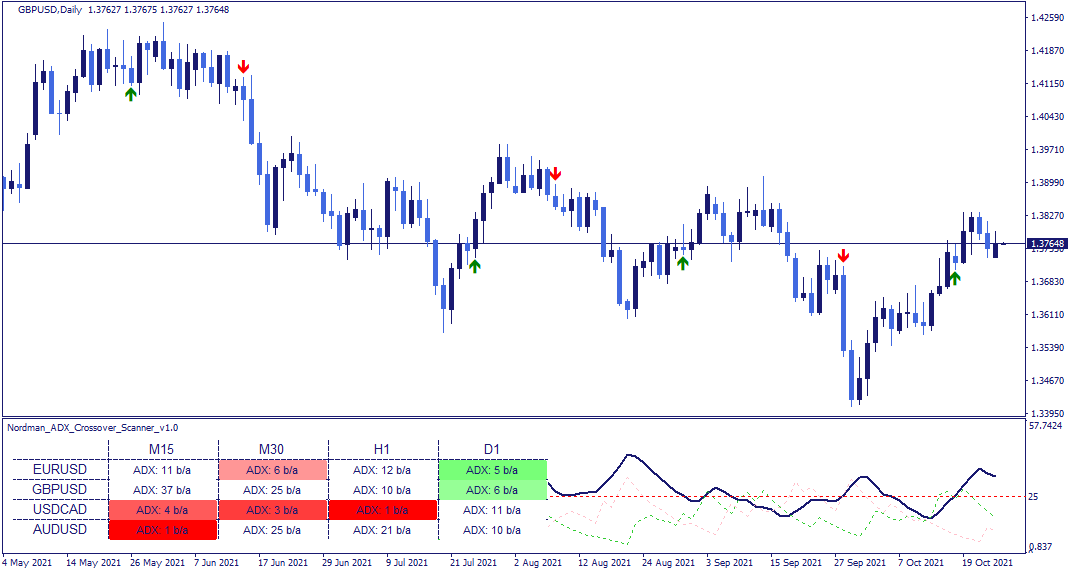
A bullish condition is registered when +DI crosses above -DI while ADX is above the configured threshold — indicating that upward directional pressure has become dominant in a market where overall directional strength is present. A bearish condition is registered when -DI crosses above +DI under the same conditions.
When ADX is below the threshold, no condition is registered — the crossover alone is not considered analytically significant without sufficient directional strength behind it.
The ADX line can also be read independently as a trend strength reference — useful in more complex analytical approaches where the presence or absence of directional momentum matters beyond the crossover itself.
Multi-Asset Monitoring with the Dashboard
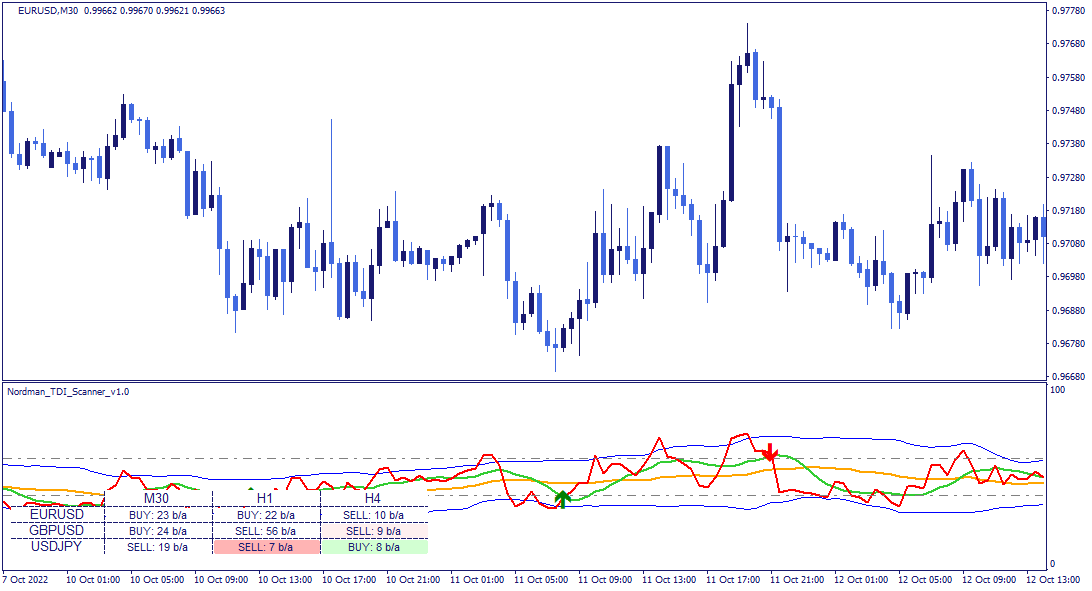
The dashboard displays the current status of registered conditions across all monitored assets and timeframes in a single structured view.
Each cell shows the directional context of the most recently registered condition — bullish or bearish — and how many bars ago it was registered. Green cells indicate a bullish condition, red cells a bearish one. Color saturation decreases as the condition becomes less recent, making it easy to prioritize the most current readings.
Clicking any cell updates the chart to the corresponding asset and timeframe directly.
Indicator Limitations — The ADX Crossover Indicator reflects calculations based on historical price data. The ADX line measures the strength of directional movement — not its future direction. Registered conditions depend on the configured period and threshold settings and do not predict future price movement or guarantee any particular market outcome. All conditions should be evaluated within a broader analytical framework.
Indicator Settings & Parameters
The indicator has the following parameters.
| Parameter | Description |
|---|---|
| Scanner & Alerts | |
| Assets | Instruments to include in the scanner. |
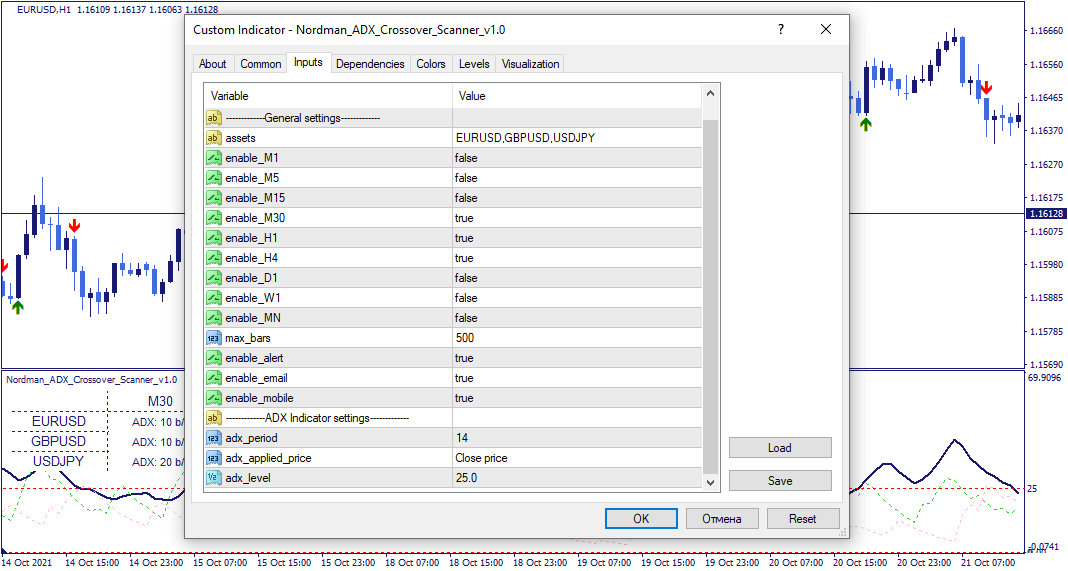
| Enable_M1–MN | Include or exclude individual timeframes from the scanner scope. |
| Max_bars | Limits how far back the scanner evaluates conditions. Reducing this value improves calculation speed. |
| Enable alert / Enable email / Enable mobile | Alert delivery configuration: platform notifications, email, or mobile — each set independently. |
| ADX | |
| ADX Indicator settings | Core ADX parameters including period, applied price, and the ADX level threshold that defines when directional conditions are considered present. |
System Requirements & Installation
What you need to run the indicator, how to download and install it in MetaTrader 4, and how the license works.
System Requirements
- Platform
- MetaTrader 4 (Desktop)
- Operating system
- Windows 10 or Windows 11
- Instruments
- Forex pairs, metals, indices, CFDs and other symbols available from your broker in MetaTrader 4
- Data
- Your broker’s price feed in MetaTrader 4
Not available on MetaTrader 4 Web or Mobile. Custom indicators run in the MetaTrader 4 desktop terminal only.
License Terms
- Lifetime License
- This indicator only, 1 live and 1 demo account, one-time payment, free updates included.
- All-Access Subscription
- All indicators and trade copiers, billed monthly, cancel anytime, updates included while the subscription is active.
- Free trial
- 5 days on the subscription plan. If not cancelled, the subscription starts automatically.
- License binding
- Linked to your email and to your MetaTrader 4 trading accounts: one live account and one demo account.
- Computers
- Not restricted. The license is linked to your trading accounts, not to a specific computer.
Installation
- Get access
Start the free trial, subscribe, or buy a lifetime license on this page.
- Download
The indicator is not sent by email. Open (top right of this page) and enter the email you used for your trial, subscription or purchase. The indicator file (.ex4) downloads to your computer.
- Copy to the MetaTrader 4 data folder
In MetaTrader 4, go to
File → Open Data Folder, openMQL4 → Indicatorsand copy the downloaded .ex4 file there. - Add to a chart
Restart MetaTrader 4 or right-click Indicators in the Navigator window and select Refresh. Then drag the indicator from the Navigator onto a chart.
- Activate the license
In the indicator inputs, enter the same email. On first activation, the license is linked to that email and to the trading account the terminal is logged into.
If MetaTrader 4 asks for additional permissions when the indicator is attached, such as DLL imports or WebRequest access, allow them in the indicator’s Common tab or under
Tools → Options → Expert Advisors.
Updating: When a new version is released, download it again through and replace the existing .ex4 file in the same folder.
Installation questions? Contact support, Monday to Friday.
Related Products
"Best Seller" and "Trending" reflect Nordman Algorithms sales and usage data, January–September 2026.
Disclaimer — Software Use & Risk Disclosure
Nordman Algorithms is a trade name of Nordman Algorithms OÜ (Reg. No. 14435535), registered in Tallinn, Estonia.
Software Use
Software Nature & User Responsibility — Nordman Algorithms provides algorithmic software tools for technical analysis. Nordman Algorithms is not a financial advisor and is not liable for any losses. All trades conducted based on the software’s output are executed at the user’s sole discretion and risk.
Visual Markers & Signal Disclosure — This software may display visual markers (such as arrows, dots, or alerts) when predefined mathematical conditions are met. These markers are provided for educational and analytical purposes only, must not be interpreted as financial guidance, and do not constitute a recommendation to buy, sell, or hold any financial instrument. Users must independently validate all visual cues within their own trading methodology.
No Financial Advice — Nordman Algorithms does not provide discretionary trading signals, investment advice, or managed signal services. Our software represents a mathematical visualization of historical and real-time data. The appearance of a visual marker does not guarantee a profitable trade or predict future market behavior.
Read the full Terms of Service →Risk Disclosure
Trading Risk Warning — Futures, Forex, and options trading involve significant risk. Risk capital is money that can be lost without jeopardizing financial security. Only risk capital should be used for trading. Past performance is not indicative of future results. An investor could potentially lose all or more than the initial amount committed.
ESMA Risk Warning — Financial instruments, especially those involving leverage such as CFDs and Forex, are complex and carry a high risk of rapid financial loss. Our software provides analytical outputs and visual markers based on predefined mathematical conditions and does not mitigate or reduce inherent market risks. You should carefully consider whether you understand how leveraged financial instruments work and whether you can afford the high risk of losing your capital.
CFTC Rule 4.41 — Hypothetical or simulated performance results have inherent limitations. Unlike actual performance records, simulated results do not represent real trading. Because trades have not actually been executed, these results may under- or over-compensate for the impact of market factors such as liquidity. Simulated results are also subject to the benefit of hindsight. No representation is being made that any account will achieve profits or losses similar to those shown.
Read the full Risk Disclosure →Trademark Notice — MetaTrader 4 and MT4 are trademarks of MetaQuotes Ltd. Nordman Algorithms is an independent software developer and is not affiliated with, sponsored by, or endorsed by MetaQuotes Ltd. References to MetaTrader 4 identify software compatibility.
Need a different setup?
We can customize this indicator to your requirements: add new features, change the calculation logic, or combine several tools into a single solution. We also build Expert Advisors on your own logic, with configurable modules such as dynamic risk parameters, multi-stage trailing stops and additional confirmation filters.
Every project is delivered with full source code and post-delivery support. Fixed-price quote before development begins.