Native MT4 development
MQL4
Expert Advisors, custom indicators, scripts and chart panels compiled for the MT4 terminal, including the order handling and trade management that run terminal-side on your account.
Explore MQL4 →Hire an MT4 developer to automate your trading rules, create custom indicators, or improve the tools you already use. We build Expert Advisors, prop trading automation, trade copiers, and connected components for MetaTrader 4 — with order handling and risk controls tailored to your account.
From your initial requirements to native MT4 software and connected services.
Nordman Algorithms develops custom MetaTrader 4 software from trading rules, calculation requirements, existing source code, and external signals. Our MT4 programmers build Expert Advisors, indicators, scanners, trade panels, trade copiers, prop trading automation, and tools for managing trades and accounts.
Native functionality runs in MQL4 inside the terminal. Connected Python or C# services and API bridges extend MT4 with analytics, reporting, signal delivery, and coordinated execution across accounts. Each project is adapted by an MT4 developer to the target broker, account rules, and the way the software will be used. Source code and full IP ownership are transferred on delivery.
Choose a new development project, a platform conversion, or a focused addition to the MetaTrader 4 software you already use.
Build an MT4 trading robot from your entry, exit, and money-management rules. Include indicator signals, session filters, pending orders, and ticket-based trade management.
Create custom MT4 indicators with your own calculations, chart patterns, levels, and alerts. Define closed-bar behaviour, multi-timeframe logic, and outputs for use by an EA.
Add daily loss controls, equity monitoring, trading-session limits, and automated actions for MT4 prop accounts. Behaviour is defined around the firm’s permitted tools and account rules.
Mirror trades between MT4 accounts or supported platforms. Configure symbol mapping, lot scaling, order updates, partial closes, and recovery after connection interruptions.
Turn Telegram, Discord, TradingView alerts, or custom API messages into MT4 orders. Add signal parsing, duplicate checks, sizing rules, and execution logs.
Convert strategies and indicators between MT4 and MT5, TradingView, NinjaTrader, or other supported platforms. Rebuild calculations, order logic, and chart behaviour for the destination.
Fix errors or add features to existing MQL4 source code. Resolve order-handling issues, incorrect alerts, missing signals, and behaviour that differs from your specification.
Connect MT4 to market data feeds, reporting systems, licensing services, and Python or C# services. We build HTTP integrations or custom bridges around the available interfaces, covering both market-data delivery and order handling.
Track conditions across currency pairs and timeframes in one MT4 view. Build signal tables, currency-strength displays, account summaries, and configurable alerts.
Create an on-chart control panel for manual or semi-automated trading. Calculate lot size, place orders, set SL/TP, move stops to breakeven, and manage partial closes.
Automate focused terminal tasks: close selected orders, adjust stops in bulk, export history, or prepare charts. Use a script for one-off actions and an EA for continuous monitoring.
Control access to your MT4 EAs and indicators with account-bound licences, trial periods, expiry dates, and activation services. Plan renewals and offline behaviour around your distribution model.
Not every requirement fits a predefined category. Send a description, screenshots of what you have in mind, reference files, or existing MQL4 source code — we will review it and tell you what is technically possible on MT4 and what it would take.
Before any code is written, an MT4 developer establishes what the tool must do on your MT4 account. The specification, fixed quote, and testing criteria are agreed from that.
Start with a description, annotated charts, or the files you want to change. For a bug fix, include the expected result, the actual result, and relevant Experts or Journal messages.
Your agreed delivery includes the MT4 build and source files, plus any external components included in the project. We explain installation, inputs, and required terminal permissions.
Native MQL4 development inside the terminal, plus the external languages and interfaces used to connect it to everything else.
Expert Advisors, custom indicators, scripts and chart panels compiled for the MT4 terminal, including the order handling and trade management that run terminal-side on your account.
Explore MQL4 →MT4 has no official Python package of its own, so Python runs as a separate process for analytics, models and signal generation, and a purpose-built bridge carries the results to the MQL4 side.
Explore Python →Dashboards, account tools, background services and bridge components built around the terminal. Where an interface is required, a compatible DLL is added — C# does not run as MT4 strategy code.
Explore C# / .NET →Connecting MT4 software to external HTTP services for market data, reporting, licensing or signal delivery. MT4 exposes no standard REST trading interface, so the integration is built around what the terminal can call.
Explore REST API →Realtime streams are terminated by an external WebSocket client, which then talks to the MT4 component through the bridge. This keeps subscription and reconnection handling outside the terminal.
Explore WebSocket API →Alerts from TradingView, Telegram bots or other sources arrive at a hosted receiver, are validated and de-duplicated, and are passed to the MT4 execution component as instructions.
Explore Webhook →MT4 is built around forex, and everything else is normally reached through broker-listed CFDs. The instruments in your account decide what the software can analyse and trade.
Forex EA development, custom indicators and pair scanners, plus the CFDs your broker lists alongside them — indices, metals, energies, commodities, shares and crypto. Logic is adapted to the broker’s quotes, contract sizes and sessions.
Forex Automation →These are underlying categories inside the platform’s CFD offering, not separate markets. Which of them your account carries — and under what contract sizes and trading hours — is set by the broker, so it is confirmed before a project is scoped.
Your MT4 project is scoped around the code, account, and trading routine you actually use — with clear responsibilities from the first review to delivery.
Expert Advisors, indicators, scripts and panels written in MQL4 by MT4 developers who work inside the terminal every day — so behaviour is judged against how MT4 actually fills, prices and reports, not against theory.
Symbol suffixes, lot steps, stop restrictions, server time, and account permissions are reviewed before the trading logic is finalised.
Receive an agreed feature list, fixed quote, and schedule. Additional requests can be assessed separately so the original delivery remains clearly defined.
Discuss proprietary rules under an NDA when needed. Source-code delivery and ownership terms are established before work starts.
Get help with installation, input settings, and technical questions within the agreed support scope. Existing projects can be extended as your requirements change.
These selected products demonstrate how our team applies MT4 development expertise to ready-made indicators and execution tools. They represent only one part of our broader custom development capabilities.
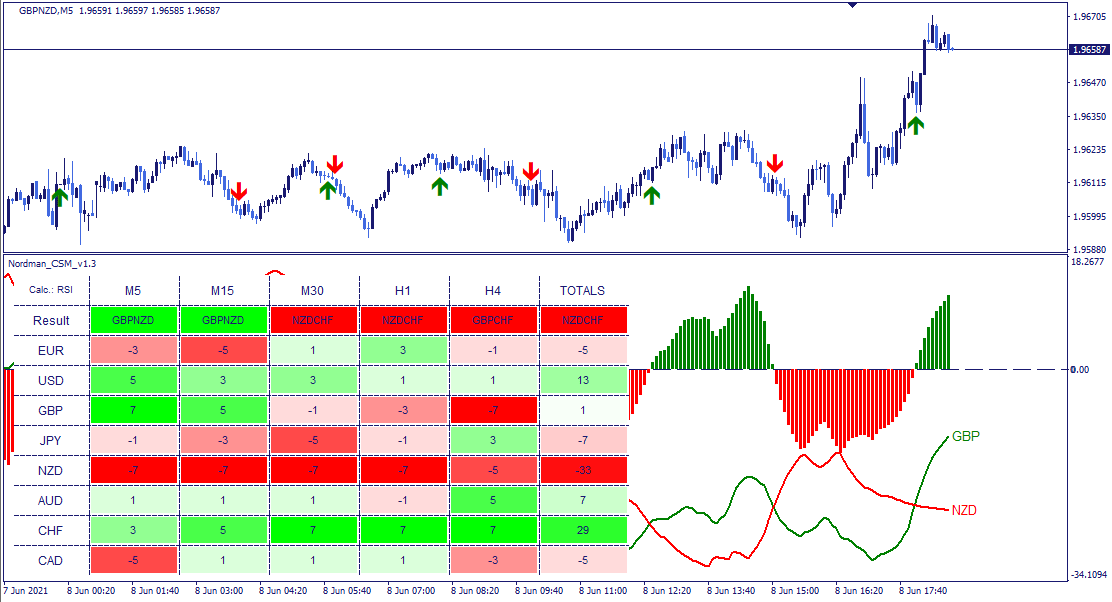 Best Seller
Currency Strength Meter indicator: 8 major currencies from 28 pairs, MA, MACD or RSI based strength, per-timeframe scores and totals, dashboard, alerts.
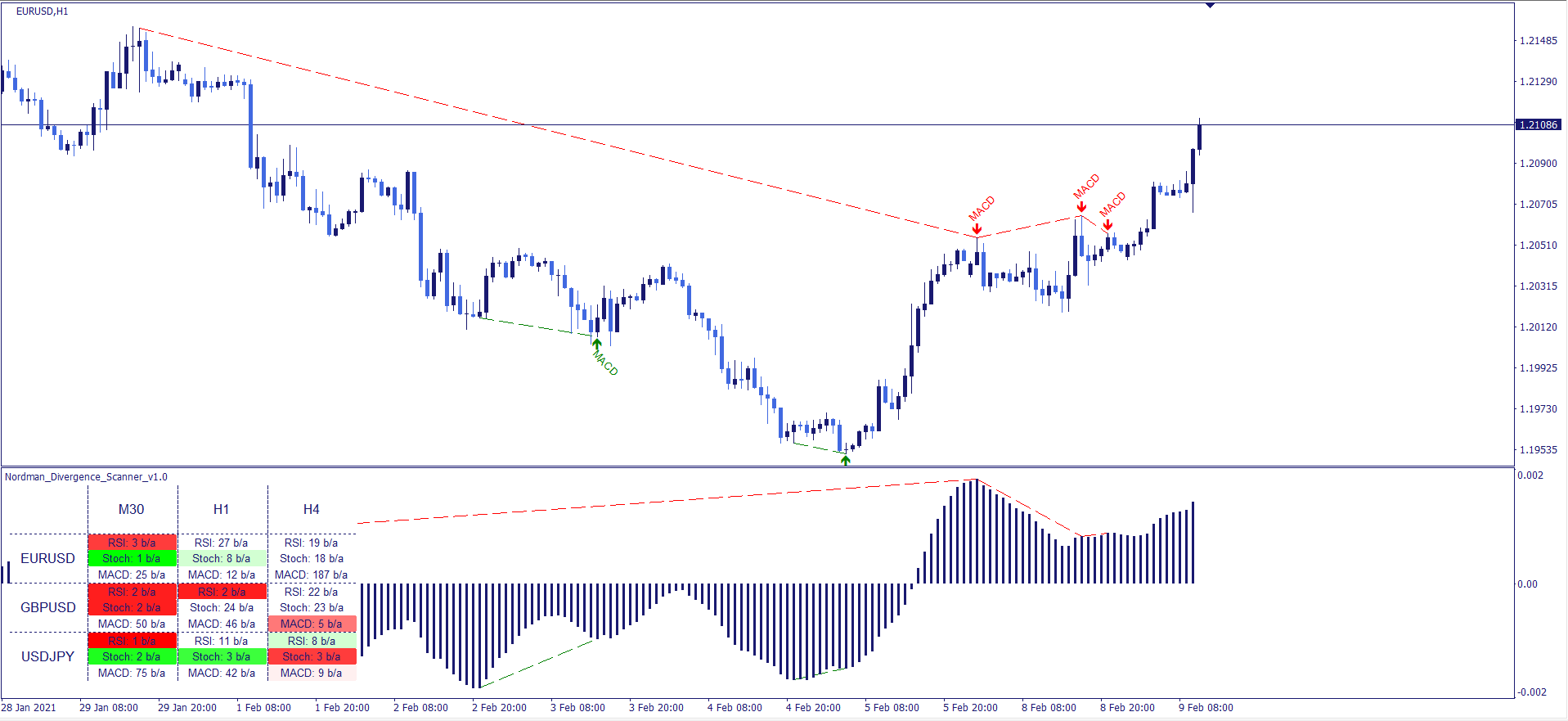 Trending
Divergence indicator: RSI, Stochastic, MACD, OBV and Awesome Oscillator divergence scanner, multi-symbol, multi-timeframe dashboard, oscillator labels, lines.
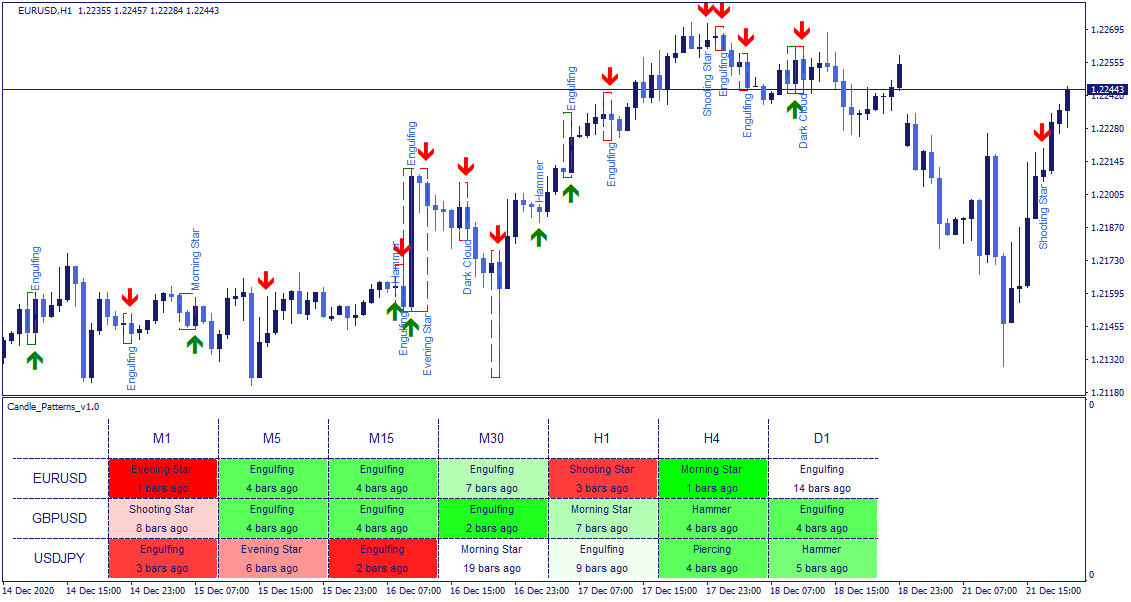
Candlestick Patterns indicator: Engulfing, Harami, Hammer, Morning Star, Marubozu and more, pattern frames and names, multi-symbol, multi-timeframe dashboard.
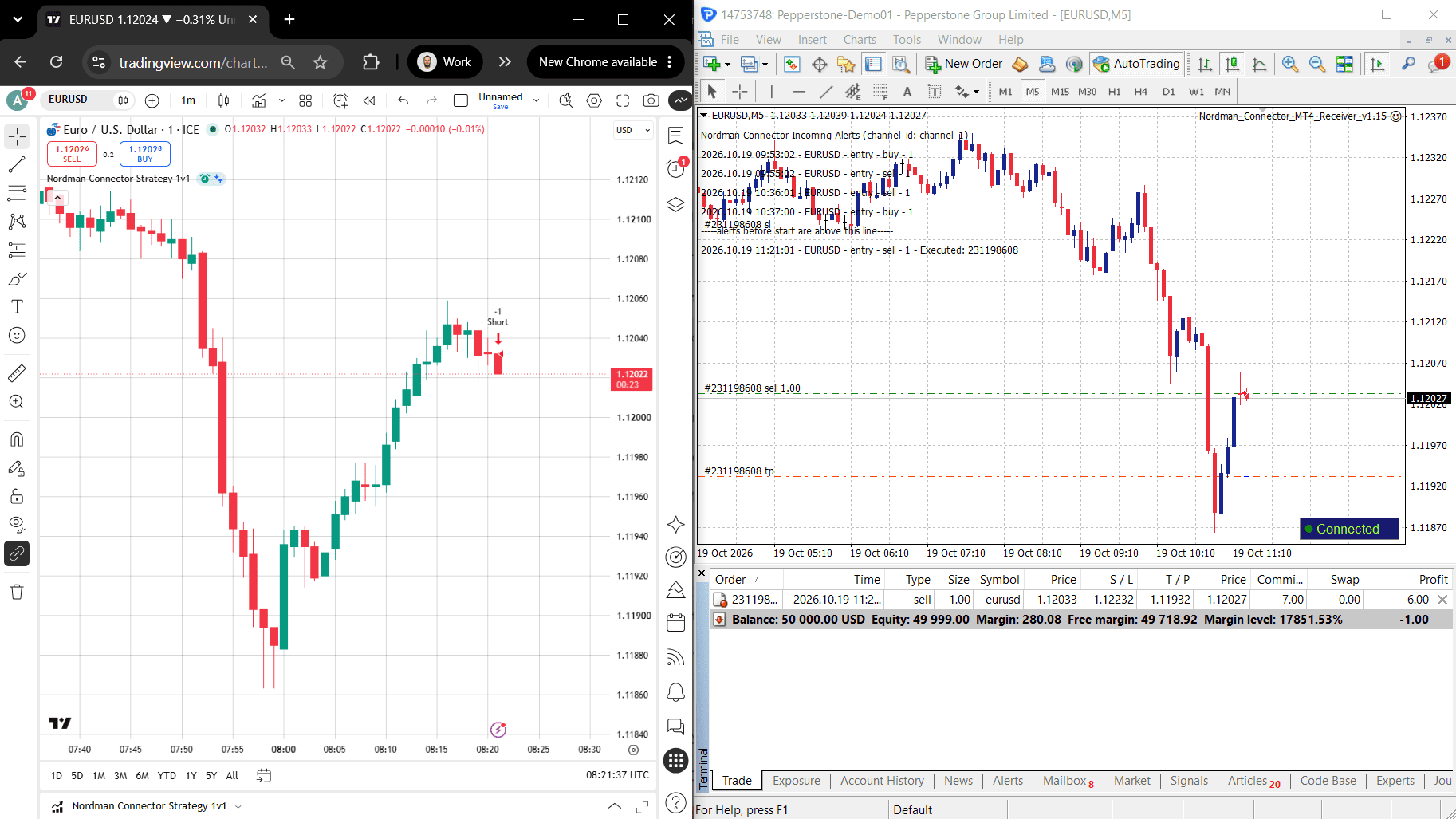
Cloud copier from TradingView alerts to MT4: manual, strategy and indicator workflows, No-Code setup, TP/SL, lot sizing, prop limits, demo + live account.
Explore our own MT4 tools, or discuss a custom solution built around your requirements.
Practical answers about existing code, automation, integrations, and commissioning a MetaTrader 4 project.
Share your trading rules, example charts, and the expected behaviour of the tool. For an existing EA or indicator, include the available MQ4/MQH source files and relevant error logs. Your broker, symbols, and account restrictions help us define order handling and testing.
Yes. We review editable MQL4 source code, reproduce the issue, and agree the changes. Typical work includes incorrect entries, missed alerts, stop-management errors, or new trading filters. If you only have an EX4 file, we can assess a rebuild from documented rules; a compiled file is not a substitute for editable source.
Yes, when its signals can be defined and read reliably. We agree which indicator outputs trigger trades, whether signals are evaluated on a closed bar, and what happens if signals change. The EA also needs explicit exit, sizing, and order-management rules.
A trade copier reads orders and changes from a source trading account and applies them to receiving accounts. A signal copier interprets external instructions, such as Telegram messages or TradingView alerts, before placing MT4 orders. Both need agreed symbol mapping, position sizing, and duplicate-handling rules.
Yes, for accounts that support MT4 and permit the proposed automation. Tools can monitor equity, daily losses, open exposure, and trading hours, then apply agreed actions. We clarify reset times and how floating profit or loss is counted. Software controls do not guarantee compliance under every market condition or a passed evaluation.
Yes. Cross-platform conversion can work in either direction when the required data and functionality are available. MQL4 and MQL5 use different trading interfaces, so an EX4 file cannot simply be opened in MT5. We rebuild the relevant logic and compare signals and trade behaviour against agreed reference examples.
It can connect an EA to external signals, reporting, data, or licensing services using HTTP requests or a custom bridge. Broker-side Manager and Server APIs are a separate infrastructure scope requiring appropriate access. An ordinary MT4 trading login does not provide those broker-side permissions.
Yes, through a custom connection between the MT4 terminal and an external service. The bridge can exchange signals, account data, or reports while an MQL4 receiver handles terminal actions. We agree hosting, connection recovery, and permissions; Python and C# components run outside the native MQL4 program.
An MT4 developer reviews the rules, interfaces, and existing code first, then we provide a fixed quote and timeline. Testing follows the agreed examples: historical checks where suitable, plus demo-account checks for execution and integrations. MT4 WebRequest calls do not run in the Strategy Tester, so connected functions need separate testing. Delivery files and technical support are defined in the scope.
Yes. Options include account restrictions, trial expiry, activation keys, and server-based licence checks. We define how the software behaves during a connection outage or renewal. Access controls help manage distribution, but no software-protection method can promise absolute resistance to copying.
Describe the new tool, the issue in your existing software, or the connection you need. Our team will review the materials and define a practical scope for your MT4 project.