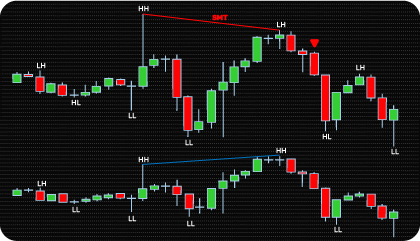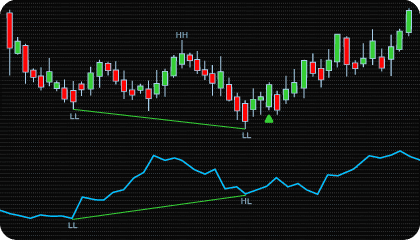
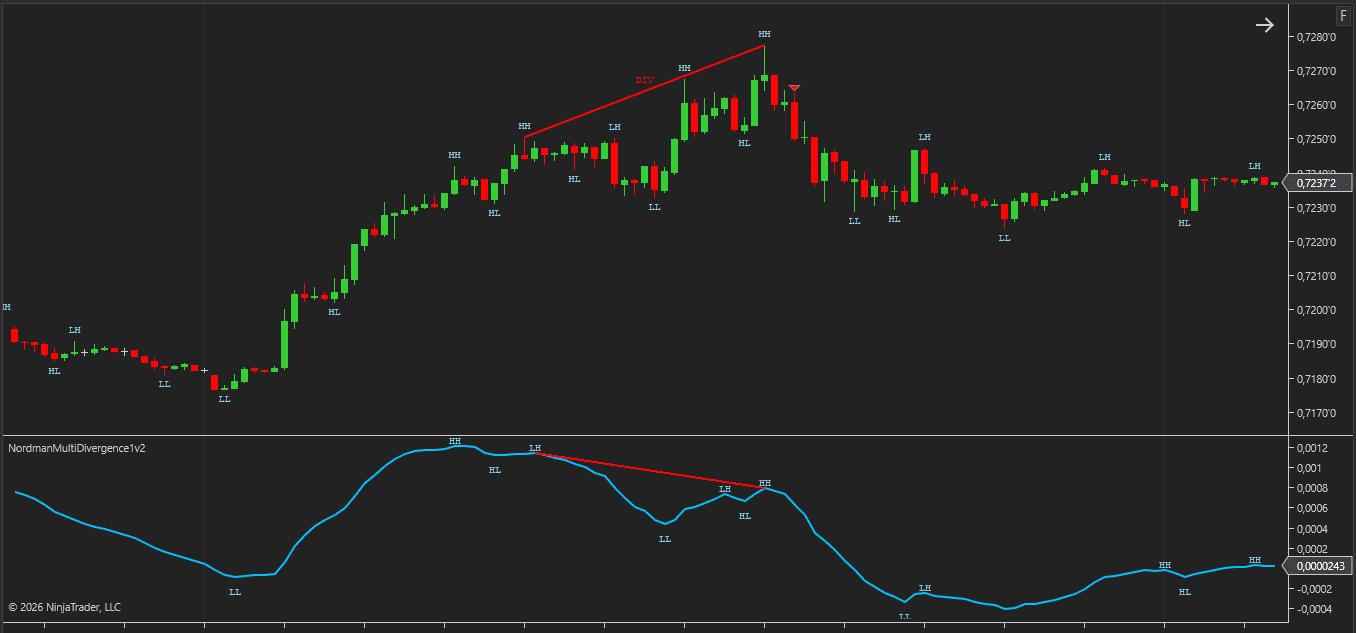
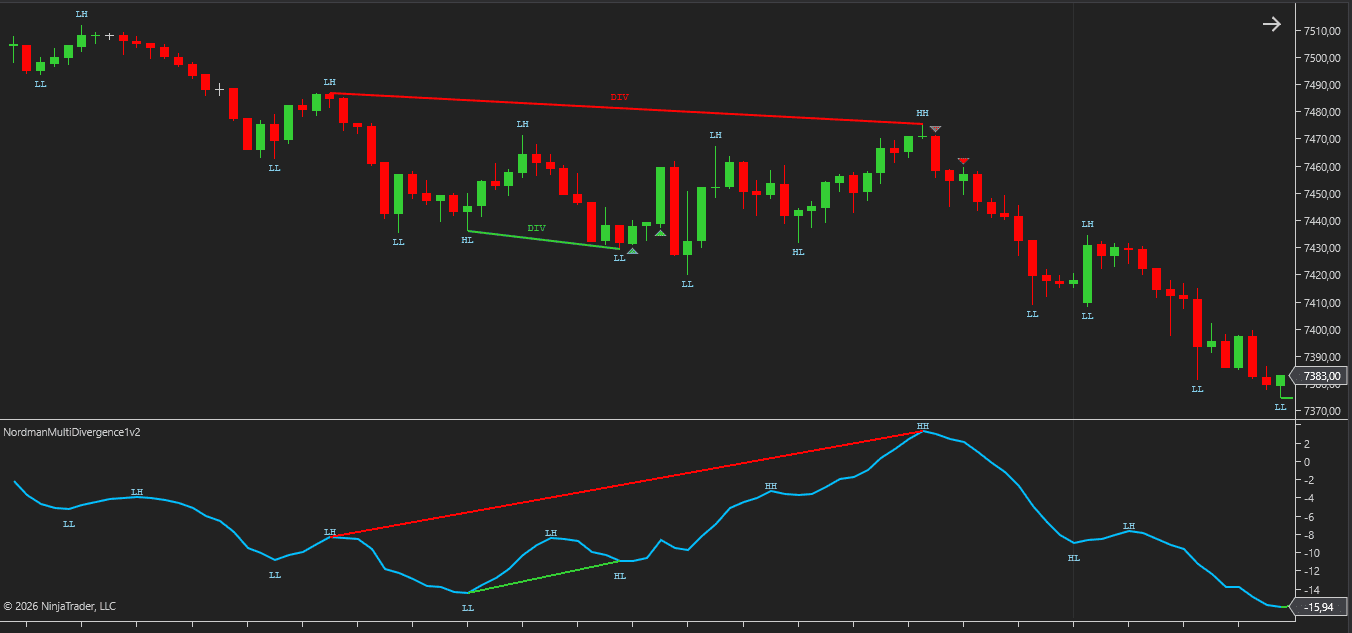
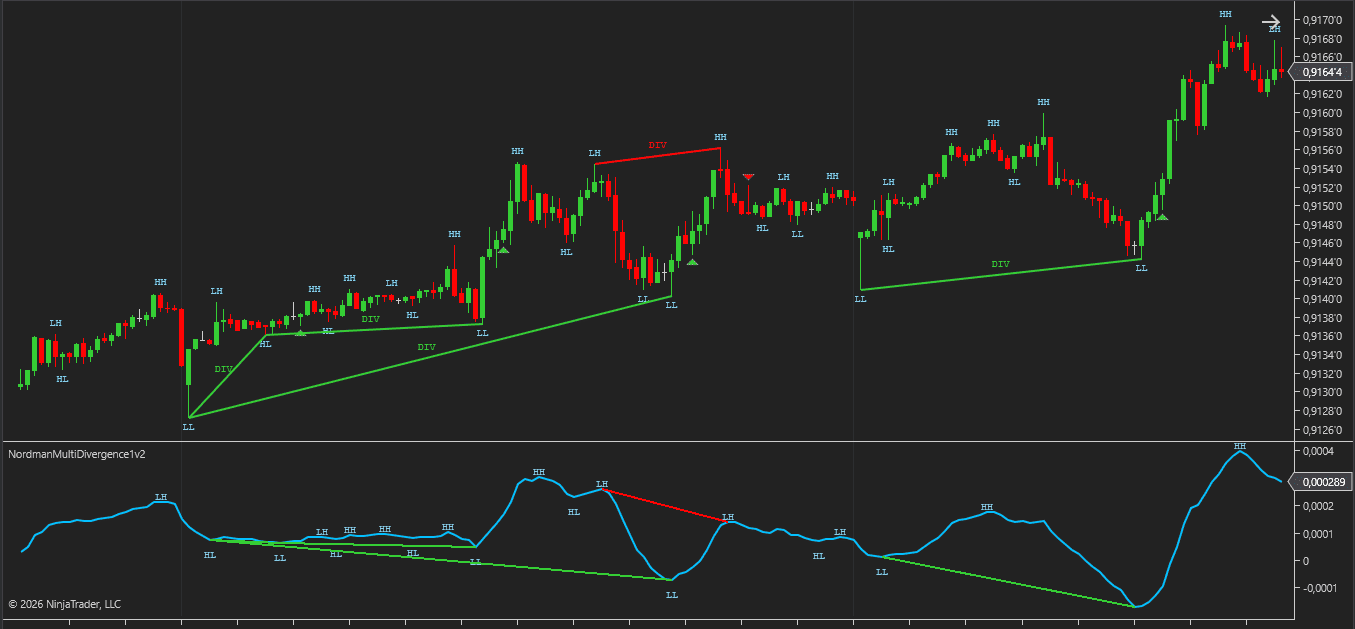
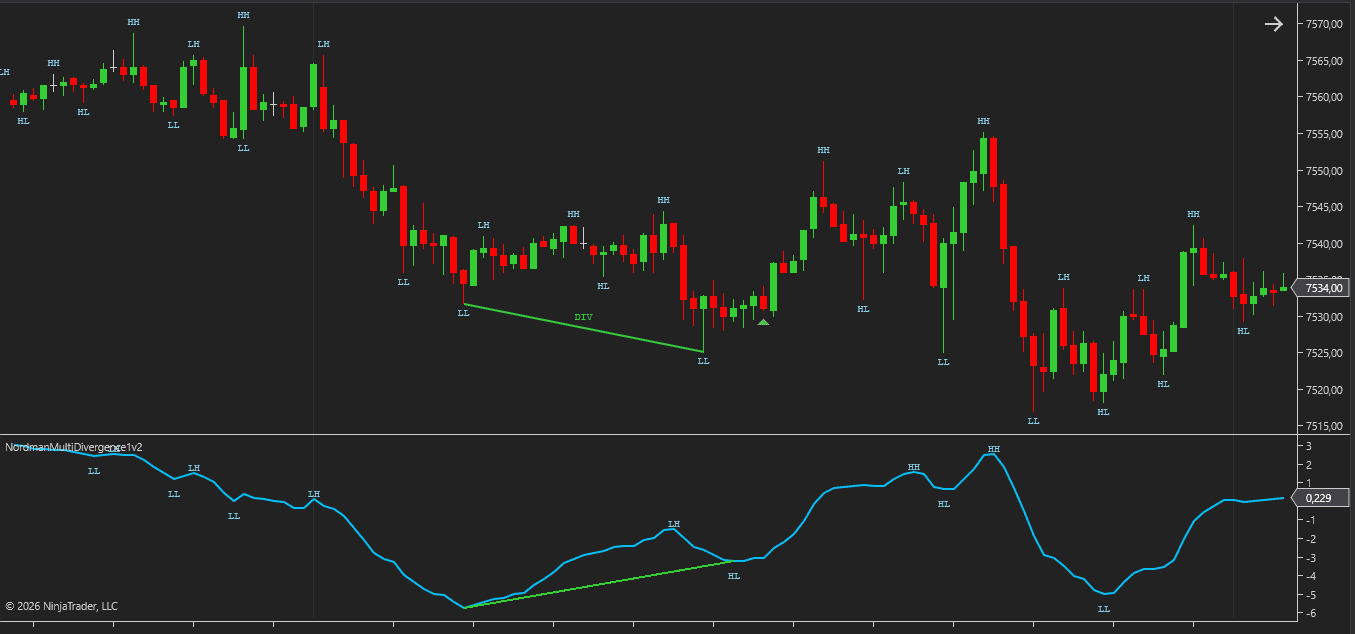
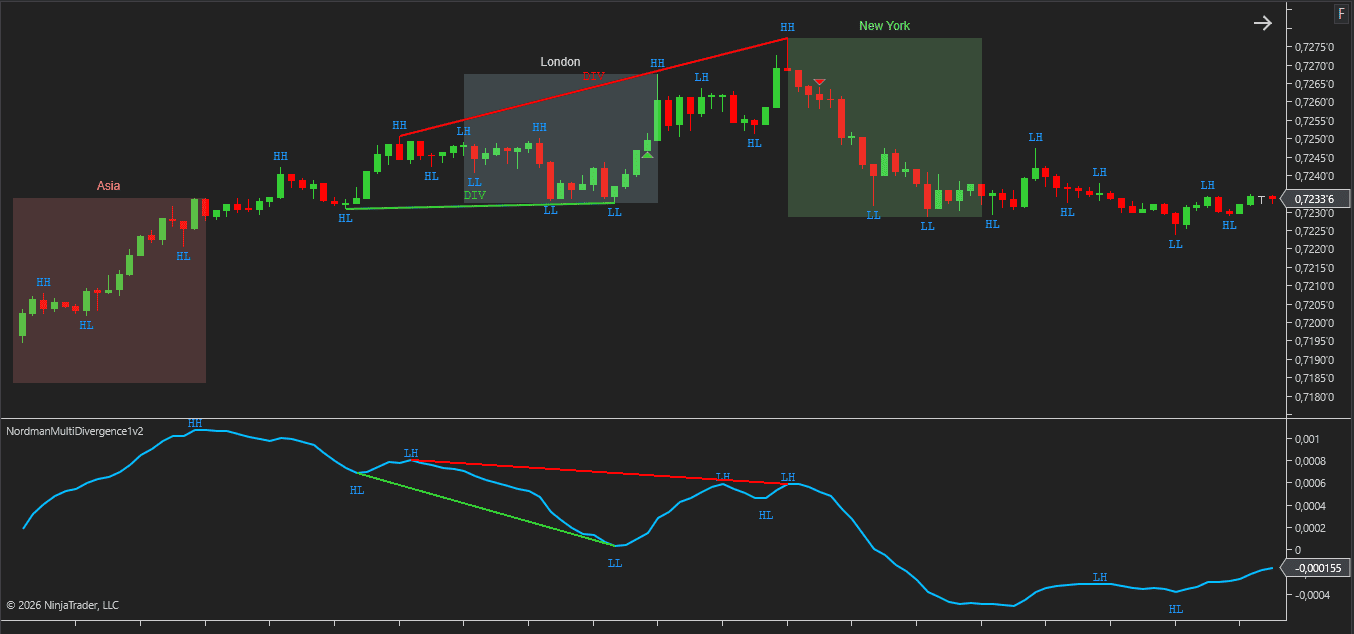
Multi divergence analysis extends the traditional divergence concept by allowing traders to select the indicator source used for divergence detection.
Most divergence indicators are built around a single predefined oscillator such as RSI, MACD, or Stochastic. The NinjaTrader Multi Divergence Indicator uses a different approach. Instead of being tied to one indicator, it can analyze divergence using a selected data source available on the chart.
Price swing highs and lows are compared against swing points from the selected indicator plot. When price and the selected source develop conflicting structural behavior, a divergence condition can be identified.
This allows the same divergence engine to be used with different analytical tools without requiring a separate divergence indicator for each oscillator or custom indicator.
The NinjaTrader Multi Divergence Indicator is designed to work with user-selected indicator plots rather than a single predefined oscillator.
Any compatible NinjaTrader indicator that exposes plot data can be used as a divergence source. This allows traders to apply the same divergence engine across different analytical tools without changing the underlying detection methodology.
Common source types include:
The indicator requires a continuous numerical plot as the divergence source. Indicators that output values only on selected bars — such as signal arrows or event markers — are not compatible with the divergence detection engine.
The indicator compares price structure against the selected source plot and applies the same divergence detection logic regardless of which compatible source is used.
For custom and third-party indicators, the source must expose plot values that can be accessed through NinjaTrader’s data series framework.
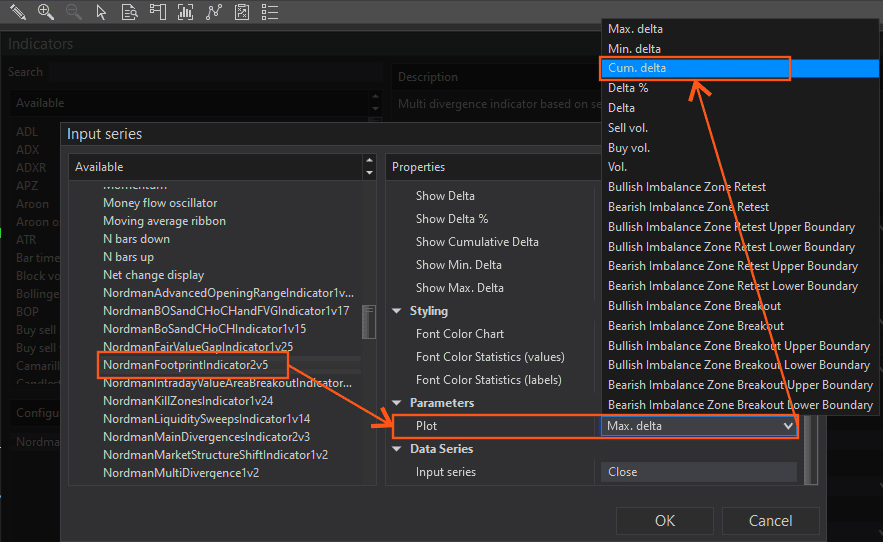
Before divergence detection can begin, a source indicator must be selected through the Input Series configuration.
Configure the indicator
Set your preferred divergence type, swing settings, filters, and alerts. See the Key Features and Indicator Settings sections for all available options.
Open Data Series → Input Series
Navigate to the Input Series section in the Data Series settings of the indicator.
Select the source indicator
Choose the desired indicator from the list. Any compatible NinjaTrader indicator that exposes plot data can be used as a divergence source.
Configure source parameters
Adjust the source indicator’s parameters in the Properties section according to your analysis requirements.
Select the desired plot
If the selected indicator exposes multiple plots, choose the specific plot to use as the divergence source. Different plots may produce different divergence conditions.
The indicator will compare price structure against the selected source plot and identify divergence conditions according to the configured detection rules.
FootPrint Divergence Example
The same workflow applies to custom and third-party indicators. For example, when using the Nordman Algorithms FootPrint Indicator as a divergence source, select it through Data Series → Input Series and choose the desired plot in the Properties section.
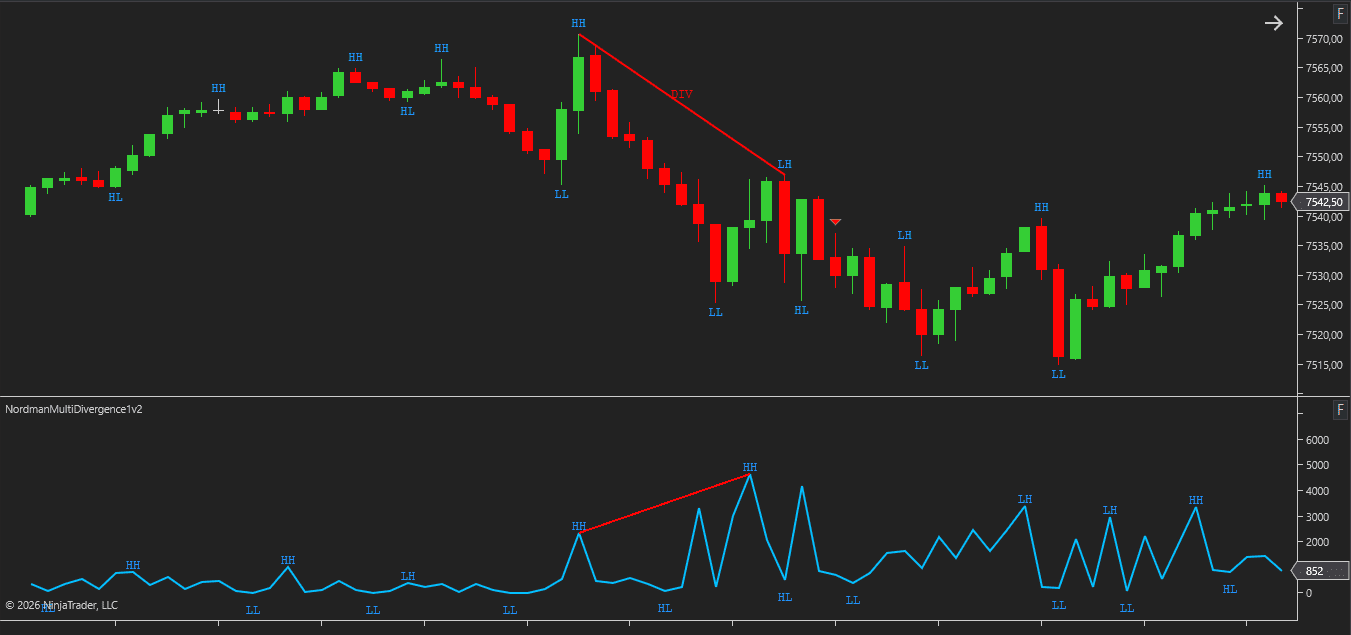
The NinjaTrader Multi Divergence Indicator supports both Classic and Hidden divergence detection.
Classic divergence occurs when price forms a new structural high or low while the selected indicator source fails to confirm the same movement.
Hidden divergence uses the opposite relationship. Price does not create a new structural extreme while the selected source continues to create a new high or low.
| Divergence Type | Bullish Condition | Bearish Condition |
|---|---|---|
| Classic Divergence | Price forms a lower low while the selected source forms a higher low or fails to create a corresponding low. | Price forms a higher high while the selected source forms a lower high or fails to create a corresponding high. |
| Hidden Divergence | Price does not create a new low while the selected source forms a lower low. | Price does not create a new high while the selected source forms a higher high. |
Both divergence types can be enabled independently, allowing traders to monitor one or both divergence models simultaneously.
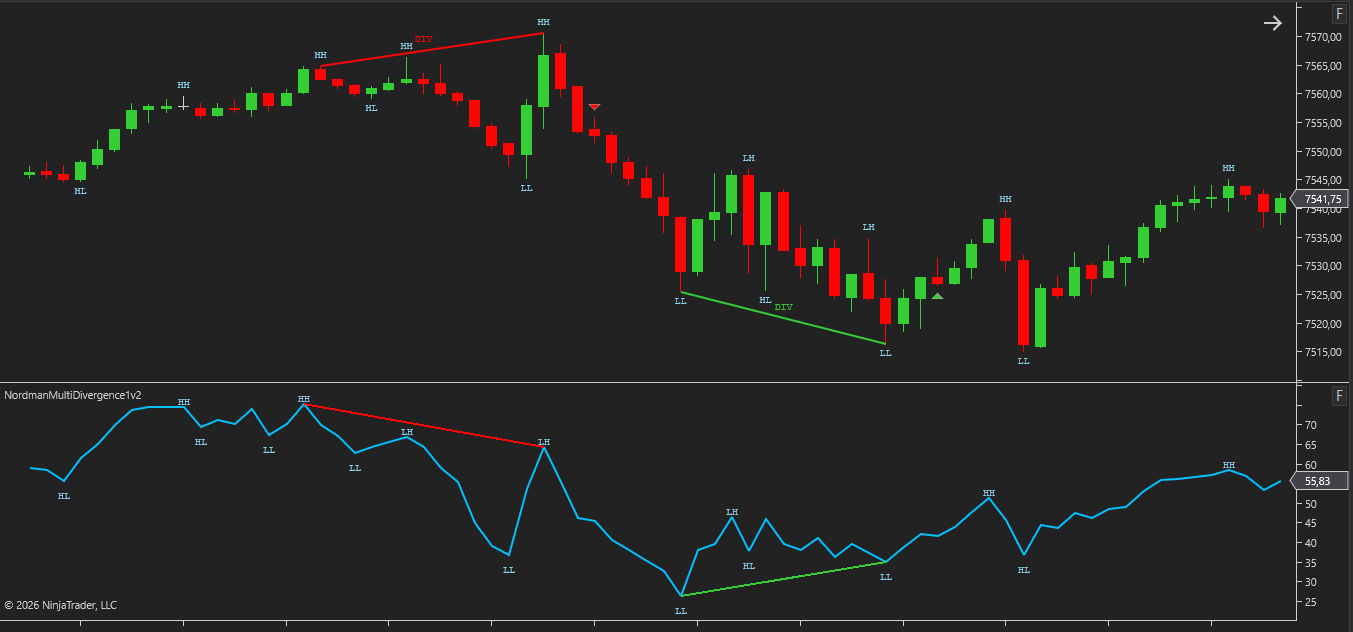
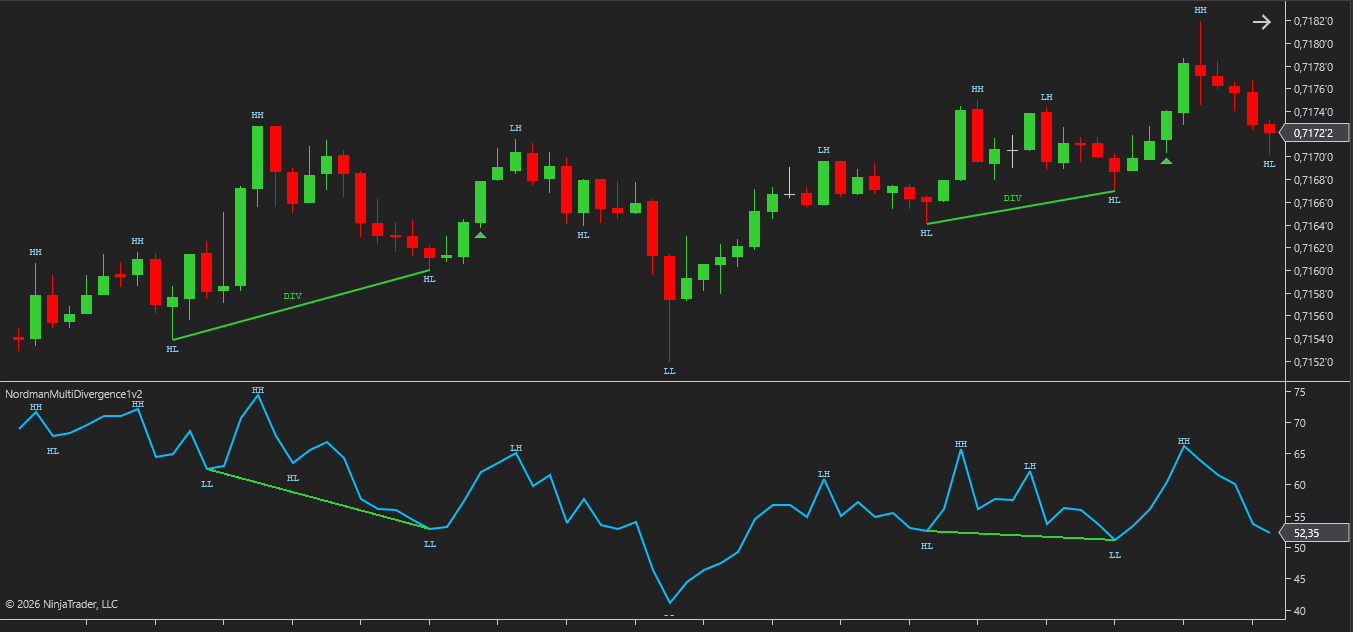
The NinjaTrader Multi Divergence Indicator supports both Forming and Confirmed divergence detection modes.
Forming divergence identifies divergence conditions before the associated swing structure has been fully confirmed. Confirmed divergence requires all involved swing points to be validated according to the selected Swing Strength setting.
| State | Detection Timing | Advantages | Considerations |
|---|---|---|---|
| Forming Divergence | Detected before swing confirmation is complete. | Potential divergence conditions become visible earlier, allowing developing divergence structures to be monitored before full swing confirmation. | Requires a different approach to risk management because the divergence is based on an unconfirmed swing structure. If confirmation does not occur, the divergence may disappear and no longer satisfy the conditions required for Confirmed divergence. |
| Confirmed Divergence | Detected only after all required swing points have been confirmed. | Based on completed swing structures that satisfy the selected validation rules. | Divergence markers appear later because confirmation requires additional bars to complete the swing structure. |
Forming and Confirmed divergence are also visually distinguished on the chart by line style. Forming divergence is displayed with a dashed line, Confirmed divergence with a solid line — making it easy to separate developing conditions from fully validated structures at a glance.
Both states can be enabled independently, allowing traders to monitor Forming divergence, Confirmed divergence, or both simultaneously.
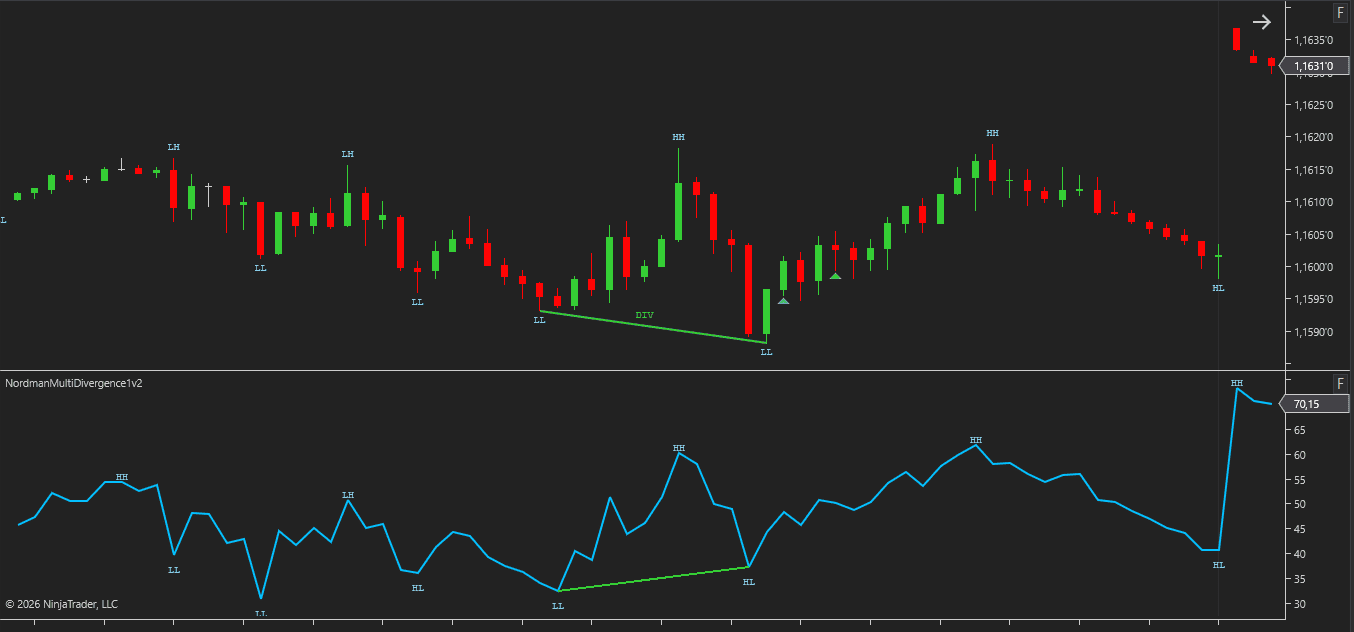
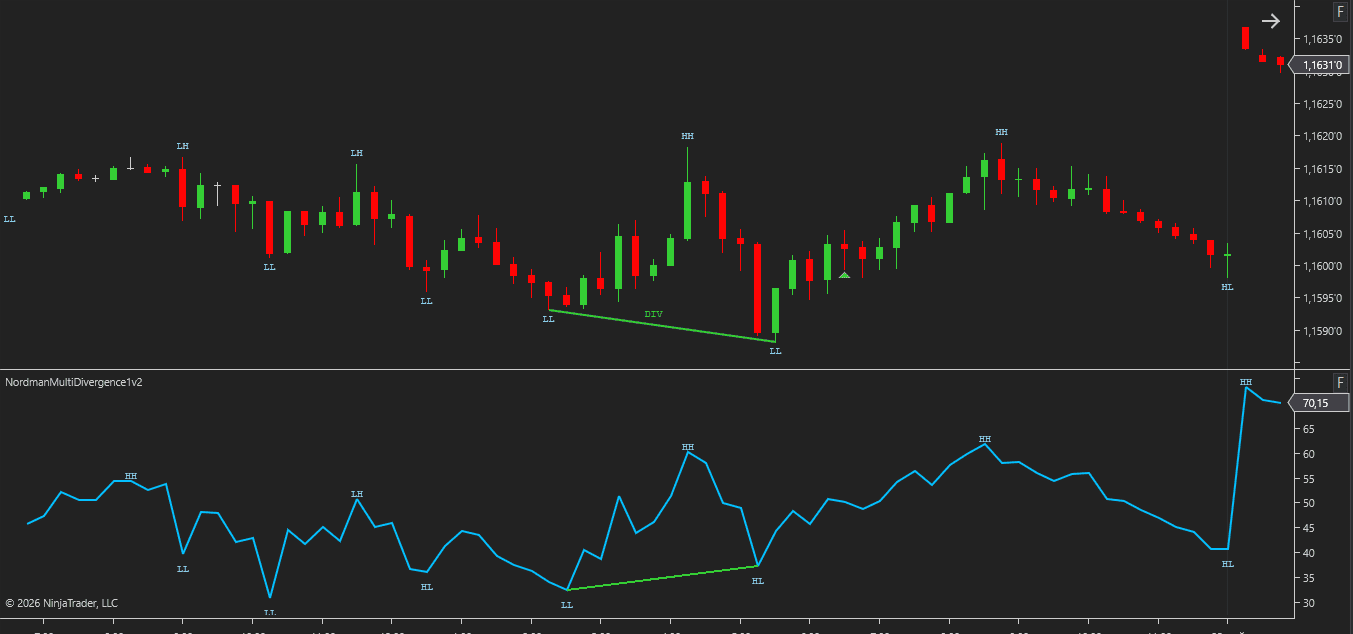
Divergence detection is built around configurable swing structure analysis rather than fixed candle patterns.
Swing Strength controls how strictly highs and lows must be validated before they qualify as structural swing points. Higher values create stricter structure, while lower values allow swing points to form more frequently.
Vertex Match Tolerance defines how closely swing points between price and the selected indicator source must align in time. Matching swing points do not need to occur on the exact same bar. For example, with a tolerance of 3, a price swing and a corresponding source swing can be matched if they occur within ±3 bars of each other.
DIV Min Bars Distance prevents divergence from being detected between swing points that form too close together. This helps filter out smaller divergence structures that can occur during short-term market fluctuations.
These settings control how swing structures are identified and matched during divergence detection.
The NinjaTrader Multi Divergence Indicator includes multiple optional filters that can be used to restrict when divergence conditions are allowed to appear.
Volume Filter
The Volume Filter restricts divergence detection to bars where volume meets a configured minimum threshold, evaluated against a lookback-based average with a configurable multiplier. This focuses divergence detection on periods of higher relative volume activity.
Higher Timeframe (HTF) Filter
The HTF Filter adds a higher-timeframe EMA reference to divergence qualification. Divergence detection is limited to conditions that align with the selected higher-timeframe directional reference. This adds higher-timeframe directional context to divergence qualification.
EMA Filter
The EMA Filter uses a moving average on the current chart timeframe to qualify divergence events. Only divergence conditions that align with the selected EMA direction are registered. This can help keep detection consistent with a defined trend reference on the trading timeframe.
VWAP Filter
The VWAP Filter evaluates divergence conditions relative to the current session VWAP. Bullish divergence requires price to be above session VWAP, bearish divergence requires price to be below. This adds a volume-weighted price reference to divergence qualification.
Kill Zone Filter
The Kill Zone Filter restricts divergence detection to selected trading session windows — Asia, London, New York, or a custom session. This is useful for traders who focus their analysis on specific trading sessions and want divergence detection to occur only during selected market hours.
Each filter can be enabled independently, allowing divergence detection to be configured using a single filter or multiple filters simultaneously.
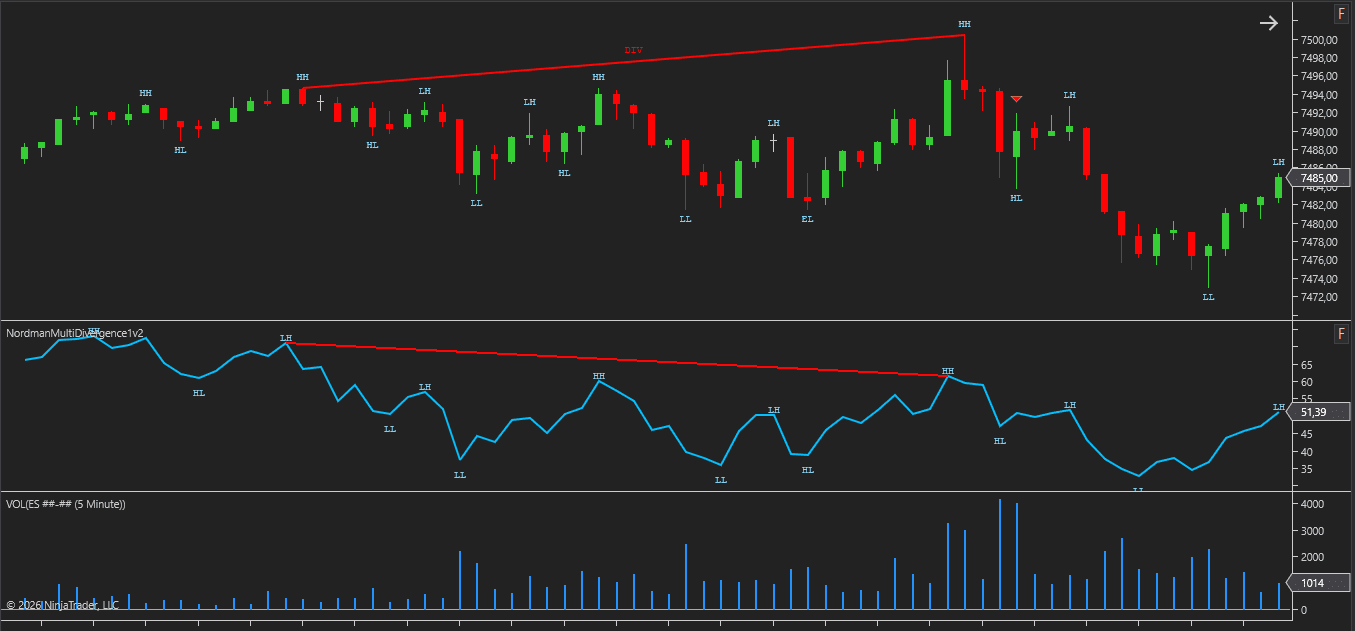
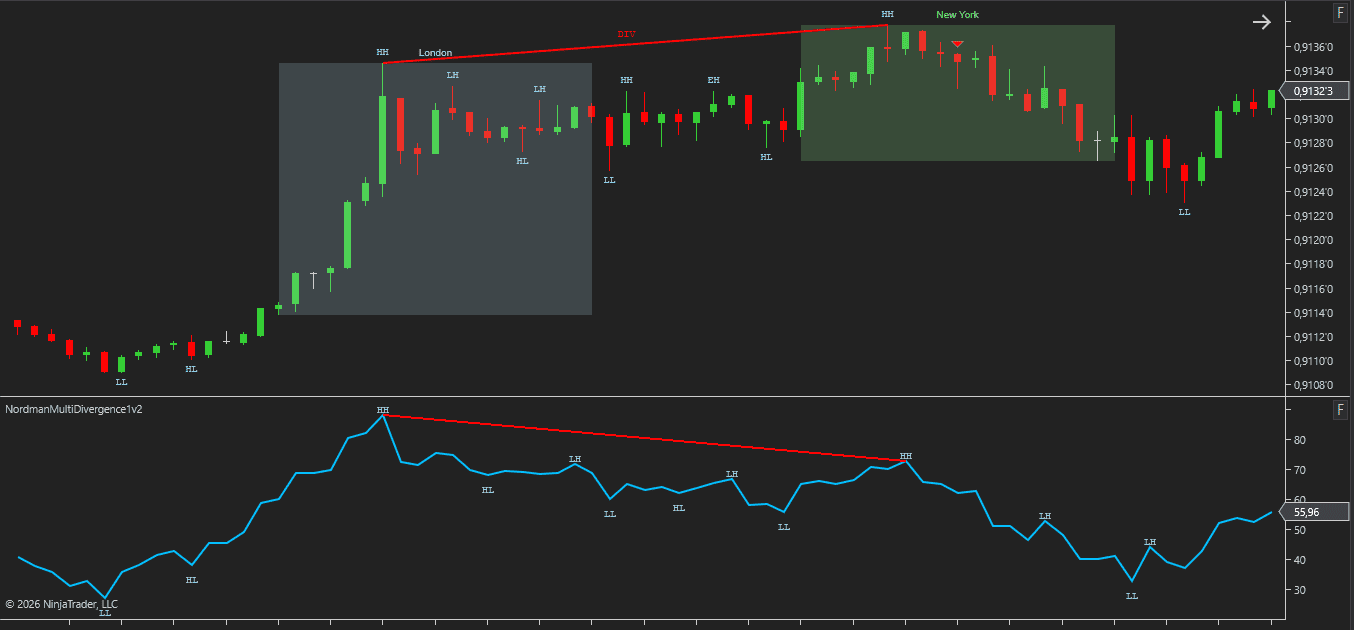
The NinjaTrader Multi Divergence Indicator supports alerts, chart markers, and analytical plot outputs for both visual analysis and strategy integration.
Alerts and markers can be configured independently for Forming and Confirmed divergence events, allowing divergence conditions to be monitored during swing formation or after full swing confirmation.
In addition to chart visualization, the indicator exposes analytical plot outputs that can be used by NinjaTrader strategies and third-party automation frameworks.
Available outputs include divergence state information, divergence type information, directional conditions, and structural swing data. These outputs can be referenced by custom strategies, automated trading systems, market scanners, and other analytical tools that support NinjaTrader plot integration.
The indicator includes an MFE/MAE Tracker module that measures how price has moved after each signal — how far it moved in the favorable direction and how far it moved against it, tracked across several configurable holding periods at once.
Results are shown directly on the chart as a dashboard and can be exported to CSV, giving a way to review signal behavior across a large sample rather than relying on visual impression from scrolling the chart. See how the MFE/MAE Tracker is calculated and how to read the dashboard →
Need changes to this indicator? We can customize it to your specifications — adding new functions, modifying logic, refining visuals, or integrating it with other NinjaTrader tools.
We also convert indicators into Automated Trading Strategies with advanced features such as trailing stops, position parameter controls, execution filters, and rule-based automation built to your technical specifications.
Request a free consultation to discuss the technical scope, timeline, and available development options.
We are committed to the ongoing development and refinement of our indicators. If you’ve spotted a bug, feel that something essential is missing, or have ideas that could make the indicator even better, just send us a message. Your feedback helps us improve and deliver tools that truly meet traders’ needs.
The indicator provides a set of exposed analytical plot outputs designed for structured integration with third-party strategy builders and automation tools such as BloodHound and BlackBird (SharkIndicators), as well as other algorithmic trading environments.
| Analytical Plot Name | Output Values |
| Input | Value |
| Classic Bullish Confirmed DIV Signal | > 0 |
| Classic Bearish Confirmed DIV Signal | > 0 |
| Classic Bullish Forming DIV Signal | > 0 |
| Classic Bearish Forming DIV Signal | > 0 |
| Hidden Bullish Confirmed DIV Signal | > 0 |
| Hidden Bearish Confirmed DIV Signal | > 0 |
| Hidden Bullish Forming DIV Signal | > 0 |
| Hidden Bearish Forming DIV Signal | > 0 |
| Swing HH | Value |
| Swing LH | Value |
| Swing EH | Value |
| Swing LL | Value |
| Swing HL | Value |
| Swing EL | Value |
| Long MFE/MAE Period 1 | Value |
| Short MFE/MAE Period 1 | Value |
| Long MFE/MAE Period 2 | Value |
| Short MFE/MAE Period 2 | Value |
| Long MFE/MAE Period 3 | Value |
| Short MFE/MAE Period 3 | Value |
| Long MFE/MAE Period 4 | Value |
| Short MFE/MAE Period 4 | Value |
| Long MFE/MAE Opposite | Value |
| Short MFE/MAE Opposite | Value |
Plot output names and descriptions are technical identifiers intended solely for software integration purposes and do not constitute trading advice, signals, or recommendations.
Traditional divergence indicators are usually tied to a single oscillator such as RSI or MACD. The Multi Divergence Indicator allows traders to select the divergence source through NinjaTrader’s Input Series framework, making it possible to apply the same divergence engine to a wide range of compatible indicators.
Yes. Any compatible NinjaTrader indicator that exposes plot data can be selected through the Input Series configuration and used as the divergence source.
The indicator compares price structure against a selected indicator source. Divergence detection is performed between price swing points and swing points from the selected indicator plot.
Classic divergence occurs when price creates a new structural high or low while the selected source fails to confirm the same movement.
Hidden divergence uses the opposite relationship. Price does not create a new structural extreme while the selected source continues to create a new high or low.
Forming divergence is detected before full swing confirmation has occurred. Confirmed divergence is detected only after all required swing points have been validated according to the selected Swing Strength setting.
Forming divergence may appear earlier but is based on an unconfirmed swing structure. Confirmed divergence appears later but is based on completed swing confirmation.
Yes. Volume, HTF, EMA, VWAP, and Kill Zone filters can be enabled independently and combined according to individual analysis requirements.
When multiple plots are available, the desired plot can be selected through the Input Series configuration. Divergence calculations will then be performed using the selected plot only.
Yes. The indicator exposes analytical plot outputs that can be referenced by NinjaTrader strategies, automated trading systems, market scanners, and other compatible analytical frameworks.
The indicator can be used with many built-in, custom, and third-party NinjaTrader indicators that expose compatible plot data. Common examples include RSI, MACD, Stochastic, CCI, volume-based indicators, FootPrint plots, and other analytical tools that provide accessible data series.
Forming divergence becomes visible before full swing confirmation has occurred. Some traders prefer to monitor developing divergence structures as they form rather than waiting for completed swing validation.
The trade-off is that Forming divergence is based on an unconfirmed swing structure and may not later qualify as a Confirmed divergence. Confirmed divergence appears later but requires all swing validation conditions to be satisfied before a marker is generated.
Nordman Algorithms is a trade name of Nordman Algorithms OÜ (Reg. No. 14435535), registered in Tallinn, Estonia.
Software Nature & User Responsibility — Nordman Algorithms provides algorithmic software tools for technical analysis. Nordman Algorithms is not a financial advisor and is not liable for any losses. All trades conducted based on the software’s output are executed at the user’s sole discretion and risk.
Visual Markers & Signal Disclosure — This software may display visual markers (such as arrows, dots, or alerts) when predefined mathematical conditions are met. These markers are provided for educational and analytical purposes only, must not be interpreted as financial guidance, and do not constitute a recommendation to buy, sell, or hold any financial instrument. Users must independently validate all visual cues within their own trading methodology.
No Financial Advice — Nordman Algorithms does not provide discretionary trading signals, investment advice, or managed signal services. Our software represents a mathematical visualization of historical and real-time data. The appearance of a visual marker does not guarantee a profitable trade or predict future market behavior.
Trading Risk Warning — Futures, Forex, and options trading involve significant risk. Risk capital is money that can be lost without jeopardizing financial security. Only risk capital should be used for trading. Past performance is not indicative of future results. View Full Risk Disclosure: https://www.nordman-algorithms.com/risk-disclosure/
ESMA Risk Warning — Financial instruments, especially those involving leverage such as CFDs and Forex, are complex and carry a high risk of rapid financial loss. Our software provides analytical outputs and visual markers based on predefined mathematical conditions and does not mitigate or reduce inherent market risks. You should carefully consider whether you understand how leveraged financial instruments work and whether you can afford the high risk of losing your capital.
CFTC Rule 4.41 — Hypothetical or simulated performance results have inherent limitations. Unlike actual performance records, simulated results do not represent real trading. Because trades have not actually been executed, these results may under- or over-compensate for the impact of market factors such as liquidity. No representation is being made that any account will achieve profits or losses similar to those shown.
Trademark Notice — NinjaTrader® is a registered trademark of NinjaTrader Group, LLC. No NinjaTrader company has any affiliation with the owner, developer, or provider of the products or services described herein, or any interest, ownership or otherwise, in any such product or service, or endorses, recommends or approves any such product or service.