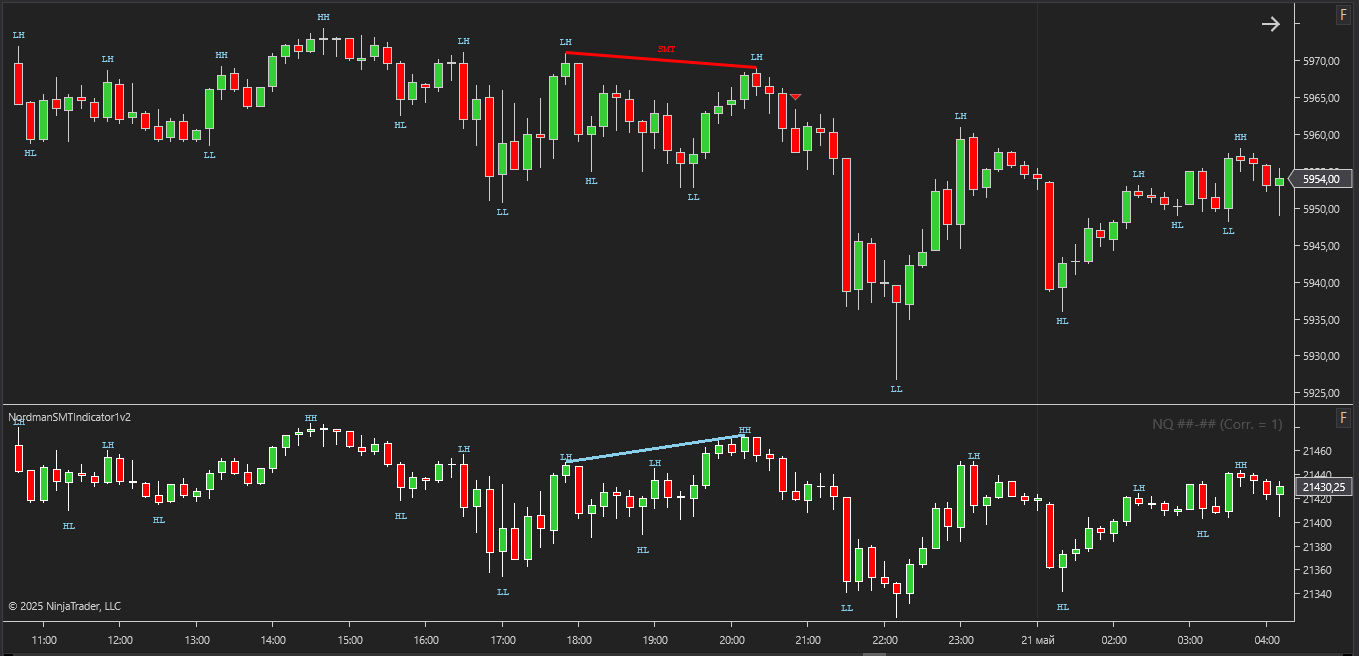
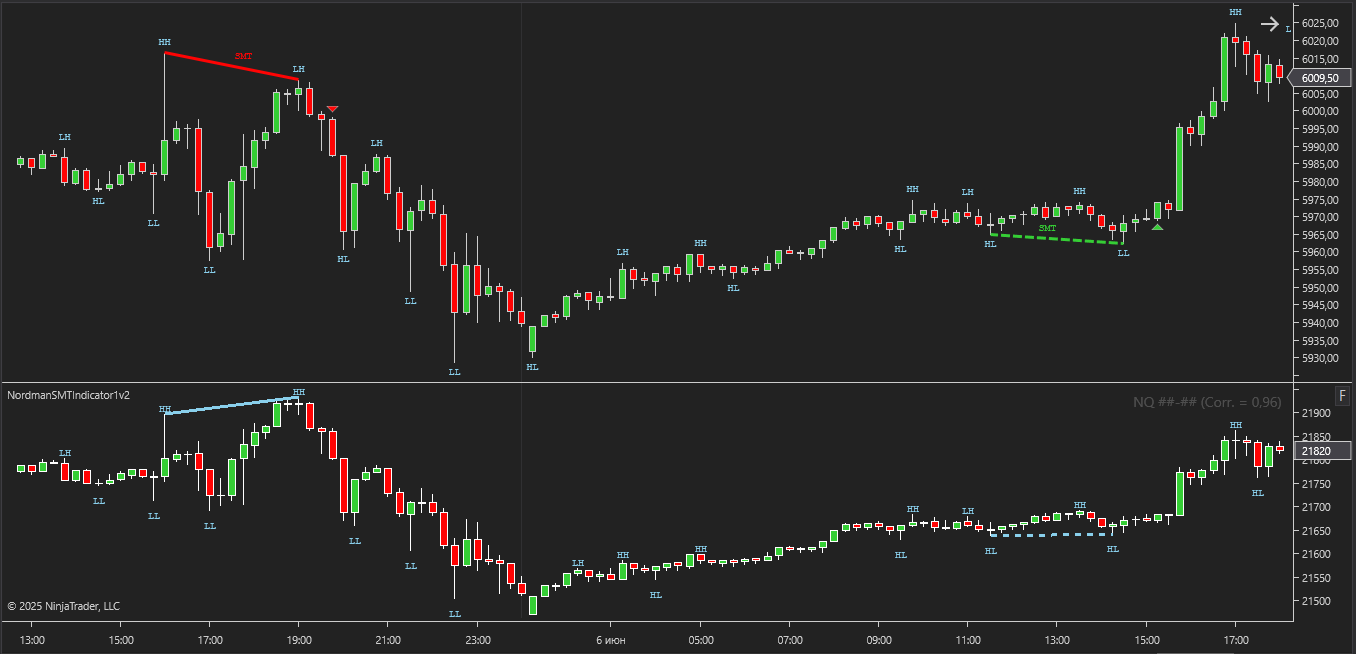
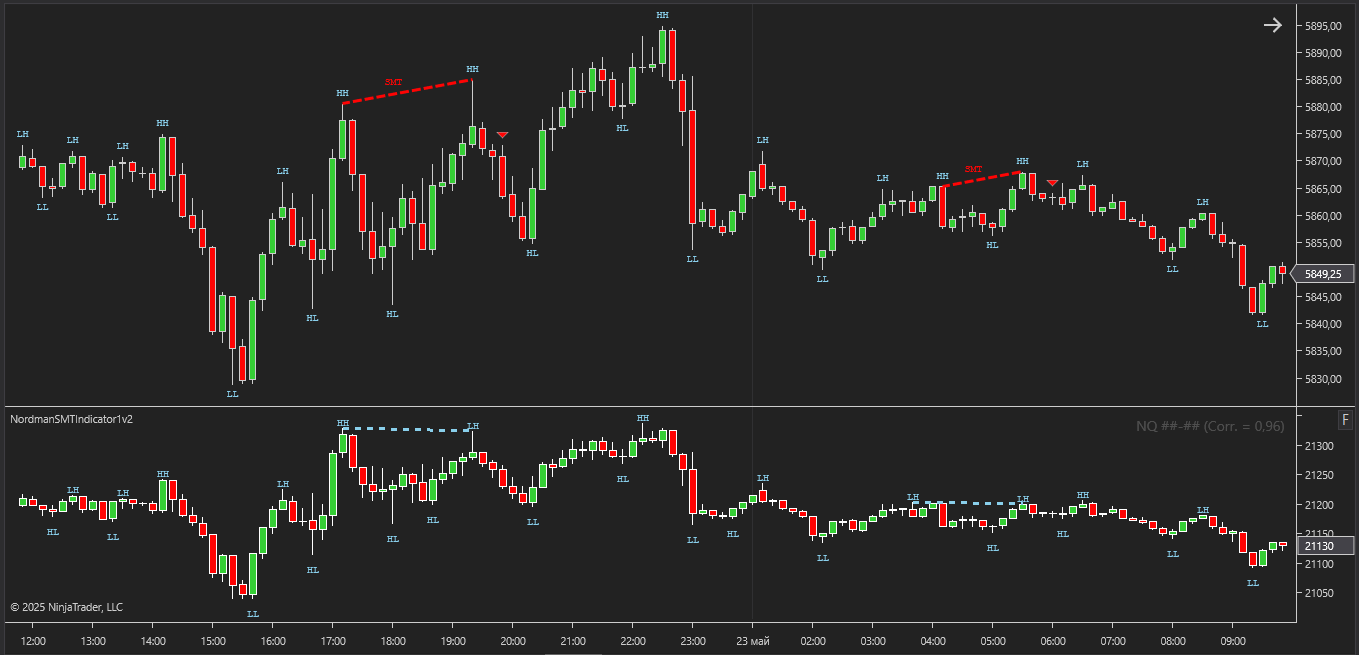
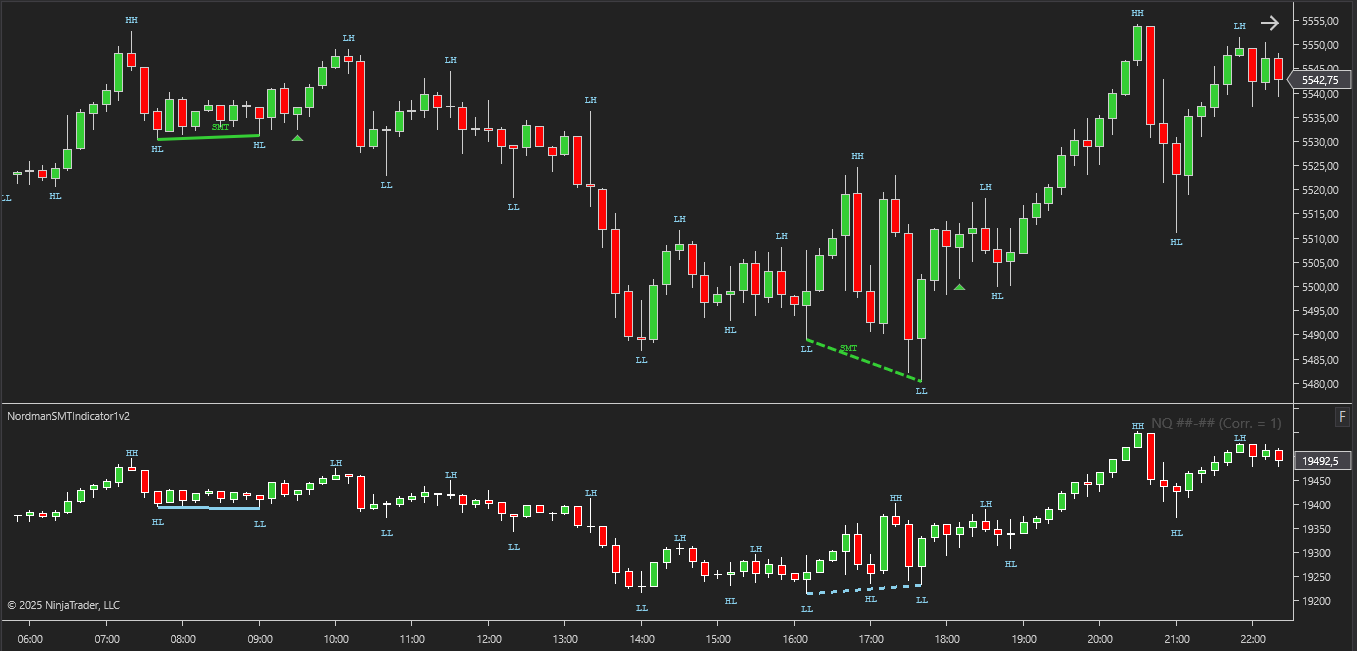
SMT (Smart Money Technique) Divergence is a form of intermarket divergence analysis widely used in ICT (Inner Circle Trader) and Smart Money Concepts (SMC) methodologies.
The idea is simple: correlated instruments normally move in similar structural patterns. When one market pushes into a new high or low while the correlated market fails to confirm the same move, the divergence may reflect weakening momentum, imbalance, or changing market participation.
Classic SMT focuses on failed confirmation between highs or lows.
For example, bearish SMT may appear when one instrument creates a stronger high while the correlated instrument fails to produce its own corresponding high. Bullish SMT follows the same logic on lows.
The indicator also supports Hidden SMT divergence. This type of SMT is often associated with continuation-style behavior rather than reversal-style divergence.
In Hidden bearish SMT, the correlated instrument may continue expanding higher while the analyzed instrument fails to show the same structural strength. Hidden bullish SMT follows the same idea on lows.
SMT quality depends heavily on swing structure and timing alignment between instruments. Small changes in swing validation can completely change how divergence appears on the chart.
That is why this indicator focuses heavily on configurable swing logic, timing tolerance, and structural filtering instead of relying on simplified fixed-pattern detection.
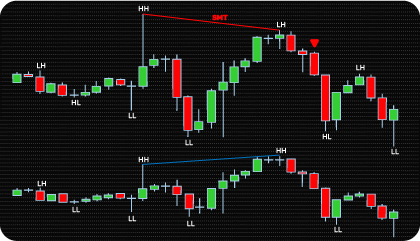
The indicator detects both Classic and Hidden SMT divergences between correlated instruments and plots them directly on the chart using divergence lines and directional markers.
Classic SMT focuses on failed confirmation between highs or lows. Hidden SMT uses the opposite structural relationship and is often interpreted as continuation-style divergence.
Both bullish and bearish SMT conditions are supported.
Same divergence concept. Different structural behavior.
The indicator supports two SMT states: Forming SMT and Confirmed SMT.
Forming SMT appears before the related swing structure is fully confirmed. The divergence shows up early, while the swing is still developing.
Confirmed SMT appears only after the involved swing points satisfy the selected Swing Strength validation.
Earlier signal versus confirmed structure.
When enabled, Forming SMT signals remain visible on the chart rather than disappearing retroactively as new bars develop.
SMT detection is based on fractal swing structure rather than immediate candle extremes. A divergence is confirmed only after the related high or low is validated by the selected Swing Strength logic.
That creates a small structural delay — but also removes many weak or unstable divergence formations that appear during fast market noise.
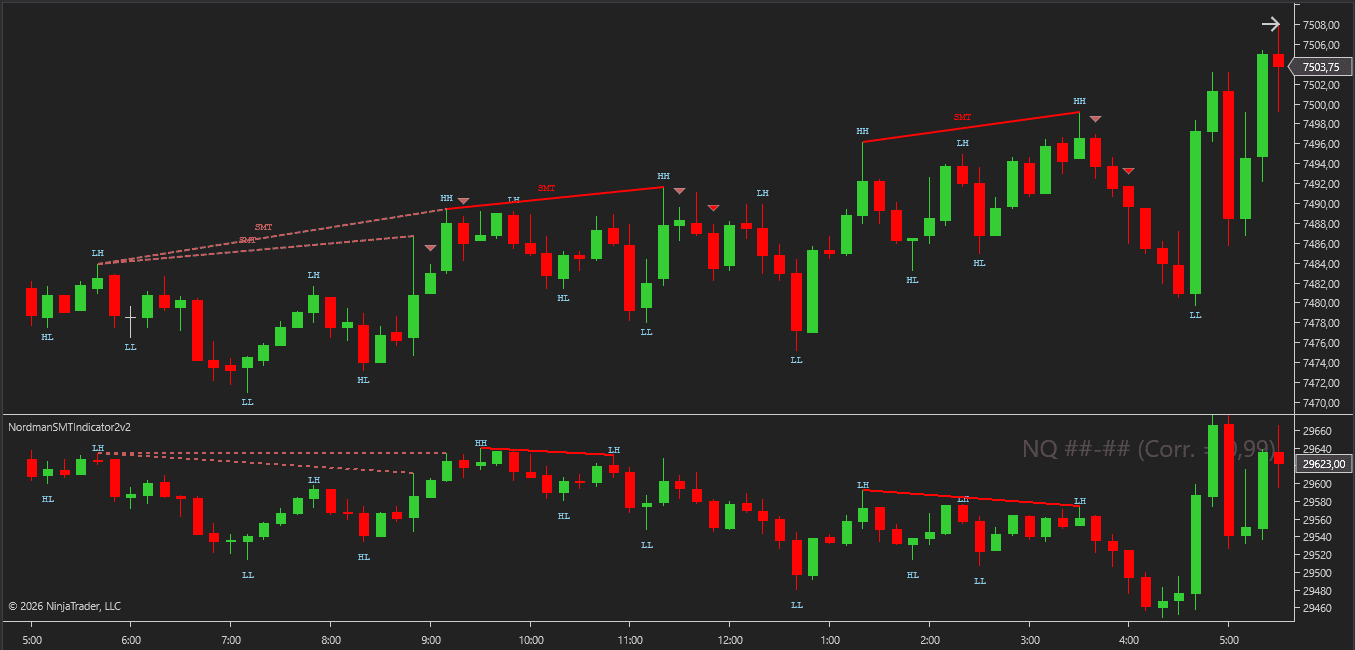
SMT detection is built around configurable swing logic rather than fixed candle patterns.
Swing Strength controls how strictly highs and lows must be validated before they qualify as structural swing points. Higher values create stricter structure. Lower values react faster.
Vertex Match Tolerance defines how closely swing points between instruments must align in time. The matching swing does not need to appear on the exact same bar. The indicator searches within a configurable tolerance window instead.
SMT Min Bars Distance filters out SMT structures where swing points form too close together.
An additional strength filter can require a minimum structural displacement before the divergence becomes valid.
This removes many of the smaller SMT formations that appear during noisy price action.
The indicator includes several optional filters that can validate SMT conditions before divergence markers appear.
Available filters include:
Some SMT signals appear during weak or directionless market conditions. Filters help remove part of that noise.
Kill Zones filtering can also restrict SMT detection to selected session windows such as Asia, London, New York, or a custom session.
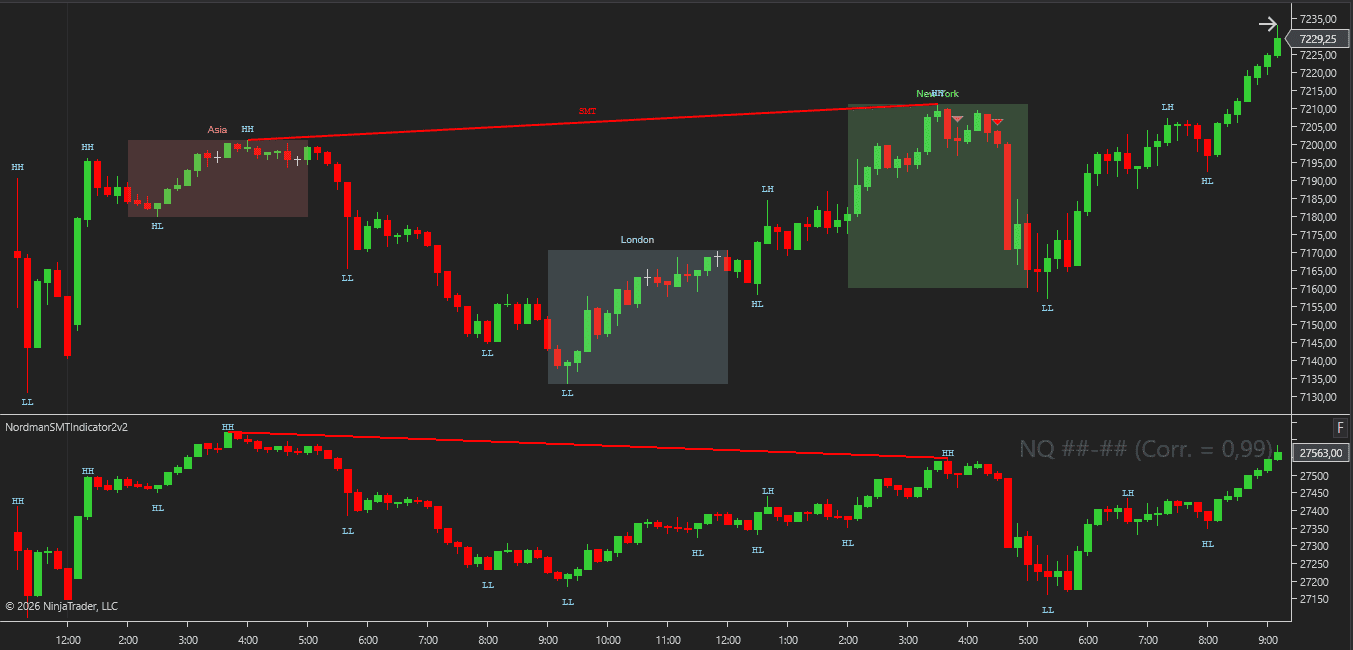
The indicator includes a dedicated correlated asset panel displayed separately from the primary chart.
SMT divergence lines are drawn directly on both instruments, making structural comparison much easier to follow visually.
Instead of flipping between separate charts, divergence structure stays synchronized in one view.
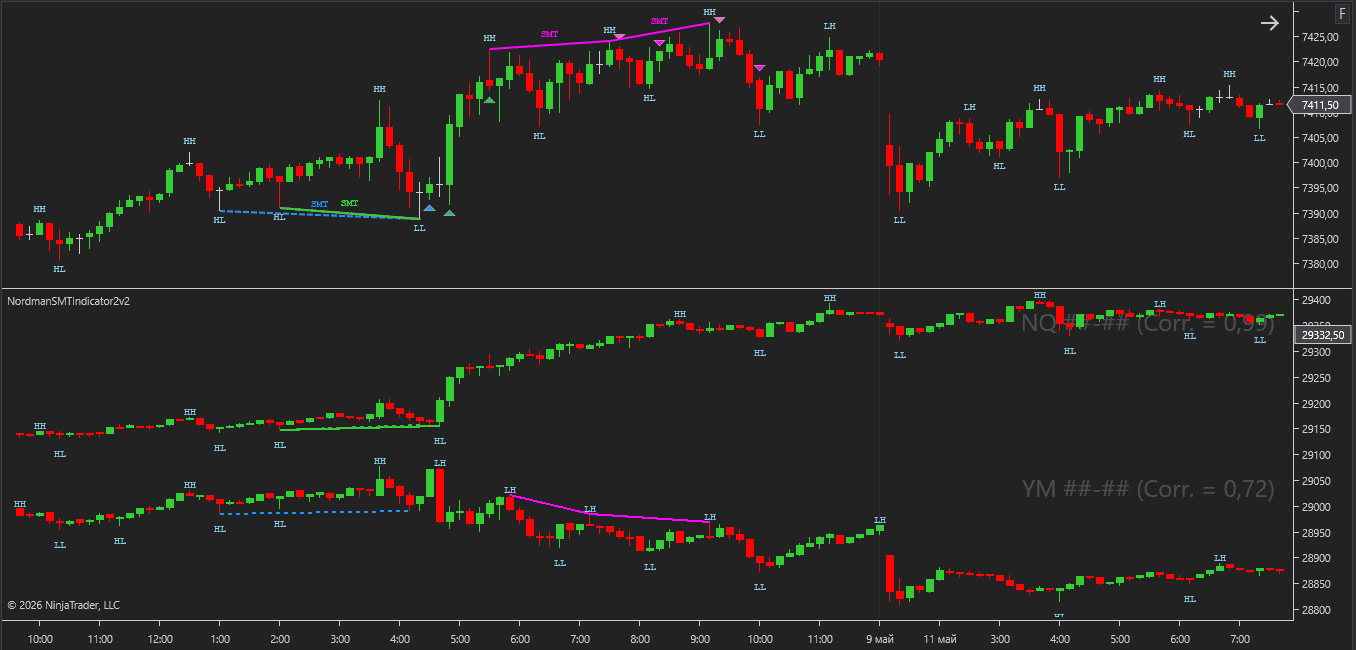
An optional second correlated instrument can also be enabled, allowing the primary instrument to be compared against two separate markets simultaneously.
Signal markers remain on the primary chart, while the correlated panel focuses on divergence alignment and structural comparison.
Colors, opacity, labels, and visual styling can all be customized independently.
The indicator includes an MFE/MAE Tracker module that measures how price has moved after each signal — how far it moved in the favorable direction and how far it moved against it, tracked across several configurable holding periods at once.
Results are shown directly on the chart as a dashboard and can be exported to CSV, giving a way to review signal behavior across a large sample rather than relying on visual impression from scrolling the chart. See how the MFE/MAE Tracker is calculated and how to read the dashboard →
Classic SMT divergence appears when correlated instruments stop confirming each other structurally.
A bearish Classic SMT may form when the analyzed instrument creates a stronger high while the correlated instrument fails to confirm the move with its own corresponding high. Bullish Classic SMT follows the same logic on lows.
Many traders monitor these divergences when looking for weakening expansion or imbalance between correlated markets.
Hidden SMT uses the opposite structural relationship and is often interpreted differently from Classic SMT.
In bearish Hidden SMT, the correlated instrument may continue producing stronger highs while the analyzed instrument fails to expand with the same strength. Bullish Hidden SMT follows the same logic on lows.
Same divergence logic. Different structural context.
Forming SMT appears before all involved swing points are fully confirmed.
The divergence shows up earlier, while the structure is still developing.
Confirmed SMT requires the related swing points to satisfy the selected Swing Strength validation first.
Forming SMT reacts faster. Confirmed SMT waits for stronger structure.
The correlated asset panel makes SMT structure easier to compare visually between instruments.
Divergence lines are displayed on both the primary chart and the correlated instrument panel at the same time.
When a second correlated instrument is enabled, the primary instrument can be evaluated against two separate comparison markets simultaneously.
This makes it easier to spot whether divergence is isolated or appears across multiple correlated relationships.
Filters can narrow SMT detection to conditions that better match a specific analytical framework.
Volume filters can reduce SMT signals during weaker participation periods. EMA, HTF EMA, and VWAP filters can align SMT detection with broader directional structure.
Kill Zones filtering can restrict SMT signals to selected trading sessions where volatility and intermarket movement are typically more active.
We can customize this indicator to your needs — adding functions, modifying logic, or integrating it with other tools for your workflow.
We also convert indicators into Automated Trading Strategies with advanced functions (trailing stops, risk management, filters) tailored to your trading style strictly according to your specifications.
Request a free consultation to discuss the technical scope and timeline of your project.
We are committed to the ongoing development and refinement of our indicators. If you’ve spotted a bug, feel that something essential is missing, or have ideas that could make the indicator even better, just send us a message. Your feedback helps us improve and deliver tools that truly meet traders’ needs.
The indicator provides a set of exposed analytical plot outputs designed for structured integration with third-party strategy builders and automation tools such as BloodHound and BlackBird (SharkIndicators), as well as other algorithmic trading environments.
| Analytical Plot Name | Output Values |
| Secondary Open | Value |
| Secondary High | Value |
| Secondary Low | Value |
| Secondary Close | Value |
| Third Open | Value |
| Third High | Value |
| Third Low | Value |
| Third Close | Value |
| Classic Bullish Confirmed DIV Signal | > 0 |
| Classic Bearish Confirmed DIV Signal | > 0 |
| Classic Bullish Forming DIV Signal | > 0 |
| Classic Bearish Forming DIV Signal | > 0 |
| Hidden Bullish Confirmed DIV Signal | > 0 |
| Hidden Bearish Confirmed DIV Signal | > 0 |
| Hidden Bullish Forming DIV Signal | > 0 |
| Hidden Bearish Forming DIV Signal | > 0 |
| Swing HH | Value |
| Swing LH | Value |
| Swing EH | Value |
| Swing LL | Value |
| Swing HL | Value |
| Swing EL | Value |
| Long MFE/MAE Period 1 | Value |
| Short MFE/MAE Period 1 | Value |
| Long MFE/MAE Period 2 | Value |
| Short MFE/MAE Period 2 | Value |
| Long MFE/MAE Period 3 | Value |
| Short MFE/MAE Period 3 | Value |
| Long MFE/MAE Period 4 | Value |
| Short MFE/MAE Period 4 | Value |
| Long MFE/MAE Opposite | Value |
| Short MFE/MAE Opposite | Value |
Plot output names and descriptions are technical identifiers intended solely for software integration purposes and do not constitute trading advice, signals, or recommendations.
SMT divergence is a form of intermarket divergence analysis used in ICT and Smart Money Concepts methodologies.
It occurs when correlated instruments stop confirming each other structurally. For example, one market may create a new high while the correlated market fails to confirm the move with its own higher high.
Classic SMT focuses on failed confirmation between correlated highs or lows and is commonly associated with potential reversal behavior.
Hidden SMT uses the opposite structural relationship and is often associated with continuation-style divergence behavior between correlated instruments.
Forming SMT represents an early-stage divergence condition before all related swing points are fully confirmed.
Confirmed SMT appears only after the involved swing structure satisfies the selected Swing Strength validation logic.
Forming SMT reacts earlier. Confirmed SMT appears later, but with confirmed structure behind it.
When Forming SMT is enabled, these signals remain visible on the chart rather than disappearing retroactively as new bars develop.
However, Forming SMT still represents developing structure, while Confirmed SMT requires fully validated swing points.
This indicator combines SMT divergence detection with advanced swing validation, multi-layer filtering, correlated asset visualization, and support for both Forming and Confirmed SMT states.
It is designed as a structured SMT analysis tool rather than a simple divergence marker indicator.
Yes. The indicator supports a primary correlated instrument and an optional second correlated instrument.
The primary chart instrument is compared separately against each correlated market.
Vertex Match Tolerance defines how closely swing points between instruments must align in time.
Instead of requiring both instruments to form swings on the exact same bar, the indicator can search for matching swing structures within a configurable tolerance window.
Yes. The indicator includes optional filters for Volume, EMA, Higher Timeframe EMA, VWAP, and Kill Zones.
Kill Zones filtering can restrict SMT detection to selected trading sessions such as Asia, London, New York, or custom-defined market windows.
Nordman Algorithms is a trade name of Nordman Algorithms OÜ (Reg. No. 14435535), registered in Tallinn, Estonia.
Software Nature & User Responsibility — Nordman Algorithms provides algorithmic software tools for technical analysis. Nordman Algorithms is not a financial advisor and is not liable for any losses. All trades conducted based on the software’s output are executed at the user’s sole discretion and risk.
Visual Markers & Signal Disclosure — This software may display visual markers (such as arrows, dots, or alerts) when predefined mathematical conditions are met. These markers are provided for educational and analytical purposes only, must not be interpreted as financial guidance, and do not constitute a recommendation to buy, sell, or hold any financial instrument. Users must independently validate all visual cues within their own trading methodology.
No Financial Advice — Nordman Algorithms does not provide discretionary trading signals, investment advice, or managed signal services. Our software represents a mathematical visualization of historical and real-time data. The appearance of a visual marker does not guarantee a profitable trade or predict future market behavior.
Trading Risk Warning — Futures, Forex, and options trading involve significant risk. Risk capital is money that can be lost without jeopardizing financial security. Only risk capital should be used for trading. Past performance is not indicative of future results. View Full Risk Disclosure: https://www.nordman-algorithms.com/risk-disclosure/
ESMA Risk Warning — Financial instruments, especially those involving leverage such as CFDs and Forex, are complex and carry a high risk of rapid financial loss. Our software provides analytical outputs and visual markers based on predefined mathematical conditions and does not mitigate or reduce inherent market risks. You should carefully consider whether you understand how leveraged financial instruments work and whether you can afford the high risk of losing your capital.
CFTC Rule 4.41 — Hypothetical or simulated performance results have inherent limitations. Unlike actual performance records, simulated results do not represent real trading. Because trades have not actually been executed, these results may under- or over-compensate for the impact of market factors such as liquidity. No representation is being made that any account will achieve profits or losses similar to those shown.
Trademark Notice — NinjaTrader® is a registered trademark of NinjaTrader Group, LLC. No NinjaTrader company has any affiliation with the owner, developer, or provider of the products or services described herein, or any interest, ownership or otherwise, in any such product or service, or endorses, recommends or approves any such product or service.