Your EA keeps its chart
The Sender is an MT5 indicator, not an Expert Advisor. A chart holds one EA, and that one stays yours.
On your phone? The copier installs on the PC where MT5 and NinjaTrader run. Send yourself the link and the setup guide.
✓ Email sent. Open it on your trading PC to start the 5-day trial.
One email with the link, one reminder the next day. Unsubscribe in one click.
A local copier sends every MT5 trade to NinjaTrader 8 on the same PC, with no server in the path. Hedging accounts, pending orders, stop loss and take profit are translated, not just forwarded. And the copier measures its own delay on every trade.
€25 a month, one subscription. Cancel whenever you like.
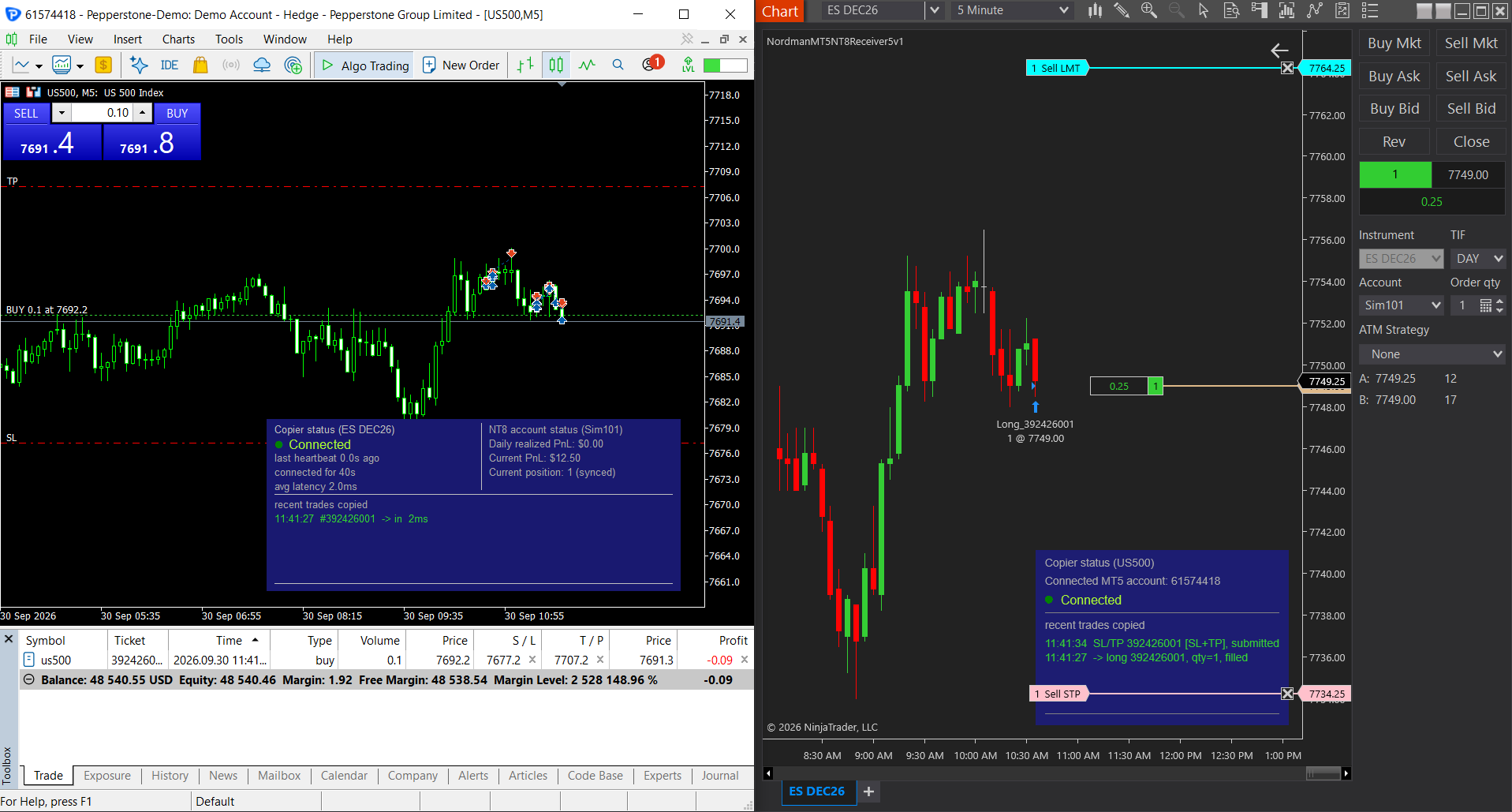
Replay of a real test on 29 September 2026: MT5 demo account into NinjaTrader 8 Sim101, same PC. Tickets, times and latencies as the copier's own panels recorded them.
Every copier has a speed on its product page. Here is a screen from one test, with both platforms side by side, so you can check each number yourself instead of taking ours.
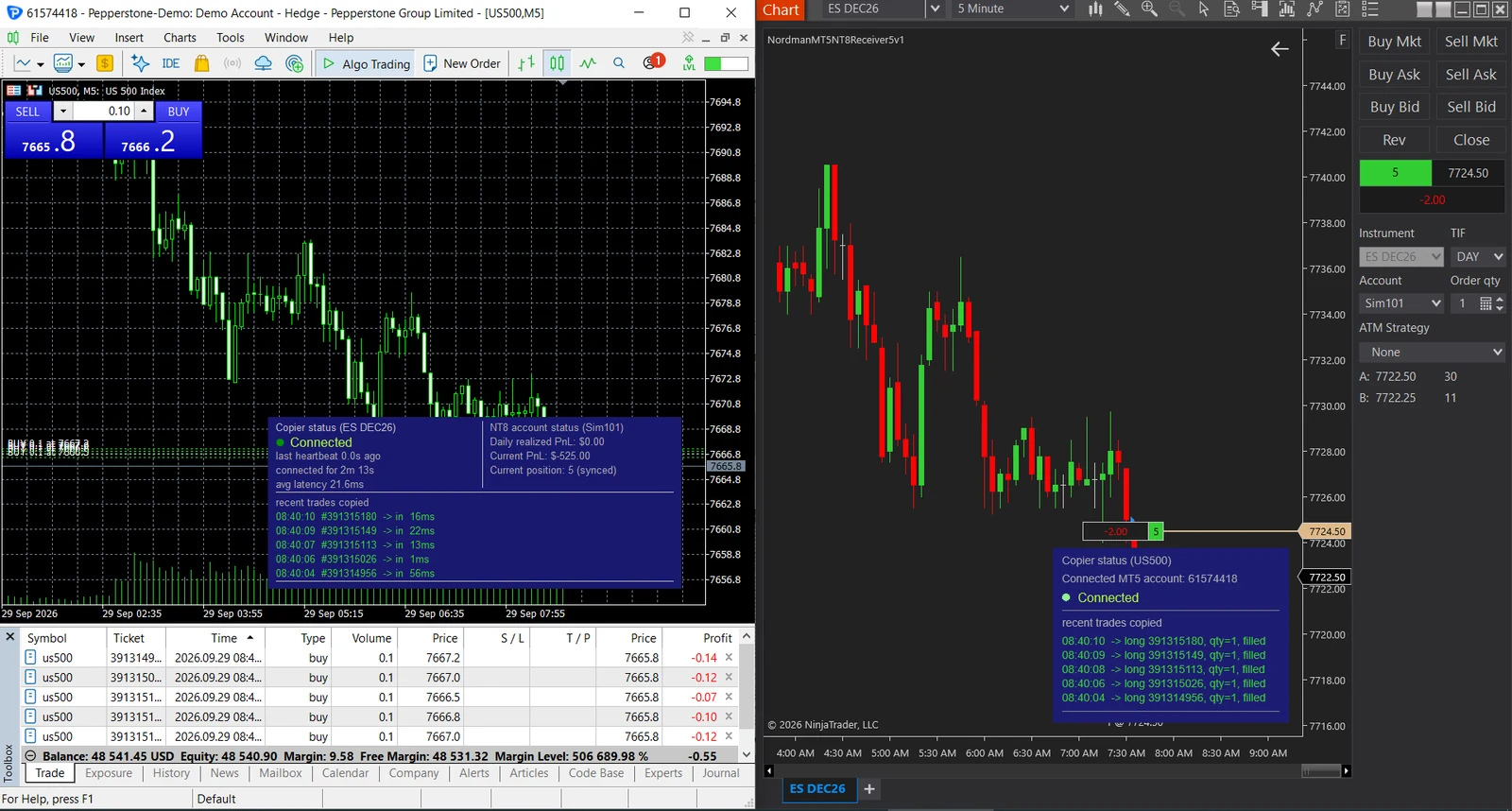
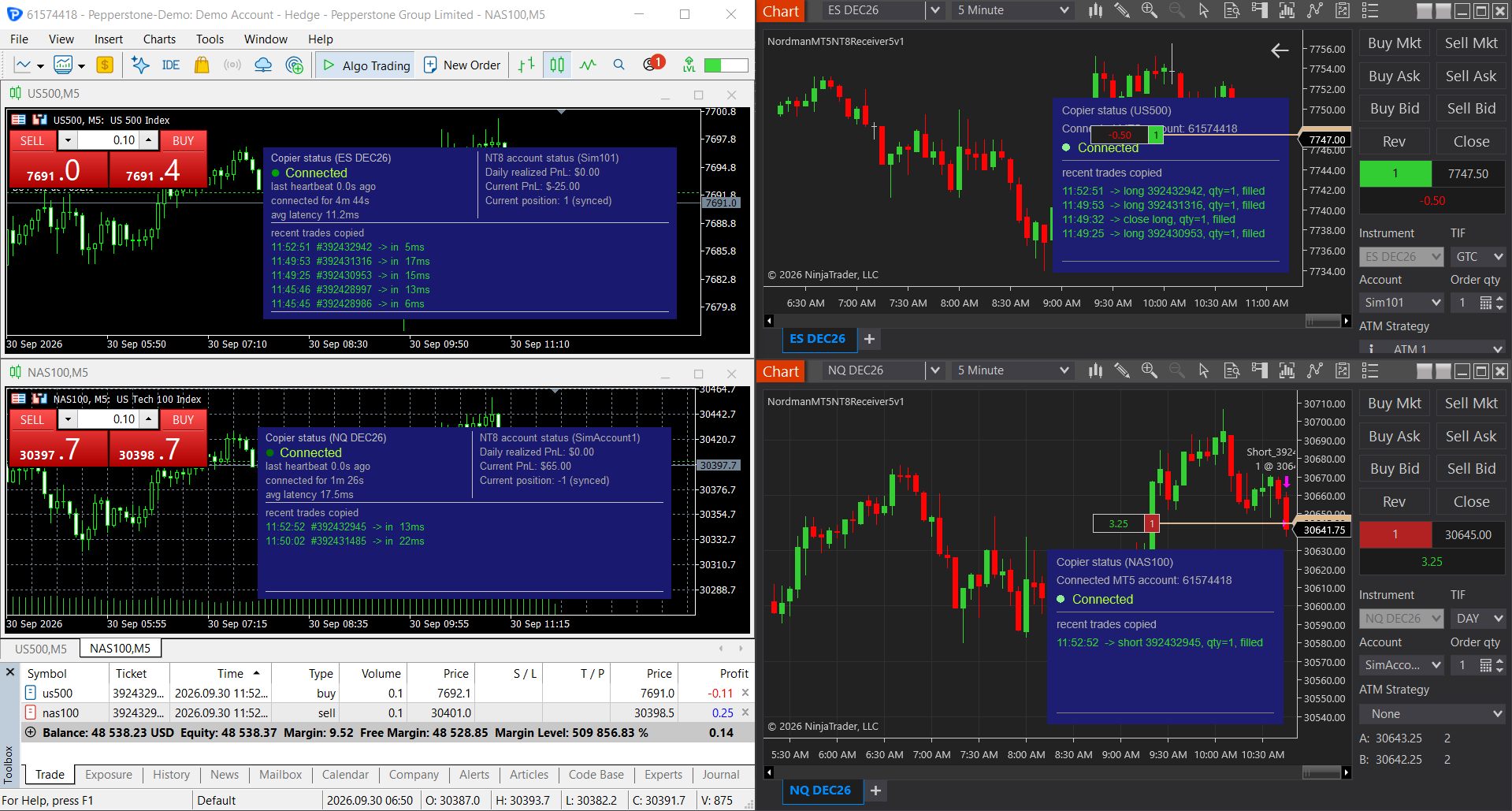
What this number is, and what it isn't. It is copy latency: the time from the trade in MT5 to the NinjaTrader side acting on it. The NinjaTrader account here is a simulation account, which fills instantly. On a live account the exchange adds its own fill time on top. Five entries is a small sample, so read 21.6 ms as what one test showed. A second session on 30 September added hedging, stops and targets, an ATM strategy and two instruments: 23 copied trades visible in its screenshots, 1 to 53 ms, median 12 ms. During your trial the same panel shows the number for your machine, and that's the one to trust.
Speed isn't the hard part of copying MT5 into NinjaTrader. The hard part is that the two platforms disagree about what a position is.
A copier that just forwards "buy 1" drifts out of sync the first time your EA hedges, the first time a pending order triggers on one side only, or the first time a stop has to exist on a platform that doesn't attach stops to positions. When a trader asked the NinjaTrader forum for a copier, the answer was "NT doesn't have a built-in one that does this" (Sachin_Kumar, NinjaTrader Community Forum, Jul 2026). Here is what has to be translated.
| Object | In MetaTrader 5 | In NinjaTrader 8 | What the copier does |
|---|---|---|---|
| Position | Netting or hedging. A hedging account can hold a long and a short on one symbol. | Netting only. One instrument, one net position. | On a hedging account the copier keeps the NinjaTrader number matched to your MT5 net. A close in MT5 never opens a position in NinjaTrader. Netting accounts copy directly. |
| Stop loss, take profit | Attached to the position. | Two separate orders linked as OCO. | Placed in NT8 as OCO orders, by distance, percent or price. Change them in MT5 and NT8 follows. |
| Pending order | Waits on your broker's CFD or index quote. | Would wait on the futures quote, not the same market tick for tick. | Not copied when placed. Copied as a market order the moment it triggers in MT5, so the two sides don't end up disagreeing about whether you're in a trade. |
| Size and symbol | Lots, by the broker's spec. US500, GER40. | Contracts of a futures month. ES DEC26, FDAX. | Lot Multiplier on the Receiver. Charts are paired by Sender ID, so there's no symbol map to maintain. |
| The sides disagree | You closed by hand on one side, NT8 restarted mid-trade, the connection dropped for ten seconds. | The dashboard shows in sync, out of sync or synced in reverse, and fixes a drift in two clicks, the second to confirm, without flattening what's already right. | |
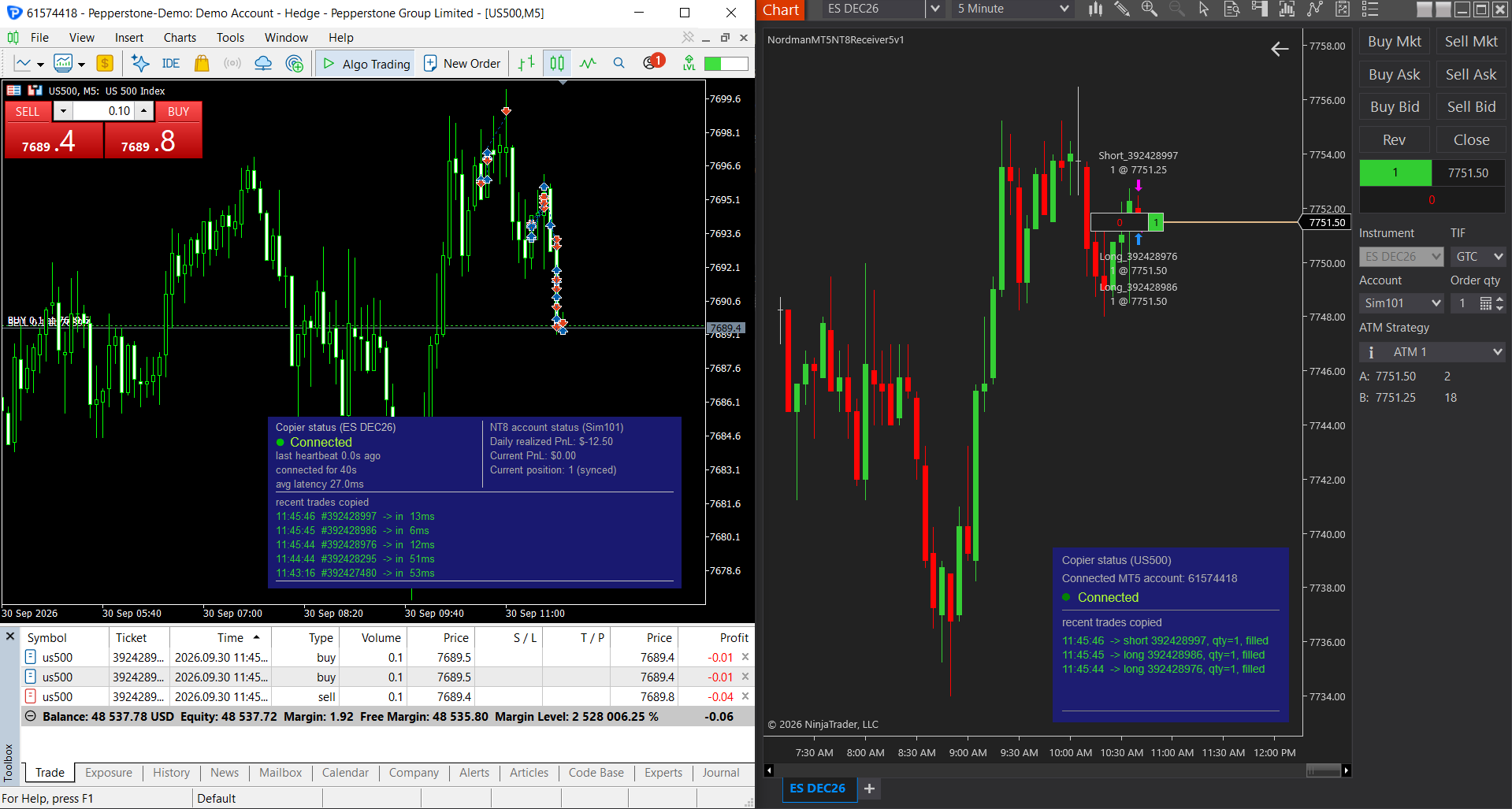
One question before anything else: is your MT5 account hedging or netting? Open the account details in MT5 and check. It decides which row above matters most to you, and people usually find out after the first mismatch, not before.
Most copier problems aren't speed. They're silence: a trade that didn't arrive and no explanation. Both terminals show the state of the link and every recent trade.
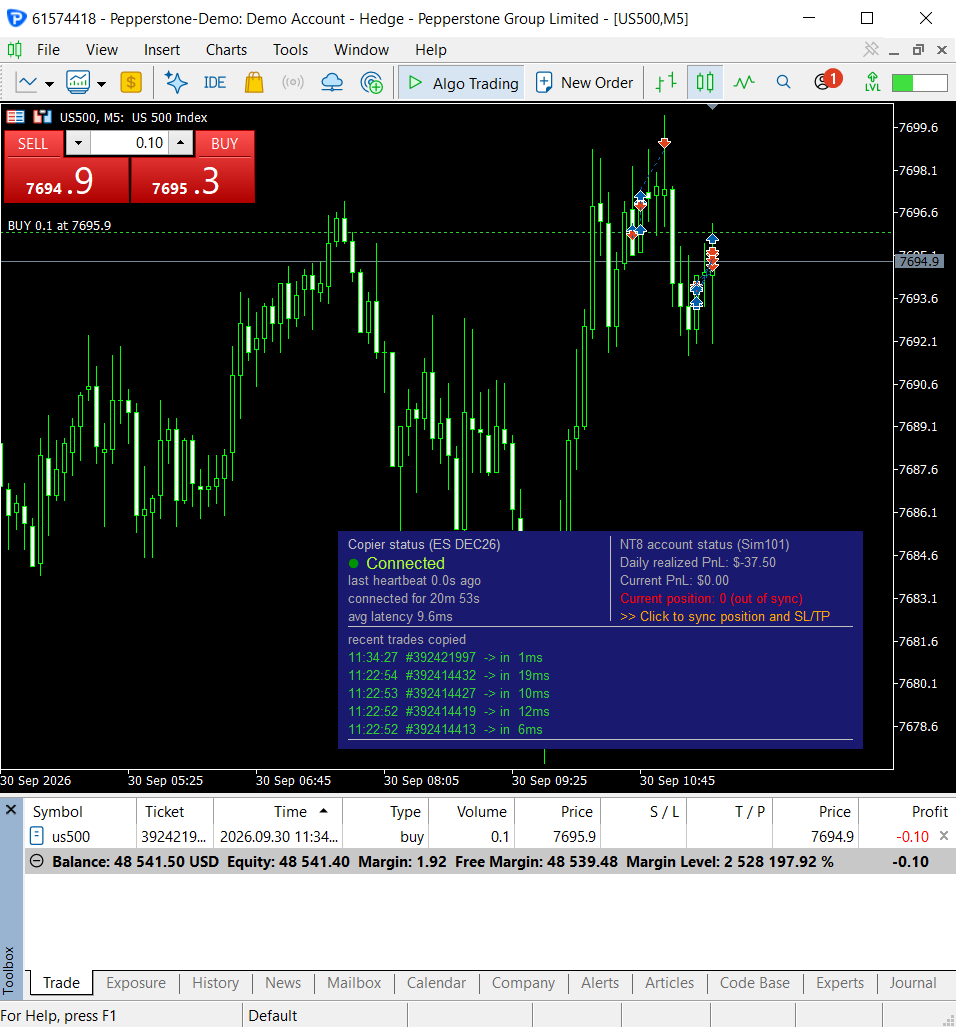
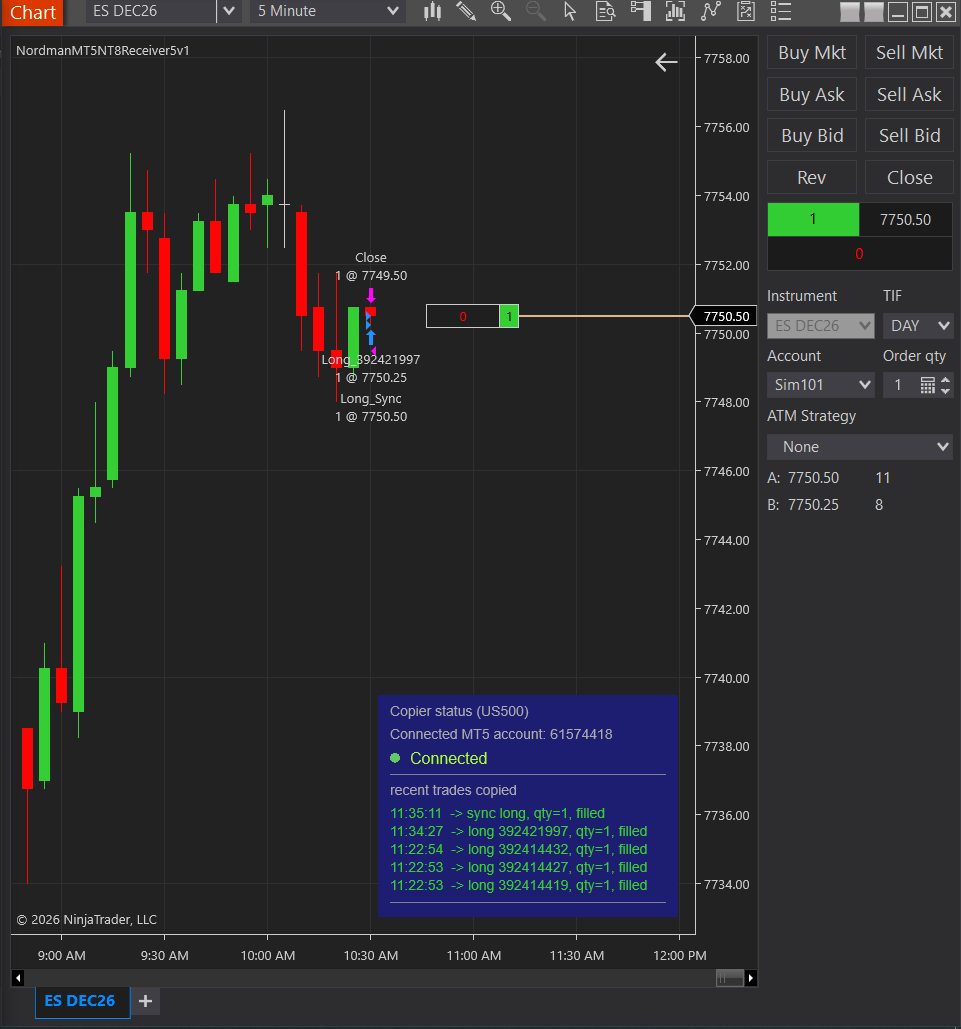
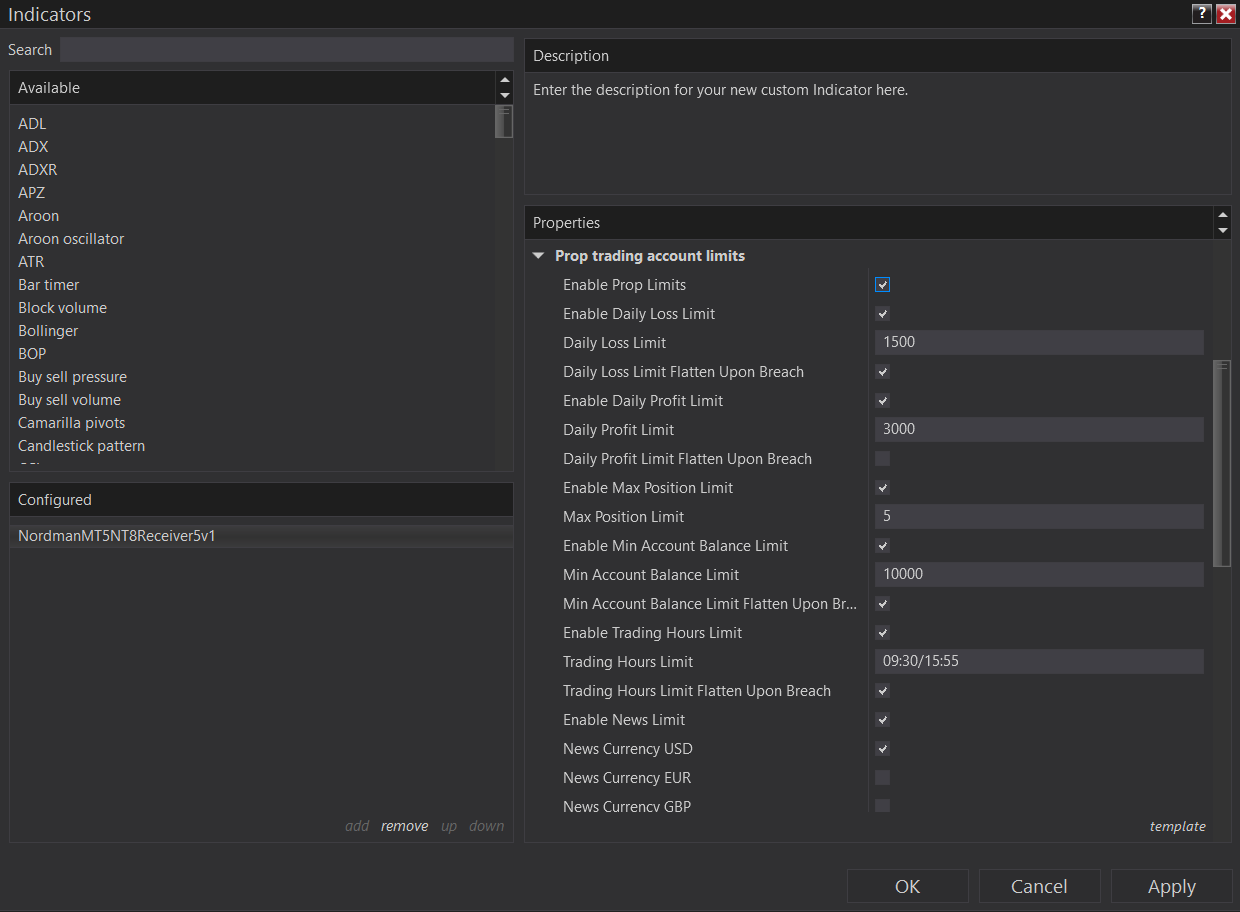
Your EA doesn't know your prop account's rules. The NinjaTrader Receiver can be configured with them. A trade that would break a limit is blocked, or the position is flattened, and the panel names the limit that did it. A "prop-safe" label doesn't enforce anything. These limits live in the copier itself.
| Limit on the Receiver | What you set | When it's hit |
|---|---|---|
| Daily P/L Limit | Separate daily loss and daily profit thresholds | New trades blocked, or open positions closed, per your setting |
| Allowed Trading Time | A window for trading | Trades outside it blocked, with optional automatic flatten |
| Maximum Open Lots | A cap on open size | Trades that would exceed it are blocked |
| Minimum Account Balance | A balance floor | Optional flatten and stop below it |
| News Filter | A window around high-impact news | New entries blocked, positions flattened, or both |
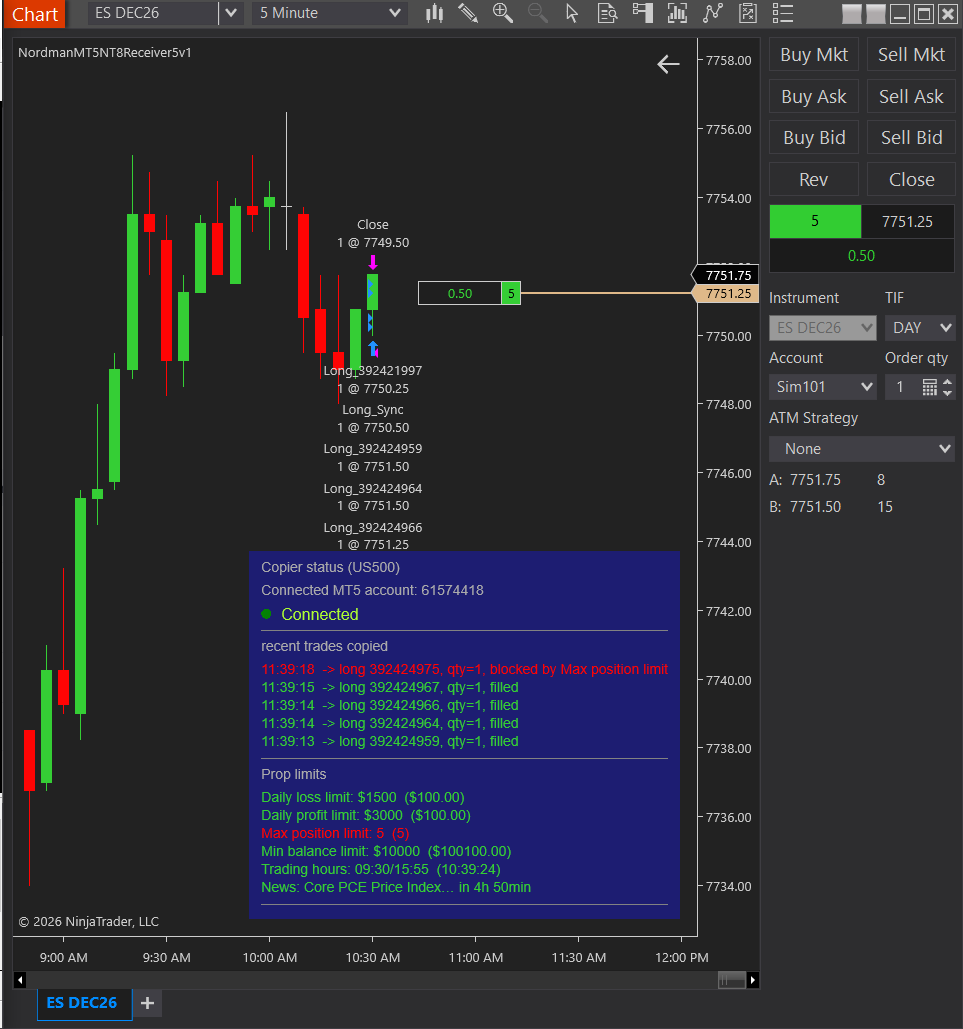
The limits help you avoid breaking a rule by accident. They don't make copying itself allowed: prop firms treat trade copying differently, and copying your own setups onto your own accounts is usually viewed differently from following someone else's signals. Check your firm's current rules first. More in Automated Trading on Prop Firm Accounts.
The Sender is an MT5 indicator, not an Expert Advisor. A chart holds one EA, and that one stays yours.
The Magic Number filter copies only one EA's trades when several run on the same account. Without it, every trade on the instrument is copied.
The Receiver is an NT8 indicator, not a strategy. Close a copied trade on the chart and the next one still arrives.
Pick an ATM in Chart Trader and it's applied to every copied entry. Exits are then managed by the ATM, and SL/TP sync from MT5 is off: it's one or the other.
Each MT5 account gets its own Sender ID and Receiver instance, with no extra licence per account.
Stops and targets become OCO orders in NT8. Move or remove them in MT5 and the NT8 orders change with them.
A buy in MT5 opens a sell in NT8, by switching one setting.
Leave the order name field empty and copied trades carry no separate tag in the NinjaTrader log.
The MT5 panel logs the delay of each copied trade and the average of the last five. No stopwatch needed.
If you're comparing tools, these decide more than any speed on a product page. Make every vendor answer all five before you pay.
The long version, with every way to get MT5 trades into NinjaTrader compared, is in our guide: How to Copy Trades from MT5 to NinjaTrader 8.
We don't sell the copier on its own. €25 a month opens it together with everything else we build for MT4, MT5, NinjaTrader 8, cTrader and TradingView.
First 5 days free. One subscription, cancel whenever you like.
If you don't cancel within 5 days, the €25/month subscription starts automatically. No charges during the trial.
Long enough to run the copier on a simulation account through a trading week, with your EA doing what it normally does, and to read your own latency off the panel.
One ZIP with the MT5 Sender and the NinjaTrader Receiver. Member Access on the product page, with the email you subscribed with.
If the standard copier doesn't fit your workflow, we extend it to order. Talk to our NinjaTrader developers.
MT5 and NinjaTrader disagree about what a position is. Every copier bug we've ever fixed started there.
I'm Alexei Kuntysh, founder of Nordman Algorithms. I've been building software for traders since 2008, and in 2018 that work became Nordman Algorithms: custom indicators, trade copiers and automation for MetaTrader, NinjaTrader 8, cTrader and TradingView. Across those years we've delivered more than 3,000 projects for private traders and funds.
The MT5 to NinjaTrader copier sits exactly where two ecosystems refuse to talk to each other. We don't publish a standing benchmark for this route. Our tests are on this page with their conditions, and the latency that matters is the one on your dashboard, measured on your machine.
Pending orders wait until they trigger. Several MT5 positions are reduced to the one number NinjaTrader can hold, and a close in MT5 never opens a position on the other side. There is no industry standard for either rule, so ask any vendor which one theirs follows.
The NinjaTrader Receiver is an indicator, not a strategy. Close a copied trade by hand and the copier keeps running. Pairs are linked by Sender ID, so you never maintain a symbol map.
We're not selling a connection. Anyone can send an order across. We're selling the translation between two platforms that were never meant to talk.
"They even helped with the NT8 side problems that came up and were patient until everything was right from the NT8 side."
Vlado, Trustpilot review of a custom NinjaTrader 8 project, Mar 2025Not sure which side you're on? Ask whether your exits would survive a different price than the one MT5 printed. If yes, run the trial on a sim account for a week and read both trade logs.
No. NinjaTrader 8 has no built-in way to receive trades from MetaTrader. Copying needs an add-on. Ours runs as an indicator on the NinjaTrader chart.
In our test on 29 September 2026 the copier's panel showed 16, 22, 13, 1 and 56 ms for five trades, an average of 21.6 ms, from a demo MT5 account to a NinjaTrader simulation account on the same PC. A second session on 30 September showed 1 to 53 ms across 23 trades, median 12 ms. That is copy latency. On a live account the exchange adds its own fill time. The panel shows the figure for your own machine during the trial.
NinjaTrader holds one net position per instrument, so several MT5 positions have to become one number. The copier keeps that number matched to your MT5 net. There is no first or last position to close on the NinjaTrader side, and a close in MT5 never opens a position there. Netting accounts are copied directly, and there is no industry standard for any of this, so ask any vendor how theirs behaves.
Not when they are placed. A pending order is copied as a market order the moment it triggers in MetaTrader, so both accounts always agree on whether a trade is open.
Yes. The MT5 Sender runs as an indicator, so your EA keeps its chart. It copies every trade on that instrument, or only one EA's trades with a Magic Number filter.
It depends on the firm, and firms change their rules, so check your firm's current terms before you copy onto a funded account. Copying your own MT5 setups onto your own account is usually treated differently from following someone else's signals. The copier runs locally under your own NinjaTrader login, and its prop limits help you avoid breaking a rule by accident. They don't make copying allowed where a firm bans it. More in Automated Trading on Prop Firm Accounts.
Yes. The copier works locally with no server between the platforms, so both terminals run on the same PC or VPS.
No. When an ATM strategy is attached to copied trades, its own stops and targets manage the position and the copier's SL/TP sync is bypassed. Choose one or the other.
The two most common causes are a mismatched Sender ID or two copiers running with the same Sender ID. Check that both sides share one ID. If it persists, both components write log files with the details, and support reads them with you.
€25 a month, one subscription. The first 5 days are free, and you can cancel whenever you like. No separate licence per MT5 account.
Five days free, then €25 a month. One subscription, cancel whenever you like.
Start your 5-day free trialNot at your trading PC right now? Send yourself the link and the setup guide, and start the trial where MT5 and NinjaTrader run.
✓ Email sent. Open it on your trading PC to start the 5-day trial.
One email with the link, one reminder the next day. Unsubscribe in one click.
Need something custom built? We develop automation to order → NinjaTrader developers